
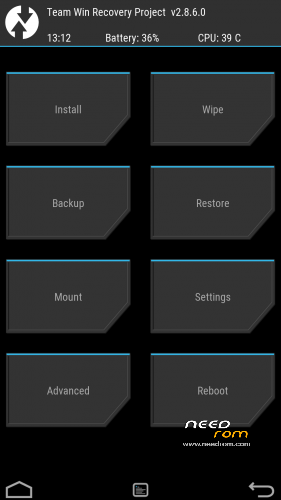
- Title: TWRP 2.8.7.3 V06
- Listed: January, 2016
- Last modified: 04/23/2016 6:55 pm
- Version: TWRP X17 NEW
You must be logged for ROM download.
20973 total views, 2 today
14 Total favorites
 Member Info
DESCRIPTION
ONLY WORK for ROM CUBOT_X17_5091C_V03_20151022
NEW TWRP for V04 version DECEMBER 2015 UPDATED
NEW TWRP for V06 version FEBRUARY 2016 UPDATED
Download and Install correctly Mediatek Preloader drivers.
Download Flashtool and unpack it in a folder..
Download and Unpack my TWRP Archive in a folder.
1- With flashtool load MT6753_Android_Scatter TWRP**.txt (it depends on wich rom version you have in your cubot)
2- Select download and connect smartphone to pc (smartphone must be powered off)… in few seconds will start the process and the new TWRP will be flashed.
To restore original stock recovery, you need load at point 1 the file MT6753_Android_Scatter.txt
P.S. to enter in the recovery, power off the smartphone, push VOL + and Power at the same time, you will see three words with VOL + you move selection, with VOL – you havw to select Recovery
Consider donate if i help you!
And please rate me 5 stars
TAKE CARE, ONLY FOR CUBOT X17
※Please make a backup of your device before installing or updating ROM
Hey Mr megthebest. Any change for the TWRP for 06 rom. Could you make some test to try to root the new rom for cubot x17.
Thanks in advance
Good morning everybody. Did somebody manage to root x17 with new rom 06?
This is such a fantastic tool! Had been working on my phone for an afternoon to root it with no results before finding this post….
Then it took me 10 minutes to get it rooted… brilliant!!! Thank you so much man!
Hi, I have rated 5 stars because I have installed the recovery with no problems.
I have tried rooting my rom but everytime I just get a boot loop.
Any help please?
Flshtool said, download ok, after I tried to boot into the recovery (Vol+ and Power) but the screen stays black. Android boots well.
try new TWRP V06 rom.. i hope is fixed now!
Please give me feedback
Good morning.
I try several times but always is stuck at the moment in logo and restart in normal mode. If I flash the normal recovery scatter file boot in android recovery mode with no problem. I give you 5 stars anyway for your effort. If you have time to make some change I will appreciate.
Confirmed. Not working. Advanced recovery not loading, after cubot screen showing 5 sec it restarting and loading to normal mode.
I installed a clean V03 original ROM, then made the OTA to V04 and then used this TWRP Recovery Image (TWRP CUBOT X17 New Rom V04 ).
When I now start the Phone with VolumeUp I get to a black/blue Screen with chines languages!? WIth volume up/down can move through the 5 Lines, but I don't know what this chinese words mean?!?
What went wrong? Can someone help me?
It ssems to be the factory Mode similar to this:
http://droidchina.com/forum/Th.....hinese-language
工厂模式(Gōng chǎng mó shì)=factory model
完整测试(Wán zhěng cè shì)=complete testing
单项测试(Dān xiàng cè shì)=single testing
测试报告(Cè shì bào gào)=test report
清除e MMC(Qīng chú e MMC)=Clear/Remove/reset e MMC
版本信息(Bǎn běn xìn xī)=Version Information
重启手机(Chóng qǐ shǒu jī)= restarting the phone
But how do I get to the TWRP Menu?
Propably something went wrong with the instal of twrp. Try to instal again The twrp 04 scatter fille (double chek for correct file) and restart again with volume up + power.
I flashed the file again "MT6735_Android_scatter – TWRP.txt"
No effect, I always get to this chinese factory menu… !?!
OK, Now I got it!! 3d try at now it works and may X17 V04 is rooted! Thanks and 5 Stars!!!