
- Title: KitKat Factory v1 for ZP998 (Komu K8)
- Listed: June, 2014
- Last modified: 06/29/2014 1:50 am
- Version: v1 final
You must be logged for ROM download.
38657 total views, 3 today
1 Total favorites

 Member Info
DESCRIPTION
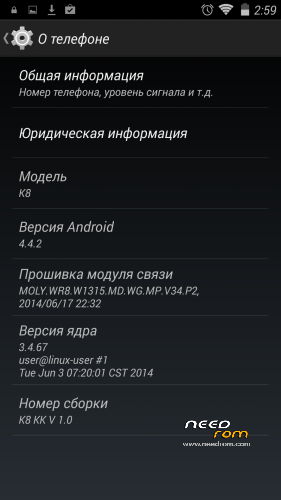
This is a factory ROM for ZP998 from a 100% Italian clone, Komu K8, a real KitKat v1 release.
No colorants, no preservatives, no ads – you just add what you want yourself.
Features:
- Real 4.4.2 KitKat, release ver. 1.0 (2014-06-28);
Root is easily done by flashing this zip through modded recovery:
https://yadi.sk/d/Fjyv4lM2VNrSK
Download rar archive, extract it (password is 123), put 4.4Root.zip on your sdcard and flash with recovery.
Xposed Framework is working, but it is not included, to keep ROM factory clean. Get it from official xda source (Xposed need root to be installed):
http://forum.xda-developers.com/xposed/xposed-installer-versions-changelog-t2714053
install, activate, reboot, and download modules, i.e. GravityBox KK
Primary partition size can be modded, just get EBR1 and EBR2 files from here:
http://forum.xda-developers.com/showthread.php?t=2455850
put these two files to the FIRMWARE folder, overwriting old files, and flash.
You may need to reboot once or twice and reset to factory settings, if partitions size is different from that in your old system!
Modded Recovery for KitKat can be found here:
https://www.needrom.com/mobile/recovery-twrp-2-7-1-0-for-zopo-zp998/
Download it, extract recovery.img, put it into FIRMWARE folder and flash.
This ROM is intended to be flashed with SP Flash Tool (included), all internal memory is lost! (IMEI intact).
Please read included manual carefully before upgrading! Use "Upgrade firmware" and NOT "Download only" in SP Flash Tool!
※Please make a backup of your device before installing or updating ROM
Thanks..
What is the best way to backup and restore apps from JB 4.2.2 to KK ?
I have no idea, sorry. I prefer to reinstall everythig if possible. This time it is difference between 4.2 and 4.4 that may be preventing Titanium from restoring 4.2 apps and settings to 4.4. I think it is a question of Titanium update.
if you have an sd card use the backup and restore that comes with the phone
What about the GPS ??? IN a car .. not outside
 With Sygic for exemple.
I have just tested it. I have put the phone on my windowsill, and, ;ess than in 10 seconds, there was a fix on 4 satellites. The ZP998 has weak antenna, we can do nothing to it. But for me, it was a remedy, because with 4.2.2, i could get no fix at all!
I have no field-tested GPS yet. 4-5 satellites instant fix is in my house, near window. I will test it in the street tomorrow.
Install recovery?????
Not quite understood you.
This ROM is for installing with SP Flash Tools, not through recovery.
And i highly recommend you to install it this way, not another.
Please check the download, there is everything nexessary inside.
Need some help here: i've replaced de recovery with the modded one but i don't have root. The other root link gives me 3 files, what to do with them?
The zip with the 3 files….you flash it with the recovery
And there you go you have root
box13 is right – put 4.4Root.zip on your sdcard (don't extract it!), reboot to recovery and install it.
Does it support multi Languages?
I do not know what languages exactly are there, but first time you boot, everything starts with a language choice, and i saw there tons of languages. Again, i do not know how good is one or another language – i only can say it must have decent italian and english, and russian is ok, too.
Can't download the root zip file. Can someone please put it on a more accessible download site? Thanks.
same problems with root.zip file
I have added another link for root, this time it is inside a RAR archive. Password for archive is 123. Unrar it, and put .zip file on your sdcard to install from recovery.
thx a lot
Some people say this root is incomplete and Titanium Backup does not restore apps with it.
This root installs Kingroot, an alternative to superuser. I also have SuperSu in my apps, it was loaded from Play Store automatically.
Just a minute ago, i have restored my AlarmDroid Pro data successfully with Titanium Pro.
Can anyone tell me how to restore imei¿!
Google for MtkDroidTools. I could give you a link to russian forum, but if you do not know russian, you will be lost there. Current version is 2.53. Be careful where you download it – some antivirus software block it.