
- Title: Fake Red Rice (2013022) – Ported from BLACKFOREST A7S
- Listed: January, 2014
- Last modified: 01/26/2014 5:37 pm
- Version: 4.2.2
You must be logged for ROM download.
38271 total views, 1 today
3 Total favorites
 Member Info
DESCRIPTION
Hello, this is my first upload.
Since Fake Red Rice is running english/chinese rom that works slowly, I've ported this rom for you guys to at least use this phone.
Thanks to the developer of Blackforest T7S for such a great work.
This ROM is designed to work in Fake Red Rice 2013022, which it is hacked and shows 1GB RAM instead the reality (512MB), also shows 4.3GB of internal data (the truth is 3.7GB), and it display it is Mediatek MT6589T @ 1.5Ghz, but the truth is that it's built using the new MT6572 @ 1.3Ghz Dual Core with Mali400MP GPU.
It might work in other phones with same specs. If you get a blackscreen try, changing the boot.img from the .zip and put the one you get from your backup (just replace files in zip using winrar, do not unpack and repack, it shouldn't work).
How to ROOT your device to install this rom:
Google ''framaroot xda'', download the apk, install and apply the exploit. Reboot, thats all. You're rooted.
How to INSTALL CWM Recovery:
Install Mobileuncletools (MUT) app from Play Store or just google about it. Then, put your recovery image (*.img) on your sd card & internal sd card. Run MUT, and update recovery. You'll see first the recovery CWM, install it and reboot later into recovery using MUT (not now).
IMPORTANT: How to BACKUP YOUR IMEI: In MUT theres an option to backup your IMEI. You don't have anything else to do, just click this option and backup sucesfully will be displayed when you request the app to backup it.
VERY IMPORTANT: How to BACKUP YOUR ROM: Go to MUT, reboot into recovery option, click yes. Phone will reboot into recovery. After that, click ''backup and restore'' and click backup or use backup into internal SD card. Take care you've to safely copy ''clockworkmod' dir into your PC to have a safe copy of your ROM backuped, before you try installation of this ROM.
So:
1 ) Root current rom.
2 ) Install MUT.
3 ) Backup IMEI.
4 ) Install CWM recovery.
5 ) Reboot into recovery.
6 ) Backup your ROM.
7 ) Do wipes (google for details).
8 ) Install this rom.
What does this ROM include:
Android 4.2.2
Rooted
Light GAPPS
Xposed framework.
Multilang.
Recommendations:
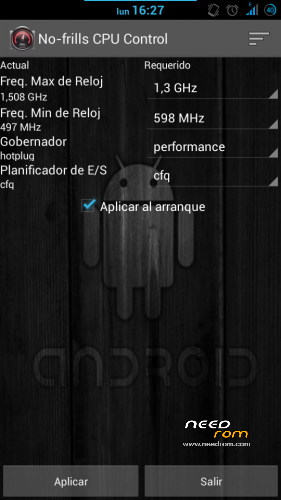
After installing this rom, install app ''no frills cpu'' and set ''performance'' and freq to the max 1300mhz. Enable it on boot.
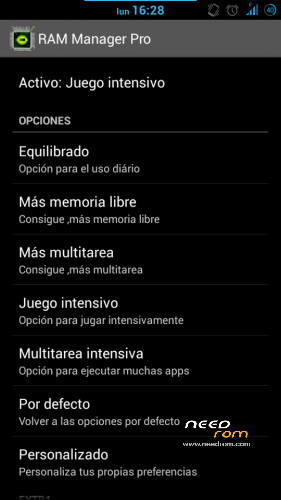
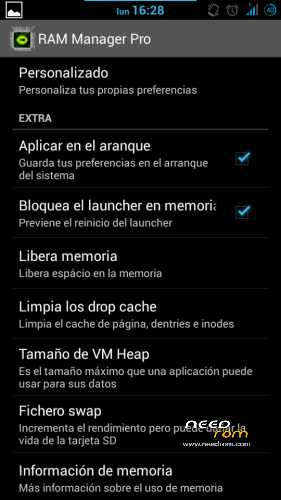
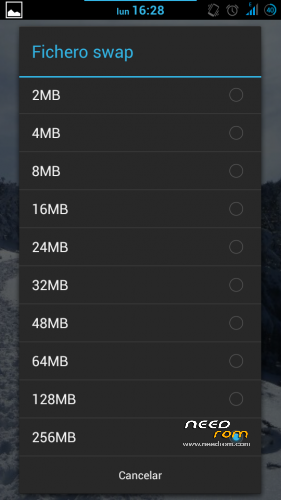
Also install Ram Manager Pro 5.2.2 app and set ''hard gaming'' option. Enable it on boot. You can also set swap to 256mb if you use good sd card (class 10 hc/xc).
Using xposed installer app which is already in the rom, download gravitybox to get a fully customization of this ROM.
KNOWN ISSUES: WiFi can't automatically connect to known networks and MAC is autochanged everytime it's activated/deactivated (It's not a big problem in fact).
Fixed on Revision 1.0 (05/02/2014):
Download this file:
https://mega.co.nz/#!99N21RBK!urEJCL1cOmDt8qOBFkUW3p1kebxJYf4sv3zSqdvNw2Y
1) Extract .zip content in your sd card (two files WIFI and WIFI_CUSTOM).
2) Open root file explorer (such as root explorer, es file explorer…). Set R/W permissions.
3) Go to the path \data\nvram\APCFG\APRDEB and backup WIFI / WIFI_CUSTOM original files.
4) Copy the files that you've downloaded and replace the original ones.
5) Set same attributes as the old files or the attributes that every file in APRDEB folder.
6) Reboot & Enjoy.
Thanks to manolett, ismapaan, rafapaco & others @ HTCMANIA.com forum for their help given.
13/05/14
Three flashtools roms are added:
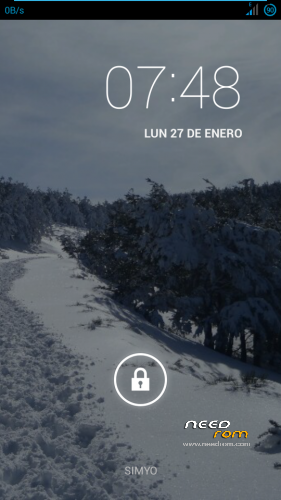
The difference between hardware #1 and hardware #2 is that you'll have the camera not working after flashing. If this is your case, try the other!
This additional options are only to help to install the rom, so, this post is not for flashtools roms. Any problem using flashtools and roms for flashtools is under your responsability. If you don't know how to flash, just do not try.
Most questions about flashtools usage will be ignored. Just google a bit.
Regards
※Please make a backup of your device before installing or updating ROM
Hi,
Where can I get CWM recovery for fake red rice?
Second, I'm going to upload it.
Also, I'm going to edit and add a bit more information how to root and so.
Is this for WCDMA or TD-version?
Backup your imei using mobileuncle tools. Backup your rom using CWM that I'm going to upload, and give a try. I did only test on the WCDMA, but might work for TD.
is BASE ROM ???
and PORT to ????
review image ??
.
tanks
Sorry, I don't really understand your msg. Would you mind to detail what you request?
About adding review images, can't do that, because the one I'm using is customized now, and its different than this one. But I didn't touch anything of customization from BLACKFOREST A7S, so the appearance is same.
Thanks
ohhh ported base rom evercoss a7s ….
my phone is evercoss a7s ^_^
Yeah, this is not for evercross a7s, its for fake red rice phone.
Regards
tanks your answer
.
your phone is mt6572
why not ported " http://www.needrom.com/mobile/.....m-party-a15/ " ?? is cool
Hi,
Thank you for the guide. I alredy installed this ROM, but it still detect my RAM as 1GB.
ram is not a problem … I also often ported ROM here ^ _ ^
Yeah, I didn't fix it yet. i don't have such knowledge to fix this.
Regards
Hi, is it suitable for HTM M1 mtk6572? thanks
As I posted, it might work, but you've to use test-error method.
can iget this rom in spflash format because my phone isa completle bricked
sorry people for my post if its in wrong fourm but i really really need your help
MY fake Hongmi mt6572 is bricked no recovery mode , factory mode , fastboot, or normal boot.
it only get recognized by spflash but i dont have an image working with spflash
what ihave is
1:IMEI backup file
2:clockworkmod backup
3: BLACKFOREST rom that work in cwm only
so if any one have a guide or link any help will be grea
Okay mate, let's try to give you the flashtools image. You can download here, fix and after that join cwm, its not needed that you turn the phone on using this image, since this image got cwm recovery on it, you can directly boot into cwm recovery and after that flash this blackforest rom.
Download here:
https://www.dropbox.com/sh/oqo.....iu_SPFlashTools
I hope you get it fixed. I remember u to vote rom 5 stars if you liked it
can you give new link
thanks putotro downloading right now i will infrom you with my news
thanks again
Please, could you post the link again? That link is bronken.
Thanks
Hola compi, yo tambien soy de htcmania, mi nick es qtekfun mandame un mp para saber quien eres. tengo uno de estos que no va ni para adelante ni para atras a ver si con tu rom puedo! thank you in advance!