
- Title: Fake Red Rice (2013022) – Ported from BLACKFOREST A7S
- Listed: January, 2014
- Last modified: 01/26/2014 5:37 pm
- Version: 4.2.2
You must be logged for ROM download.
37897 total views, 7 today
3 Total favorites
 Member Info
DESCRIPTION
Hello, this is my first upload.
Since Fake Red Rice is running english/chinese rom that works slowly, I've ported this rom for you guys to at least use this phone.
Thanks to the developer of Blackforest T7S for such a great work.
This ROM is designed to work in Fake Red Rice 2013022, which it is hacked and shows 1GB RAM instead the reality (512MB), also shows 4.3GB of internal data (the truth is 3.7GB), and it display it is Mediatek MT6589T @ 1.5Ghz, but the truth is that it's built using the new MT6572 @ 1.3Ghz Dual Core with Mali400MP GPU.
It might work in other phones with same specs. If you get a blackscreen try, changing the boot.img from the .zip and put the one you get from your backup (just replace files in zip using winrar, do not unpack and repack, it shouldn't work).
How to ROOT your device to install this rom:
Google ''framaroot xda'', download the apk, install and apply the exploit. Reboot, thats all. You're rooted.
How to INSTALL CWM Recovery:
Install Mobileuncletools (MUT) app from Play Store or just google about it. Then, put your recovery image (*.img) on your sd card & internal sd card. Run MUT, and update recovery. You'll see first the recovery CWM, install it and reboot later into recovery using MUT (not now).
IMPORTANT: How to BACKUP YOUR IMEI: In MUT theres an option to backup your IMEI. You don't have anything else to do, just click this option and backup sucesfully will be displayed when you request the app to backup it.
VERY IMPORTANT: How to BACKUP YOUR ROM: Go to MUT, reboot into recovery option, click yes. Phone will reboot into recovery. After that, click ''backup and restore'' and click backup or use backup into internal SD card. Take care you've to safely copy ''clockworkmod' dir into your PC to have a safe copy of your ROM backuped, before you try installation of this ROM.
So:
1 ) Root current rom.
2 ) Install MUT.
3 ) Backup IMEI.
4 ) Install CWM recovery.
5 ) Reboot into recovery.
6 ) Backup your ROM.
7 ) Do wipes (google for details).
8 ) Install this rom.
What does this ROM include:
Android 4.2.2
Rooted
Light GAPPS
Xposed framework.
Multilang.
Recommendations:
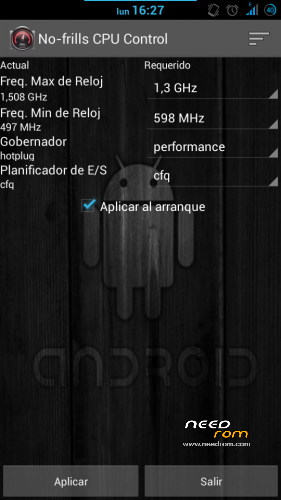
After installing this rom, install app ''no frills cpu'' and set ''performance'' and freq to the max 1300mhz. Enable it on boot.
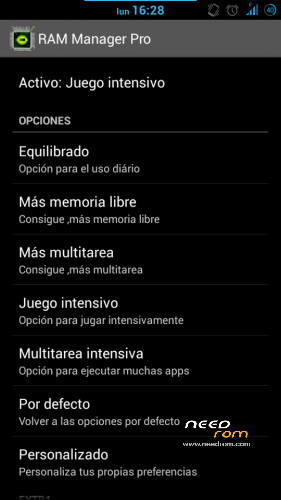
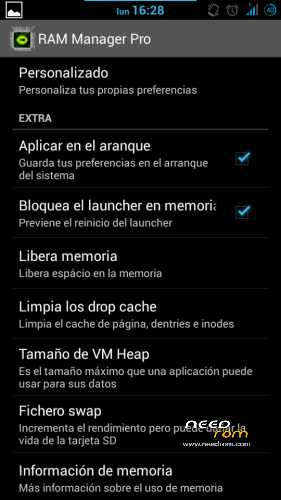
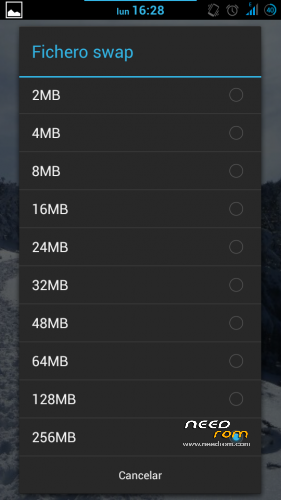
Also install Ram Manager Pro 5.2.2 app and set ''hard gaming'' option. Enable it on boot. You can also set swap to 256mb if you use good sd card (class 10 hc/xc).
Using xposed installer app which is already in the rom, download gravitybox to get a fully customization of this ROM.
KNOWN ISSUES: WiFi can't automatically connect to known networks and MAC is autochanged everytime it's activated/deactivated (It's not a big problem in fact).
Fixed on Revision 1.0 (05/02/2014):
Download this file:
https://mega.co.nz/#!99N21RBK!urEJCL1cOmDt8qOBFkUW3p1kebxJYf4sv3zSqdvNw2Y
1) Extract .zip content in your sd card (two files WIFI and WIFI_CUSTOM).
2) Open root file explorer (such as root explorer, es file explorer…). Set R/W permissions.
3) Go to the path \data\nvram\APCFG\APRDEB and backup WIFI / WIFI_CUSTOM original files.
4) Copy the files that you've downloaded and replace the original ones.
5) Set same attributes as the old files or the attributes that every file in APRDEB folder.
6) Reboot & Enjoy.
Thanks to manolett, ismapaan, rafapaco & others @ HTCMANIA.com forum for their help given.
13/05/14
Three flashtools roms are added:
The difference between hardware #1 and hardware #2 is that you'll have the camera not working after flashing. If this is your case, try the other!
This additional options are only to help to install the rom, so, this post is not for flashtools roms. Any problem using flashtools and roms for flashtools is under your responsability. If you don't know how to flash, just do not try.
Most questions about flashtools usage will be ignored. Just google a bit.
Regards
※Please make a backup of your device before installing or updating ROM
Hello All,
i have a badly bricked fake hongmi red rice (2013022). a friend in the process of helping to install a custom ROM bricked the phone. in an attempt to bring it back, he also flashed the preloader and boot image. now the phone is totally dead and no initial backup.
Please can i get a full ROM with preloader and all necessary files to flash this phone?
Thank you in advance.
You need to use flashtools rom according to your hardware. If we don't know exactly your version noone of us could help. Best is that you dissassemble your phone and post photos to check which is your model. Then I guess you could find specific flashtools rom with preloader for it and make it alive again.
Regards
Hi trol_sg i have fake redmi mtk6572, now IMEI problem exist . I try flashed phone but no results. I have backup clockworkmod files, When turn on phone with vol- + power i get chinese menu to navigate.
Please give me advice how configure hardware in such situation (no IMEI , chinese bios menu), .
Case bios phone:
1. VolUP + power – recovery mode (i can navigate but when use option recovery mode phone reboot)
2. VolDown + power factory mode (any chinese menu is loaded)
What should i first ? Why recovery mode reboot phone ?
You can use mtkdroidtools to set your imei again, or you can use also mobileuncle tools and engineering mode to set IMEI.
By the way you can flash CWM recovery that I share (if same hardware) using Flashtools to set this recovery to restore your backup.
In the worst case you could use the IMEI SN MTK Write tool shared in some places, you can google about it.
THX trol_sg
I checked your advice .
1. I try Flashtools but with this phone i spend 3 h to one correct download (i've check on win8_64, win7_32, XP_32 OS ). I know it is driver problem but i use flashtools with any tutorial (phone off, battery put etc…) pure result , any advice ?
2. I use Mobileuncle with root and try write IMEI , no results, use adb with AT command now results , use cli terminal with root and AT command teh same . The IMEI problem exist .
3. The mtkdroidtools i use this tool but driver not recognize fake redmi mt6572 . Try connect but no results. (i power off , batery in/out , boot system and try ) pure result , any advice ?
PS. The attached links: Flashtools ROM – Miui for Hardware #1 includes boot.img which size is more then 6Mb , is it correct ? (it means if the scater file set correct memory )
I see on miui http://en.miui.com/thread-3910.....6-1-1.html it was miui V5 portde on all mtk5672 . What do you think about it ? (now link is blocked as [4.7.23] [MT6572] MIUI v5 For All MTK6572 Device [Update …)
Hi ALL
I solved driver instalation and write IMEI as below:
1. Uninstall all driver for USB , clean loaded driver in system simple program show what driver exist . Should be cleaned .
2. Inastll driver for MTK Preloder.
IMEI:
1. I used MTK Droid tool . It set IMEI with any error on android device. (WIN7 32b)
2. Manualy copy root/data/vram….. MP0B_001 from my redemi (orginal) to fake in the sam place( set root acces). The problem IMEI exist.
3. I used IMEI WRITE $S/N TOOL . Thi tool succes write Imei , i reboot phon and read back Imei. It is ok .
Probelm no service (i use 2 SIM card in 2 slot )
I try change ROM in my fake phone to yours
1. I flash phon RedRice_SukiLiu_SPFlashTools.zip use scater file exist inside the zip file.
Past this my phone reboot may times . I Back to my ROM it is ok.
If anyboby know how solve IMEI problem and/or unlock service phone. Second where is correct flash ROM for fake redemi mtk 6572 ?
Waiting for yours advice , what else i should check?
Hi All
I Use MTK DROID and have progress SIM card i green but Phone radio is off and IMEI in invalid . I set and read back IMEI by 6 different method:
1. MTK DROID.2 IMEI WRITE $S/N TOOL , 3 adb.exe, 4 Manual copy MP0B_001 file . 5 Manual copy folder md/NVRAM 6 IMEI&SN Writer V1.5.3 . 7 MUT and write AT+E….
(all method works but Imei is invalid )
2. recovery mode hangs i no idea how solve it.
Any advice for me ?
Hi All
1. Do research with my Fake MTK6572 in no service problem
a) When i use model_1_tg_n.img reside in $root/etc/firmware/ with -rw-r-r permision the phon see SIM 1 and SIM2 plug in to slot.
b) i change permision to -rwx -rwx – rwx SIM is not detected.
c) i try with model_1_wg_n.img from other nvram with permision -rw-r-r SIM is not detected.
Any idea why modem turn off radio, and only detect SIM ?
2. IMEI problem research .
a) I write and read back IMEI with many different low level program and get correct IMEI result, but Android system all the time show invalid IMEI.
b) i use software MUT to write IMEI with command AT+EGMR=1,7, "imei_number" , and click send no result.
How it should work , where is bug ?
3. Recovery mode hangs
a) Do you have any method to unlock recovery in this phone ?
b) which memory region in scatter file is dedicated for correct loading Recovery ?
c) May be boot.bin have any error but i don't know how debug it.
Hi mate,
b) i use software MUT to write IMEI with command AT+EGMR=1,7, "imei_number" , and click send no result.
You've to set this command with or without simcard, I don't remember now which is correct, but try both, one of the options will give you error sending at command, and the other will give you at command is sucesfully msent. In that case IMEI is sucesfully sent, reboot and you'll have your imei.
In case you don't have imei after rebooting and getting 'sucesfully command is msent' it's modem problem and I don't know how to solve because I dunno which is your hardware.
I recommend you to dissassemble your phone, check the numbers in the mainboard to research specificly about your hardware. In that case, you might find a rom which is designed completely for your phone, to do a complete flash using flashtools.
After having this rom, you can put mtkdroidtools to run to make flashtools backup of entire rom including your nvram to do any test with other roms safe.
Regards, I wish best luck.
Hi mate
I have progress but not finish case:)
1. When i copy modem_1_wg_n.img to etc/firmware i can use my phone with sim card. Telephon works, but WIFI not works.
2. When i remove modem_1_wg_n.img from etc/firmware folder the sim modem dosen't work bur WIFI work correct.
Where is teh problem system can't support two tchings at the same time.
Please help , any suggestion.?
After placing the modem.img file, place the wifi files:
Download this file:
https://mega.co.nz/#!99N21RBK!.....Yf4sv3zSqdvNw2Y
1) Extract .zip content in your sd card (two files WIFI and WIFI_CUSTOM).
2) Open root file explorer (such as root explorer, es file explorer…). Set R/W permissions.
3) Go to the path \data\nvram\APCFG\APRDEB and backup WIFI / WIFI_CUSTOM original files.
4) Copy the files that you've downloaded and replace the original ones.
5) Set same attributes as the old files or the attributes that every file in APRDEB folder.
6) Reboot & Enjoy.
Hi! Unfortunately, I bought a fake device Redman 2013022. Unfortunately, it's not WDMCA TD SDCMA. In the black forest ruin WDCMA on. I found the SIM modem driver system / etc / firmware / modem_1_wd_n.img this is likely to be replaced with a modem_1_td_n.img. Of course, this is not available in all IMEI and sim not. Almost certainly, it is not going to the modem driver. I suspect the kernel version deviation or other discrepancy because you can not start.
In summary, it would be nice to flackforest ruin my device, but it's not WDCMA because TD SDCMA.
No idea how to help you to run this rom in TD.
Maybe the Blackforest rom makers ?
drtapfesz what I would do is change the modem as you did, but if this didn't work, need to be port a rom from TD phone. You can try suggest rom cookers who can test TD phone, but here in Spain we don't have TD, only Wcmda.
Regards
Hy!
I know I can try and report what is not good about it yet.
I'll try to port, please attach your rom base (backup).
Regards