
- Title: Fake Red Rice (2013022) – Ported from BLACKFOREST A7S
- Listed: January, 2014
- Last modified: 01/26/2014 5:37 pm
- Version: 4.2.2
You must be logged for ROM download.
37895 total views, 5 today
3 Total favorites
 Member Info
DESCRIPTION
Hello, this is my first upload.
Since Fake Red Rice is running english/chinese rom that works slowly, I've ported this rom for you guys to at least use this phone.
Thanks to the developer of Blackforest T7S for such a great work.
This ROM is designed to work in Fake Red Rice 2013022, which it is hacked and shows 1GB RAM instead the reality (512MB), also shows 4.3GB of internal data (the truth is 3.7GB), and it display it is Mediatek MT6589T @ 1.5Ghz, but the truth is that it's built using the new MT6572 @ 1.3Ghz Dual Core with Mali400MP GPU.
It might work in other phones with same specs. If you get a blackscreen try, changing the boot.img from the .zip and put the one you get from your backup (just replace files in zip using winrar, do not unpack and repack, it shouldn't work).
How to ROOT your device to install this rom:
Google ''framaroot xda'', download the apk, install and apply the exploit. Reboot, thats all. You're rooted.
How to INSTALL CWM Recovery:
Install Mobileuncletools (MUT) app from Play Store or just google about it. Then, put your recovery image (*.img) on your sd card & internal sd card. Run MUT, and update recovery. You'll see first the recovery CWM, install it and reboot later into recovery using MUT (not now).
IMPORTANT: How to BACKUP YOUR IMEI: In MUT theres an option to backup your IMEI. You don't have anything else to do, just click this option and backup sucesfully will be displayed when you request the app to backup it.
VERY IMPORTANT: How to BACKUP YOUR ROM: Go to MUT, reboot into recovery option, click yes. Phone will reboot into recovery. After that, click ''backup and restore'' and click backup or use backup into internal SD card. Take care you've to safely copy ''clockworkmod' dir into your PC to have a safe copy of your ROM backuped, before you try installation of this ROM.
So:
1 ) Root current rom.
2 ) Install MUT.
3 ) Backup IMEI.
4 ) Install CWM recovery.
5 ) Reboot into recovery.
6 ) Backup your ROM.
7 ) Do wipes (google for details).
8 ) Install this rom.
What does this ROM include:
Android 4.2.2
Rooted
Light GAPPS
Xposed framework.
Multilang.
Recommendations:
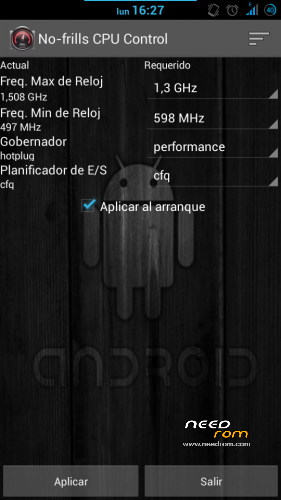
After installing this rom, install app ''no frills cpu'' and set ''performance'' and freq to the max 1300mhz. Enable it on boot.
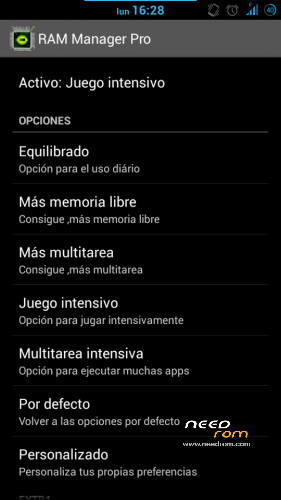
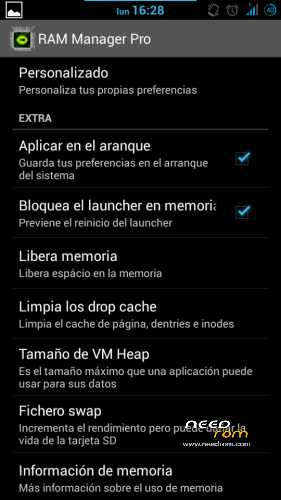
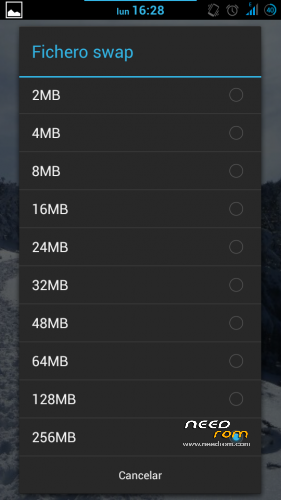
Also install Ram Manager Pro 5.2.2 app and set ''hard gaming'' option. Enable it on boot. You can also set swap to 256mb if you use good sd card (class 10 hc/xc).
Using xposed installer app which is already in the rom, download gravitybox to get a fully customization of this ROM.
KNOWN ISSUES: WiFi can't automatically connect to known networks and MAC is autochanged everytime it's activated/deactivated (It's not a big problem in fact).
Fixed on Revision 1.0 (05/02/2014):
Download this file:
https://mega.co.nz/#!99N21RBK!urEJCL1cOmDt8qOBFkUW3p1kebxJYf4sv3zSqdvNw2Y
1) Extract .zip content in your sd card (two files WIFI and WIFI_CUSTOM).
2) Open root file explorer (such as root explorer, es file explorer…). Set R/W permissions.
3) Go to the path \data\nvram\APCFG\APRDEB and backup WIFI / WIFI_CUSTOM original files.
4) Copy the files that you've downloaded and replace the original ones.
5) Set same attributes as the old files or the attributes that every file in APRDEB folder.
6) Reboot & Enjoy.
Thanks to manolett, ismapaan, rafapaco & others @ HTCMANIA.com forum for their help given.
13/05/14
Three flashtools roms are added:
The difference between hardware #1 and hardware #2 is that you'll have the camera not working after flashing. If this is your case, try the other!
This additional options are only to help to install the rom, so, this post is not for flashtools roms. Any problem using flashtools and roms for flashtools is under your responsability. If you don't know how to flash, just do not try.
Most questions about flashtools usage will be ignored. Just google a bit.
Regards
※Please make a backup of your device before installing or updating ROM
You are a freakin HERO!
Until I got your CWM I could not do anything with this phone. Might be checking about the ROM, too, but I'd really like to stick to MIUI, it's highly ergonomical IMHO.
Thanks!
I'm glad to hear that. I'm sorry but I don't like miui a lot mate. I could improve miui rom itself and upload but..for its hardware (not so good) miui eat A LOT of resources, so best way is to keep the smallest pure android like this port. If you really enjoy with miui, I recommend you to give an opportunity to the real xiaomi phones with miui and high-end hardware to run miui smoothly.
Also, you've a lot of roms for other phones who can run miui as well as xiaomi or even better.
Regards
I c.
Unfortunately I cannot install the ROMs provided.
Following the intruction for the installation of the Blackforest port for CWM goes well up to the ROM flashing. Everything completes without any error but when I restart my phone it always reboots after the white 'mi' logo is shown. Normally an animation would turn it into yellow then the OS loads. Bootloader problem perhaps? Shouldn't be happening if it worked for other Hongmi 2013022 users.
Flashing does not work either. The phone keeps disconnecting within a few seconds without the battery) so SP FLash Tools can't do its job.
Restoration of the backup I made in CMW in the beginning brings back my old OS but I really want to get rid of it, as some 'virus' switches on cellular data connection and uses some bandwith.
Any help would be appriciated.
PS: I've seen on china-phones.com that disconnecting stuff affects others as well and it is probably the preloader's fault but I haven't found any solution yet.
How could you improve a MIUI rom? I might be interested.
Hello Szasz,
First af all, I think your phone has different hardware, because obviously this rom is not working for you, as long as it stuck in the boot.
The second what I propose for you is that you replace boot.img from your rom base to my .zip using winrar (drag-drop and replace). Try installing it. Some hardware might not work even, so in that case you should change libraries (libs) from your rom base.
The last question is, how to improve a miui rom? Okay, a miui rom can be improved by removing useless things, such xiaomi services that for the most users are not useful, but I'm not meaning that…the rom base of this phone (miui port) is usually full of spyware and crap software installed on it, so remove them can improve it. And also some modifications in build.prop makes the phone run better.
Regards.
Hey trol_sg,
Thanks, you're very helpful.
Unfortunately I don't understand every step.
Where to put the boot.img? By your .zip do you mean the Blackforest rom?
Regarding libs am I supposed to copy my original /system/lib/*.*
over to a new rom? Is it safe? Won't this process brings all the virus as well?
I totally agree! Dumbass baidu, 聿肀肉臣自至臼舌舛舟艮色艸艹虍apps, Chinese and any language support other than English. I don't need SPanish either as a matter of fact. And it is indeed full of spyware, that's why I want to get rid of it.
Since flashing still does not work on this piece of **** there is no way I could try out your MIUI port.
Kind regards
I stand corrected: I figured out the boot.img stuff and it was the best idea ever! It works for your Blackforest ROM and I suppose it will work for others as well.
Libs are still a bit foggy to me. Wifi shows some error but it works lmao.
I can't get used to the usual app management and home screen on Android so cleaning up my owm (original) ROM may be the best way to go. I'm not sure what are the unnecessary files though. Are they just apk-s in /system/app/ or some other files as well?
You're a lifesaver either way. A clean os is always better than a dirty and infected one.
And you've one more rom uploaded by me (miui base) a little bit improved for H13W fake red rice:
https://www.needrom.com/downlo.....sh-translation/
Update on you MIUI rom: but unusable.
It works, but it's completely upside down!
And as the phone recognizes rotating itself by me it always rearrange the screen so it is always upside down. I think it's very funny
(H13W can not be seen anywhere on my phone, maybe it's not it.)
Yeah mate, this rom is not for you, different hardware, you can replace boot.img from your rom to this one and try again, hopefully would work.
After that some hw parts might not work, but…it's possible to make libs replacements to keep them working again (hopefully).
Regards
Tried both to no avail.
So I decided to screw around with the Blackforest ROM.
Managed to make the WiFi error go away but Swiftkey always disappeared after a reboot which leaves me without a usable input method. Weird that removing the default AOSP keyboard then reboot leaves me with no keyboard at all rather than conserving the only remaining Swiftkey.
Your hint would be very welcome how to get around this issue.
Heureka.
This ROM has modified storage mounting order which is a bad idea. Well, it’s a good idea but a risky approach.
So had to modify /system/etc/vold.fstab in order to achieve a permanent solution for all other apps as well. Otherwise moving all SwiftKey app data to internal storage would have done it.
Yeah mate, the problem is with swiftkey itself. This app is wrong developed and always look into the internal memory and give trouble when you've sdcard1 as main storage and sdcard0 the default internal storage (not used as main). Not the first time I've faced this problem in Huawei and other brands. This problem is caused because usually sdcard0 is the default internal storage and main storage for app data, so app keeps looking for files there. And some roms force to store on sdcard1. Swiftkey developers though only on phones with sdcard0 as real external storage, or phones with only internal storage mounted emulated as sdcard0…bad boys, because a lot of other phones got sdcard0/sdcard1* distribution which is not a bad idea for most users that would like to preserve their internal memory with free space.
Of course it's not a bad idea if one needs more storage. It's just not an all-around solution. Many app have problems this way since mounting an sdcard takes time so if an app tries to access its data on the sdcard at system startup it does not exist yet (and gets force closed in the case of Swiftkey).
Now there's something I'm stuck with and really need help.
Since switching ROMs I do not have connectivity. Tried to restore IMEI via sevaral methods but it does not seem to be the problem. Getting "failed to send command" in MUT MTK Engineering mode when I tried to set an IMEI got me thinking and he issue might be with the SIM slot itself. As far as I remember restoring my old MIUI backup was not any different and since I'm quite new at Android I have no idea what's the matter.
Nope, take care!
You've to check that the modem is inside your phone as .img. If so, you can write imeis using MUT. If you can't something you're doing wrong in most cases.
help me.. please upload the boot.img only from both roms.. my horizontal multitouch not working normaly..
¿?
i have problem
my phone 2013022 WCDMA
after flashing the screen is blurry and can't use back camera
please help how to solve this?
I ma
I managed to solve the problem regarding blurry image. You need the right LK file that will replace the LK file from the flash ROM provided in this thread.
nice, thanks for sharing.