
- Title: Fake Red Rice (2013022) – Ported from BLACKFOREST A7S
- Listed: January, 2014
- Last modified: 01/26/2014 5:37 pm
- Version: 4.2.2
You must be logged for ROM download.
37893 total views, 3 today
3 Total favorites
 Member Info
DESCRIPTION
Hello, this is my first upload.
Since Fake Red Rice is running english/chinese rom that works slowly, I've ported this rom for you guys to at least use this phone.
Thanks to the developer of Blackforest T7S for such a great work.
This ROM is designed to work in Fake Red Rice 2013022, which it is hacked and shows 1GB RAM instead the reality (512MB), also shows 4.3GB of internal data (the truth is 3.7GB), and it display it is Mediatek MT6589T @ 1.5Ghz, but the truth is that it's built using the new MT6572 @ 1.3Ghz Dual Core with Mali400MP GPU.
It might work in other phones with same specs. If you get a blackscreen try, changing the boot.img from the .zip and put the one you get from your backup (just replace files in zip using winrar, do not unpack and repack, it shouldn't work).
How to ROOT your device to install this rom:
Google ''framaroot xda'', download the apk, install and apply the exploit. Reboot, thats all. You're rooted.
How to INSTALL CWM Recovery:
Install Mobileuncletools (MUT) app from Play Store or just google about it. Then, put your recovery image (*.img) on your sd card & internal sd card. Run MUT, and update recovery. You'll see first the recovery CWM, install it and reboot later into recovery using MUT (not now).
IMPORTANT: How to BACKUP YOUR IMEI: In MUT theres an option to backup your IMEI. You don't have anything else to do, just click this option and backup sucesfully will be displayed when you request the app to backup it.
VERY IMPORTANT: How to BACKUP YOUR ROM: Go to MUT, reboot into recovery option, click yes. Phone will reboot into recovery. After that, click ''backup and restore'' and click backup or use backup into internal SD card. Take care you've to safely copy ''clockworkmod' dir into your PC to have a safe copy of your ROM backuped, before you try installation of this ROM.
So:
1 ) Root current rom.
2 ) Install MUT.
3 ) Backup IMEI.
4 ) Install CWM recovery.
5 ) Reboot into recovery.
6 ) Backup your ROM.
7 ) Do wipes (google for details).
8 ) Install this rom.
What does this ROM include:
Android 4.2.2
Rooted
Light GAPPS
Xposed framework.
Multilang.
Recommendations:
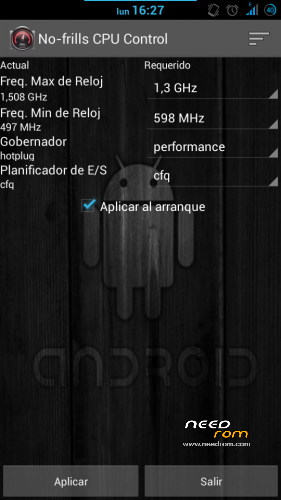
After installing this rom, install app ''no frills cpu'' and set ''performance'' and freq to the max 1300mhz. Enable it on boot.
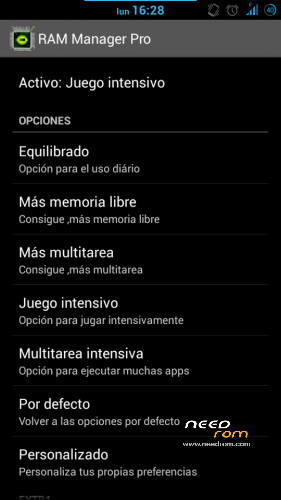
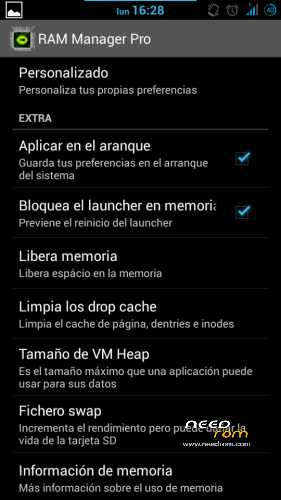
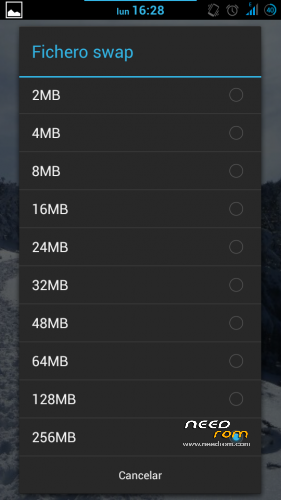
Also install Ram Manager Pro 5.2.2 app and set ''hard gaming'' option. Enable it on boot. You can also set swap to 256mb if you use good sd card (class 10 hc/xc).
Using xposed installer app which is already in the rom, download gravitybox to get a fully customization of this ROM.
KNOWN ISSUES: WiFi can't automatically connect to known networks and MAC is autochanged everytime it's activated/deactivated (It's not a big problem in fact).
Fixed on Revision 1.0 (05/02/2014):
Download this file:
https://mega.co.nz/#!99N21RBK!urEJCL1cOmDt8qOBFkUW3p1kebxJYf4sv3zSqdvNw2Y
1) Extract .zip content in your sd card (two files WIFI and WIFI_CUSTOM).
2) Open root file explorer (such as root explorer, es file explorer…). Set R/W permissions.
3) Go to the path \data\nvram\APCFG\APRDEB and backup WIFI / WIFI_CUSTOM original files.
4) Copy the files that you've downloaded and replace the original ones.
5) Set same attributes as the old files or the attributes that every file in APRDEB folder.
6) Reboot & Enjoy.
Thanks to manolett, ismapaan, rafapaco & others @ HTCMANIA.com forum for their help given.
13/05/14
Three flashtools roms are added:
The difference between hardware #1 and hardware #2 is that you'll have the camera not working after flashing. If this is your case, try the other!
This additional options are only to help to install the rom, so, this post is not for flashtools roms. Any problem using flashtools and roms for flashtools is under your responsability. If you don't know how to flash, just do not try.
Most questions about flashtools usage will be ignored. Just google a bit.
Regards
※Please make a backup of your device before installing or updating ROM
Hello I have the same problem, only work front camera.
simple fix for front camera not working.
follow flashing instruction to the letter (make sure wipe properly) then flash the zip, do not reboot, wipe data and cache partition again. then reboot
/system shoud be formatted, if not traces from old mtk camera from miui
Thanks for the tip.
I usually do all the wipes
i have a bricked phone, recovery dont work but spflash tool work
how can i flash it?
you need a flashtools firmware.
If I've time I'll try to make a flashtools version of this firmware.
Regards
i will wait
but i need MT6572_S00 ROM
I dont really know which rom you request. It appear to be different that this phone
Same problem here… Back camera not working and I see is not detecting flash… not the 8MP that original rom has.. Anyway to fix this problem? Without back camera is like useless rom
  . Maybe if we copy any file from the config of the original rom? Thank you, regards
Yeah, I need to put the camera drivers of your original firmware into this firmware to make it work. But since I cannot do that for every model you could do that by yourself, open my .zip firmware and just throw the camera drivers files of your original firm in this zip (replace the files in the zip).
If you decompress and compress will fail. Only replace.
Regards.
Can you give something to unbrick phone to start recovery? I have mt6572_s00 red rice
Try flashing only the recovery thru flashtools. Do you have the recovery?
recovery from this site? i try and nothing
before i bricked phone i have your rom on my phone but i flash it with other rom and it bricked, and therefore I think that your rom it should be done
i have a fake red rice model 2013022 and so i tried this rom
i have followed the tuts (full wipe also) but the back camera isn't working.
any idea about this? unfortunately my backup of initial rom is corrupt so i have no way back.
can you make backup of your rom
like this tutorial: http://forum.gsmhosting.com/vb.....nbrick-1666984/
??
You've a diferent drivers phone…really sad, no way to recover back. Flashtools backup with mtkdroid tools could fix it.but if you've corrupted. I'll try to find the other phone version and post.
hi what is the file of camera drivers in my phone (what name the file)?
I wish I know what's your phone..
hi sorry but I only known is a fake red rice and with this rom not run back camera. If you say where was driver files I can look it in my rom. regards
this is the backup but don´t run in other phone
http://share.myflare.com/xJdrd.....4
backup of?
I do this bucku with MTKdroid and I try run it in other same phone and don´t run. But i put it if is posible take the drivers for put it in blackforest rom