
- Title: Fake Red Rice (2013022) – Ported from BLACKFOREST A7S
- Listed: January, 2014
- Last modified: 01/26/2014 5:37 pm
- Version: 4.2.2
You must be logged for ROM download.
37899 total views, 9 today
3 Total favorites
 Member Info
DESCRIPTION
Hello, this is my first upload.
Since Fake Red Rice is running english/chinese rom that works slowly, I've ported this rom for you guys to at least use this phone.
Thanks to the developer of Blackforest T7S for such a great work.
This ROM is designed to work in Fake Red Rice 2013022, which it is hacked and shows 1GB RAM instead the reality (512MB), also shows 4.3GB of internal data (the truth is 3.7GB), and it display it is Mediatek MT6589T @ 1.5Ghz, but the truth is that it's built using the new MT6572 @ 1.3Ghz Dual Core with Mali400MP GPU.
It might work in other phones with same specs. If you get a blackscreen try, changing the boot.img from the .zip and put the one you get from your backup (just replace files in zip using winrar, do not unpack and repack, it shouldn't work).
How to ROOT your device to install this rom:
Google ''framaroot xda'', download the apk, install and apply the exploit. Reboot, thats all. You're rooted.
How to INSTALL CWM Recovery:
Install Mobileuncletools (MUT) app from Play Store or just google about it. Then, put your recovery image (*.img) on your sd card & internal sd card. Run MUT, and update recovery. You'll see first the recovery CWM, install it and reboot later into recovery using MUT (not now).
IMPORTANT: How to BACKUP YOUR IMEI: In MUT theres an option to backup your IMEI. You don't have anything else to do, just click this option and backup sucesfully will be displayed when you request the app to backup it.
VERY IMPORTANT: How to BACKUP YOUR ROM: Go to MUT, reboot into recovery option, click yes. Phone will reboot into recovery. After that, click ''backup and restore'' and click backup or use backup into internal SD card. Take care you've to safely copy ''clockworkmod' dir into your PC to have a safe copy of your ROM backuped, before you try installation of this ROM.
So:
1 ) Root current rom.
2 ) Install MUT.
3 ) Backup IMEI.
4 ) Install CWM recovery.
5 ) Reboot into recovery.
6 ) Backup your ROM.
7 ) Do wipes (google for details).
8 ) Install this rom.
What does this ROM include:
Android 4.2.2
Rooted
Light GAPPS
Xposed framework.
Multilang.
Recommendations:
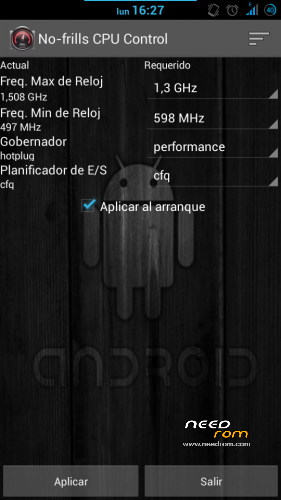
After installing this rom, install app ''no frills cpu'' and set ''performance'' and freq to the max 1300mhz. Enable it on boot.
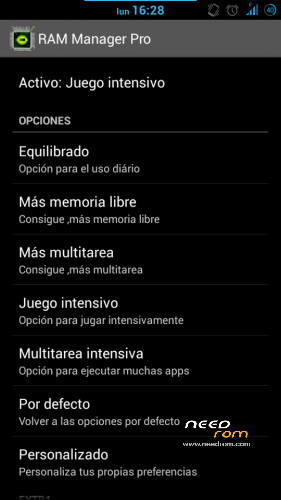
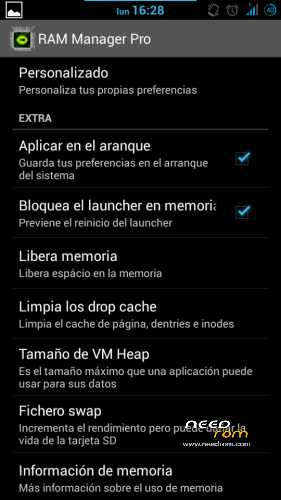
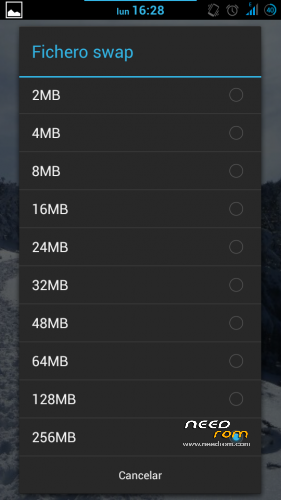
Also install Ram Manager Pro 5.2.2 app and set ''hard gaming'' option. Enable it on boot. You can also set swap to 256mb if you use good sd card (class 10 hc/xc).
Using xposed installer app which is already in the rom, download gravitybox to get a fully customization of this ROM.
KNOWN ISSUES: WiFi can't automatically connect to known networks and MAC is autochanged everytime it's activated/deactivated (It's not a big problem in fact).
Fixed on Revision 1.0 (05/02/2014):
Download this file:
https://mega.co.nz/#!99N21RBK!urEJCL1cOmDt8qOBFkUW3p1kebxJYf4sv3zSqdvNw2Y
1) Extract .zip content in your sd card (two files WIFI and WIFI_CUSTOM).
2) Open root file explorer (such as root explorer, es file explorer…). Set R/W permissions.
3) Go to the path \data\nvram\APCFG\APRDEB and backup WIFI / WIFI_CUSTOM original files.
4) Copy the files that you've downloaded and replace the original ones.
5) Set same attributes as the old files or the attributes that every file in APRDEB folder.
6) Reboot & Enjoy.
Thanks to manolett, ismapaan, rafapaco & others @ HTCMANIA.com forum for their help given.
13/05/14
Three flashtools roms are added:
The difference between hardware #1 and hardware #2 is that you'll have the camera not working after flashing. If this is your case, try the other!
This additional options are only to help to install the rom, so, this post is not for flashtools roms. Any problem using flashtools and roms for flashtools is under your responsability. If you don't know how to flash, just do not try.
Most questions about flashtools usage will be ignored. Just google a bit.
Regards
※Please make a backup of your device before installing or updating ROM
Hí!
https://mega.co.nz/#!I4wEmZKb!....._0IXNnbfguWzs9g
Thx.
Let me check it, we will see.
I'll let you know. Atm I'm busy please have patience.
OK.
Please, look for phone with rom aosp or android near pure, mt6572 and 512 ram, same resolution and TD-SDCDMA as freqs.
I've done a test, I'm going to drop the link now (uploading 46%), but I doubt this is going to work. I need also this kind of rom as basis to mix the three roms and see if I can do the port.
Try this one: https://www.mediafire.com/?rlg.....2sgya7qugs3d
Thx !
Hi! GSM ok , Wifi ok , but google parts is not work , unfortunately google service has stopped , message.
Maybe memory problem ?
Ram manager pro :memory info Free memory: 573MB , Used memory -5xxMB
wow!!! perfect!!!! that's perfect news!!!
Don't worry about google service problem, just flash gapps core for 4.2.2 in recovery and that's all!!
Don't worry about ram problem, kernel is modified, so the correct disaplay of ram is not possible!
Hy!
http://forum.xda-developers.co.....d.php?t=2405292
4.2.2 update.
Download file This is foto with my problem
Ah, process.acore is not google play problem…
Try to install again, do wipes and install again.
Verify that the .zip copied to sd is correct -crc check-
Regards
Hy.
1. Install the rom. from the .zip
2. Install the google aps from .zip
3. Wipe data/factory reset
4. wipe cache partition
5. Intall the rom again from the .zip
—-
Its ok without sim and wifi.
-wifi its ok
-SIM its ok.
————————————————
ROM working.
Mediatek MT6572 chip , samsung RAM
TD-SDCMA
Thx!
Really good, I'll upload the rom for ppl with TD-SDCDMA version!
HI! only one thing left. The GPS is not working, the old ROM in operation.
Thanks for helping
Yeah, to have working GPS, Go to gps settings and activate everything, agps, epo, and also download epo and agps in roaming. You can install MT GPS EPO Fix app and download EPO files.
After that reboot.
Put the phone in a place open to the sky with data connection and/or wifi activated and leave it first time for some minutes running 'androits gps test app'.
Hopefully you'll catch fix soon.
Anyway GPS of this unit is really bad.
Hi! Working.
Thans.
In old rom GPS working fast and not nessesary wifi or data roaming only GPS.
Good to know.
If I helped, please vote me