
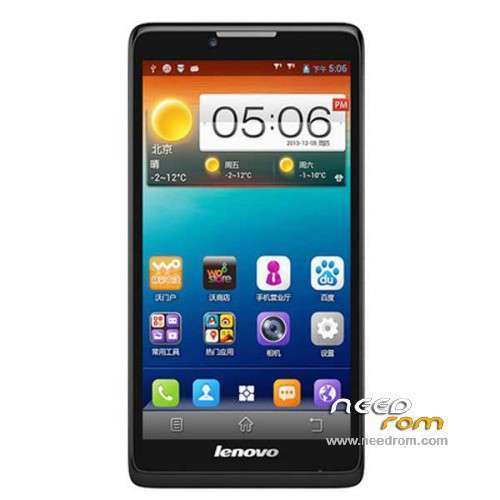
- Title: LENOVO A880
- Listed: January, 2014
- Last modified: 01/30/2014 8:35 pm
- Version: ROM Android 4.2.2
You must be logged for ROM download.
76139 total views, 3 today
15 Total favorites
 Member Info
DESCRIPTION
ROM Phone LENOVO A880 – ROM Android 4.2.2
Official ROM Lenovo A880 Version: Lenovo A880_S020_140109
No Gapps – No rooted
Language support: EN/CN
ROM Install :
1: the phone turned off (only shut down, do not pull the battery), and the phone do not connect the computer with the data cable, disconnect the cable
2: download ROM package first to extract, extract out of a folder
3: Extract the downloaded above down the Brush tool SP_Flash_Tool
4: And then to find out the unpacked folder SP_Flash_Tool [Flash_tool.exe] file, and then double-click to run
5: Scatter-loading button and then click on the corresponding software on the choice of software files.
6: Then select MT6582_Android_scatter.txt in just unzipped rom package folder

7: Then click on the check [DA DL All With Check Sum], check the name of the process, the whole tick:

8: Click [Firmware Upgrade] button

9: The phone in the off state, with usb data cable to connect your phone with a PC good start downloading automatically, without any action, is being downloaded (download time a bit longer, please be patient)
This case, unplug the cable re-brush once, not repeatedly try to restart the computer and try again the next.

10 And green circles display Finish ! You can now safely disconnect your phone and turn it on.
ROOT:
1. download vroot
2. Connect your phone to PC (USB debugging ticked) and start vroot. Click ROO and wait until the phone restarts. Disconnect it from the PC.
3. Download ClockworkMod superuser from the Play Store and launch the application. Update the binary.
4. Download Titanium Backup (with license) and from recent applications, close all open applications.
5. Start Titanium Backup and freeze vroot (recognizable at the end of list). Restart Clockworkmod SuperUser and put new update binary. Restart the phone.
6. VRoot uninstall with Titanium Backup
※Please make a backup of your device before installing or updating ROM
i need to lenovo a880 rom. please sir
Thanks a ZILLION! I just bought an A880 but could not find the firmware since it is a new model there are a lot on A850 and S880.I want this a s a back up since I want to root the phone and just in caseanything goes wrong with the rooting procedure, I have a back up (I am going to to use FRAMAROOT to root the phone, since it is successfull on MT6582 Soc JB). I was afraid thatwithout the backup firmware I will spoil the fun of owning a brand new LENOVO phone.
I just notice you said no GApps ? that means we have to install GMail, Playstore Log-in all sync software ourself?
any success? tried to find the flash tool but can't find it anywhere. tried framaroot to no avail. it seem this phone is already rooted but overtime i lost my root previlige. now i cannot get root anymore. can u guys teach how to flash and if possible how to root? thanx.
Just download http://www.mgyun.com/m/en here to root ur phone
just tried framaroot 1.8.1 Boromir/Faramir exploit and got error #9. guess have to wait for another updat
This is the MT6582 FlashTool but if you say it is already rooted then all we have to do is install Superuser/SuperSU and busybox?
here is the link to my MT6582 FlashTool : https://drive.google.com/file/.....dit?usp=sharing
hi, how to install gapps after flashing this rom?
We need to root it first and then install the app manually one by one because we dont have CWM/TWRP or using adb push. I am working on an adb script )based on MOTOChopper to see whether it is successfulthen we can root using ADB only for A880)
"deloyang" description of his problem points to the only one thing, it has a busybox already either in /bin or /xbin folder and that "framaroot" tried to install another busybox copy in the wrong location and causes conflict. We need to install only the "su" binaries and Superuser app and when we achieve that we can go in to check the location of busybox and if needed itupdate the busybox in the right location.
If the frama root method screwup your phone ,you can try after flashing this ROM and to use framaroot again (since the author says it is not rooted) ten install the GApps one by one manually.
how about if we put CWM with mobile uncle tool apps? it can work or not?
thanx for sharing the link. as of my phone, it came with SuperSU installed so it mean it has root. i have installed Titanium and it work.. ..for a while. the thing is that when I opened the SuperSU, it asked to install binary update blablabla and as always, I select the normal install but then it failed. after that i lost all my root. tried to reinstall SuperSU and same result. failed. so i wonder if installing this ROM should I do 'Upgrade' or 'Download'? hopefully framaroot will work this time.
why when i load the scatter file, it says invalid file? i cannot flash this rom because of invalid scatter. how to fix this problem?
try renaming your folder with no chinese language.i try renaming all its folder which has an unrecognised language,the flashtool can read the scatter..hope it helps..
@Cracktech by the way how long should I wait for the process to start after I pressed Download? It seem like nothing happened. I use the Firmware Upgrade option. sorry to bother you.
Try flashing with MTK Droid Tools links is here : https://mega.co.nz/#!74IWjaaC
It also have rooting capabilities. I think what happened to you deloyang is that the su binaries ere installed in the wrong location (xbin/bin) SuperSU will install it in /xbin but most ROM cooker likely will install it in the /bin folder. And it will erase or it will put a dot in front of the name of su like (.su) instead of (su). and in android when you put a dot infront of a file name it means to ignore the file.
If you happen to get your original ROM just go and get an updated 'su" binary and manually copy over to the location that it originally resides and copy over the latest SuperSU app and update it into /system folder and rename it to the original name some people named it SuperSU and some Superuser.
I can be found on Archtablet forum "moderator" cracktech or on my own facebook site :
https://www.facebook.com/crack.....tech,
It is more quiet on my personal site.Aaaaah this has got to be the toughest asignment yet with no backup ROM and i dont have the A880 in my hand yet, it will only be with me towards Monday next week.No customs ROM like A850
@cracktech
could you please upload the scatter file only at here? i cannot use scatter file in the folder given. sp flash tools said it is invalid. i paste here the scatter file content. hope you can help me. thank you
############################################################################################################
#
# General Setting
#
############################################################################################################
- general: MTK_PLATFORM_CFG
info:
– config_version: V1.1.1
platform: MT6582
project: lcsh82_wet_jb5
storage: EMMC
boot_channel: MSDC_0
block_size: 0×20000
############################################################################################################
#
# Layout Setting
#
############################################################################################################
- partition_index: SYS0
partition_name: PRELOADER
file_name: preloader_lcsh82_wet_jb5.bin
is_download: true
type: SV5_BL_BIN
linear_start_addr: 0×0
physical_start_addr: 0×0
partition_size: 0xc00000
region: EMMC_BOOT_1
storage: HW_STORAGE_EMMC
boundary_check: true
is_reserved: false
operation_type: BOOTLOADERS
reserve: 0×00
- partition_index: SYS1
partition_name: MBR
file_name: MBR
is_download: true
type: NORMAL_ROM
linear_start_addr: 0xc00000
physical_start_addr: 0×0
partition_size: 0×80000
region: EMMC_USER
storage: HW_STORAGE_EMMC
boundary_check: true
is_reserved: false
operation_type: UPDATE
reserve: 0×00
- partition_index: SYS2
partition_name: EBR1
file_name: EBR1
is_download: true
type: NORMAL_ROM
linear_start_addr: 0xc80000
physical_start_addr: 0×80000
partition_size: 0×80000
region: EMMC_USER
storage: HW_STORAGE_EMMC
boundary_check: true
is_reserved: false
operation_type: UPDATE
reserve: 0×00
- partition_index: SYS3
partition_name: PRO_INFO
file_name: NONE
is_download: false
type: NONE
linear_start_addr: 0xd00000
physical_start_addr: 0×100000
partition_size: 0×300000
region: EMMC_USER
storage: HW_STORAGE_EMMC
boundary_check: true
is_reserved: false
operation_type: PROTECTED
reserve: 0×00
- partition_index: SYS4
partition_name: NVRAM
file_name: NONE
is_download: false
type: NONE
linear_start_addr: 0×1000000
physical_start_addr: 0×400000
partition_size: 0×500000
region: EMMC_USER
storage: HW_STORAGE_EMMC
boundary_check: true
is_reserved: false
operation_type: BINREGION
reserve: 0×00
- partition_index: SYS5
partition_name: PROTECT_F
file_name: NONE
is_download: false
type: NONE
linear_start_addr: 0×1500000
physical_start_addr: 0×900000
partition_size: 0xa00000
region: EMMC_USER
storage: HW_STORAGE_EMMC
boundary_check: true
is_reserved: false
operation_type: PROTECTED
reserve: 0×00
- partition_index: SYS6
partition_name: PROTECT_S
file_name: NONE
is_download: false
type: NONE
linear_start_addr: 0x1f00000
physical_start_addr: 0×1300000
partition_size: 0xa00000
region: EMMC_USER
storage: HW_STORAGE_EMMC
boundary_check: true
is_reserved: false
operation_type: PROTECTED
reserve: 0×00
- partition_index: SYS7
partition_name: SECCFG
file_name: NONE
is_download: false
type: NONE
linear_start_addr: 0×2900000
physical_start_addr: 0x1d00000
partition_size: 0×20000
region: EMMC_USER
storage: HW_STORAGE_EMMC
boundary_check: true
is_reserved: false
operation_type: INVISIBLE
reserve: 0×00
- partition_index: SYS8
partition_name: UBOOT
file_name: lk.bin
is_download: true
type: NORMAL_ROM
linear_start_addr: 0×2920000
physical_start_addr: 0x1d20000
partition_size: 0×60000
region: EMMC_USER
storage: HW_STORAGE_EMMC
boundary_check: true
is_reserved: false
operation_type: UPDATE
reserve: 0×00
- partition_index: SYS9
partition_name: BOOTIMG
file_name: boot.img
is_download: true
type: NORMAL_ROM
linear_start_addr: 0×2980000
physical_start_addr: 0x1d80000
partition_size: 0×600000
region: EMMC_USER
storage: HW_STORAGE_EMMC
boundary_check: true
is_reserved: false
operation_type: UPDATE
reserve: 0×00
- partition_index: SYS10
partition_name: RECOVERY
file_name: recovery.img
is_download: true
type: NORMAL_ROM
linear_start_addr: 0x2f80000
physical_start_addr: 0×2380000
partition_size: 0×600000
region: EMMC_USER
storage: HW_STORAGE_EMMC
boundary_check: true
is_reserved: false
operation_type: UPDATE
reserve: 0×00
- partition_index: SYS11
partition_name: SEC_RO
file_name: secro.img
is_download: true
type: YAFFS_IMG
linear_start_addr: 0×3580000
physical_start_addr: 0×2980000
partition_size: 0×600000
region: EMMC_USER
storage: HW_STORAGE_EMMC
boundary_check: true
is_reserved: false
operation_type: UPDATE
reserve: 0×00
- partition_index: SYS12
partition_name: MISC
file_name: NONE
is_download: false
type: NONE
linear_start_addr: 0x3b80000
physical_start_addr: 0x2f80000
partition_size: 0×80000
region: EMMC_USER
storage: HW_STORAGE_EMMC
boundary_check: true
is_reserved: false
operation_type: INVISIBLE
reserve: 0×00
- partition_index: SYS13
partition_name: LOGO
file_name: logo.bin
is_download: true
type: NORMAL_ROM
linear_start_addr: 0x3c00000
physical_start_addr: 0×3000000
partition_size: 0×300000
region: EMMC_USER
storage: HW_STORAGE_EMMC
boundary_check: true
is_reserved: false
operation_type: UPDATE
reserve: 0×00
- partition_index: SYS14
partition_name: EXPDB
file_name: NONE
is_download: false
type: NONE
linear_start_addr: 0x3f00000
physical_start_addr: 0×3300000
partition_size: 0xa00000
region: EMMC_USER
storage: HW_STORAGE_EMMC
boundary_check: true
is_reserved: false
operation_type: INVISIBLE
reserve: 0×00
- partition_index: SYS15
partition_name: ANDROID
file_name: system.img
is_download: true
type: YAFFS_IMG
linear_start_addr: 0×4900000
physical_start_addr: 0x3d00000
partition_size: 0x2bc00000
region: EMMC_USER
storage: HW_STORAGE_EMMC
boundary_check: true
is_reserved: false
operation_type: UPDATE
reserve: 0×00
- partition_index: SYS16
partition_name: CACHE
file_name: cache.img
is_download: true
type: YAFFS_IMG
linear_start_addr: 0×30500000
physical_start_addr: 0x2f900000
partition_size: 0x7e00000
region: EMMC_USER
storage: HW_STORAGE_EMMC
boundary_check: true
is_reserved: false
operation_type: UPDATE
reserve: 0×00
- partition_index: SYS17
partition_name: USRDATA
file_name: userdata.img
is_download: true
type: YAFFS_IMG
linear_start_addr: 0×38300000
physical_start_addr: 0×37700000
partition_size: 0×40000000
region: EMMC_USER
storage: HW_STORAGE_EMMC
boundary_check: true
is_reserved: false
operation_type: UPDATE
reserve: 0×00
- partition_index: SYS18
partition_name: BMTPOOL
file_name: NONE
is_download: false
type: NONE
linear_start_addr: 0xFFFF00a8
physical_start_addr: 0xffff00a8
partition_size: 0×1500000
region: EMMC_USER
storage: HW_STORAGE_EMMC
boundary_check: false
is_reserved: true
operation_type: RESERVED
reserve: 0×00
I think you cant load your scatter file because you are using an older SPFlashTool the old ones is NOT compatible with MT6582 : here is the latest one that is compatible with MT6582 :
https://mega.co.nz/#!Wh5EnaLK!.....pc26a6a13mQm7GE