
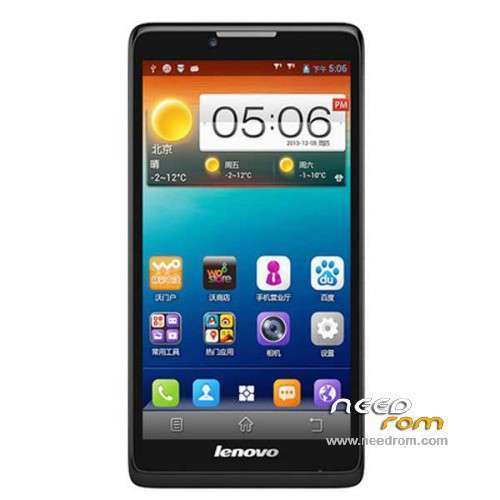
- Title: LENOVO A880
- Listed: January, 2014
- Last modified: 01/30/2014 8:35 pm
- Version: ROM Android 4.2.2
You must be logged for ROM download.
76141 total views, 5 today
15 Total favorites
 Member Info
DESCRIPTION
ROM Phone LENOVO A880 – ROM Android 4.2.2
Official ROM Lenovo A880 Version: Lenovo A880_S020_140109
No Gapps – No rooted
Language support: EN/CN
ROM Install :
1: the phone turned off (only shut down, do not pull the battery), and the phone do not connect the computer with the data cable, disconnect the cable
2: download ROM package first to extract, extract out of a folder
3: Extract the downloaded above down the Brush tool SP_Flash_Tool
4: And then to find out the unpacked folder SP_Flash_Tool [Flash_tool.exe] file, and then double-click to run
5: Scatter-loading button and then click on the corresponding software on the choice of software files.
6: Then select MT6582_Android_scatter.txt in just unzipped rom package folder

7: Then click on the check [DA DL All With Check Sum], check the name of the process, the whole tick:

8: Click [Firmware Upgrade] button

9: The phone in the off state, with usb data cable to connect your phone with a PC good start downloading automatically, without any action, is being downloaded (download time a bit longer, please be patient)
This case, unplug the cable re-brush once, not repeatedly try to restart the computer and try again the next.

10 And green circles display Finish ! You can now safely disconnect your phone and turn it on.
ROOT:
1. download vroot
2. Connect your phone to PC (USB debugging ticked) and start vroot. Click ROO and wait until the phone restarts. Disconnect it from the PC.
3. Download ClockworkMod superuser from the Play Store and launch the application. Update the binary.
4. Download Titanium Backup (with license) and from recent applications, close all open applications.
5. Start Titanium Backup and freeze vroot (recognizable at the end of list). Restart Clockworkmod SuperUser and put new update binary. Restart the phone.
6. VRoot uninstall with Titanium Backup
※Please make a backup of your device before installing or updating ROM
HEY GUYS RATHER THAN HOG THIS ROM POSTING PAGE, I HAVE SET UP A NEW PORT ON X-D-A FORUM. GO OVER THERE TO VENT OUT YOUR FRUSTRATION AND GET HELP.
HERE IS THE PAGE : http://forum.xda-developers.co......php?p=50352804
s020 NO GAPPS
Does anybody knows if can work in GSM-850MHz (I'm not talking about 3G)
In some website they said ''YES'' (like GSMArena)http://www.gsmarena.com/lenovo_a880-6047.php, but in others said ''NO''
Can someone please check in Engineer mode if there is 850MHz band?
Thank you.
hurm….still cant proceed the process for firmware > upgrade….i dont know why….pc does not detect my phone….do i need to debug usb mode? what should i do?? i cant open my wechat…..
can move apps to external memory???
reply pls
umm..this phone cannot move to sdcard ?
hi bro…availalable storage for apps is how many gb…4gb or 3gb or 8 gb… iam confused
DONT USE THIS CHINAMANS ROM MIUI Or OTHERWISE, IT WILL CAUSE YOU HEADACHES, COUNTLESS HEADACHES. YES THIS DEVICE CANNOT MOVE APP TO SD NO MATTER WHAT ROM YOU USE. THE BEST ROM FOR A880 IS MY "MANNUR' IT HAS ENGLISH TWRP RECOVERY AND GAPPS,PLUS WORKING SuperSU,BUSYBOX. IT ALSO IS REALLY UNLOCK NOT LOCKED INTO CHINA TELCOS SERVICES AND YOU DONT LOOSE 3G OR USE OF SMS LIKE I DO (ever 30 mins I loose 3G or ability to send SMS ubtil reboot)
is it ok to flash this rom to lenovo a889 ?
Hi
I brough one lenovo A880 from china, i am using it and i found some situations which i woule like to get any help from the forum:
1 – I have all contacts in phonebook, but when i receive a call the phone just show the number, not showing the contact name, how do i solve this?
2 – I cant fine my city name in the home city settings, i am currently in Maputo/Mozambique.
3 – Mostly of the appliacation on the mobile are in chines, my browser and other applications all in chines and i cant even download the google store.
Please can someone help me with sollutions, maybe i need to install a new firmware or something else, please hel with instructios.
Best Regards,
Zulficar Adamo
Hi
I brough one lenovo A880 from china, i am using it and i found some situations which i woule like to get any help from the forum:
1 – I have all contacts in phonebook, but when i receive a call the phone just show the number, not showing the contact name, how do i solve this?
2 – I cant find my city name in the home city settings, i am currently in Maputo/Mozambique.
3 – Mostly of the appliacation on the mobile are in chines, my browser and other applications all in chinese and i cant even download the google store.
Please can someone help me with sollutions, maybe i need to install a new firmware or something else, please help with instructios.
Best Regards,
Zulficar Adamo
This is a ChinaUnicom version firmware. dont be stupid if you bought it in China all the settings inside will be for CHina (not even Taiwan).You should download the S020 firmware by MANNUR (S020RU) not this Chinamans stupid firmware. Then go to the XDA Forum site to get help from other users. I have provided the guide to flashing this firmware.Stop asking for help here.