
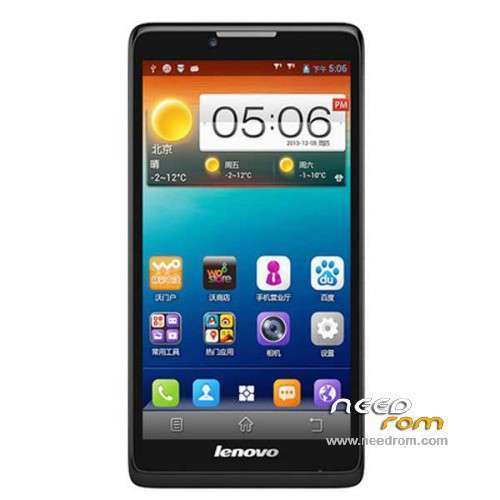
- Title: LENOVO A880
- Listed: January, 2014
- Last modified: 01/30/2014 8:35 pm
- Version: ROM Android 4.2.2
You must be logged for ROM download.
76141 total views, 5 today
15 Total favorites
 Member Info
DESCRIPTION
ROM Phone LENOVO A880 – ROM Android 4.2.2
Official ROM Lenovo A880 Version: Lenovo A880_S020_140109
No Gapps – No rooted
Language support: EN/CN
ROM Install :
1: the phone turned off (only shut down, do not pull the battery), and the phone do not connect the computer with the data cable, disconnect the cable
2: download ROM package first to extract, extract out of a folder
3: Extract the downloaded above down the Brush tool SP_Flash_Tool
4: And then to find out the unpacked folder SP_Flash_Tool [Flash_tool.exe] file, and then double-click to run
5: Scatter-loading button and then click on the corresponding software on the choice of software files.
6: Then select MT6582_Android_scatter.txt in just unzipped rom package folder

7: Then click on the check [DA DL All With Check Sum], check the name of the process, the whole tick:

8: Click [Firmware Upgrade] button

9: The phone in the off state, with usb data cable to connect your phone with a PC good start downloading automatically, without any action, is being downloaded (download time a bit longer, please be patient)
This case, unplug the cable re-brush once, not repeatedly try to restart the computer and try again the next.

10 And green circles display Finish ! You can now safely disconnect your phone and turn it on.
ROOT:
1. download vroot
2. Connect your phone to PC (USB debugging ticked) and start vroot. Click ROO and wait until the phone restarts. Disconnect it from the PC.
3. Download ClockworkMod superuser from the Play Store and launch the application. Update the binary.
4. Download Titanium Backup (with license) and from recent applications, close all open applications.
5. Start Titanium Backup and freeze vroot (recognizable at the end of list). Restart Clockworkmod SuperUser and put new update binary. Restart the phone.
6. VRoot uninstall with Titanium Backup
※Please make a backup of your device before installing or updating ROM
my a880 got problem on wechat~~cant play wechat…
Small matter as long as your device is working flawlessly. Dont use wechat.We have bigger problems to solved
@cracktech thanx for all the tips u give us. finally i got my root previlige.
What did I do? how did it help you? I need to know your procedures in order to keep records please take your time to savour your new found LOVE A880 and (root) and post it on my facebook site. or you can e-mail me at 1cracktech@gmail.com
I can use your experience to learn somethings from YOU!
thanks to cracktech and admin for replying.. I’ve got everything worked flawlessly.. this time I flash the rom again, root using vroot, manually install latest gapps for 4.2.2 using root explorer (except text-to-speech) doesnt work.. gps is working like before maybe there is something wrong in previous flashed rom after i failed to root using root genius before admin told me about vroot.. .. and the bootscreen ,shutdown screen and sound I think I could change them in /system/media… Im sad why lenovo doesnt list this model in their website.. @cracktech i got this phablet on local shop with 2 years warranty from brandstar..
Text to speech has got a bug in it (Googletext to Speech) use default TTS the device will update the Google texttoSpeech leave it outside as an aftermarket install not as system app. It will interfere with Google Maps everytime it starts it will show you "sorry GoogleTTS ForceClose".Or just leave it out (like you did) and maintain Android TTS only (as default engine). good to hear about somebody solved his problem.
Now to get help from XDA members to put in GApps back into this ROM and add root (SuperSU and busybox .1.21 into /xbin not /bin because busybox installer will always default to /xbin instead of /bin.
With the stock ROM it has no problem with wechat. I didn’t reflash my phone with the new version since it got no Gapps. Just rooted it with vroot. After rooting I tried installing supersu then updating it’s binary thingamajig to no avail since it conflict with RootMaster that was installed by vroot. Not that I really care though. As long I can have root, others doesn’t matter. Gonna wait for newer ROM with Gapps. Got mine a China set. the manual are in Chinese and the charger also got the 2 pins. 1 year shop warranty only. I don’t mind.
Thank for the info,my a880 auto update,so my old supersu can't be use, i will root back using vroot n update binary using busy box…thanks again~~
The stock ROM I have this has this signature and it is widely sold in Malaysia/ASEAN region. Although it cannot update su binaries successfully , I know (mine cannot) but it hac full "ROOT" access the ROm dont come with "busybox" installed I expected that to be in /xbin but it wasnt there so I copied "busybox" 1.22 over into /xbin but it fails to symlink.
I still have full root access and dont want to risk screwing up the ROM (and the phone) since , it is working with ALL root app that i need for day to day auto maintenance app. But the thing come prerooted I think the original firmware was configured for the UK market (since build.prop was satnadard to UK). I ahve attached the buld.prop for your keeping Even if you dont update the SuperSU app with its binaries it still cannot install "busybox"the only thing is to "Full unroot"it and "reroot", which i am NOT risking it until I have the stock ROm (with GApps) available in my hand.
It has updated the LENOVO Launcher beatifully.I am so used to ApexLauncher. NO I AM NOT GOING TO RISK UNROOTING AND REROOTING my phone until I have the firmware.Thats how I manage to survive for 4 years in the Android forums , no firmware no talk.
Sorry I left out the build.stock buold.prop. here it is.
https://mega.co.nz/#!Tk5lQQzQ!.....HQIPqYzYrgSArXc
Hopefully the CWM recovery you test will be success..then at least can backup the rom before mess around..
Was wondering, if it doesn’t have Gapps, is it possible to install apps via Mobogenie/Blackmart etc.? The only bad things about my phone ROM (Build Number A880_S013_131205 which is come ‘originally’ with this phone)is that it cannot auto update, some of the settings are not functioning (FC), and still show some Chinese characters (in Contact especially). Other than that, no problem
The functions such as BasicDreams doesnt have the function in the Settings menu (to set what type of screensaver comes up) i was loking thrugh it myself.. maybe have to change the "GUI".apk that can show this settings.The ones that I had was also prerooted with superSU and configured for UK. But the root is incomplete although functional for apps to operate there is no busybox and installation of busybox is futile coz the stock ROM of mine doesnt want to symlink (after a lot of kung fu) did it manage to symlink.
But now I cant download any think from Playstore cause it is saying "insufficient storage space" but I can sneak it in through side loading directly into /data/app folders and it will be installed, I can live with that as long as it does allow me to install side;load it.I ahd a bad experience with busybox that totally zero "0"rised my available memory and I cant eevn side load anything but to reflash the whole ROM.I dont know how or why our OP has released this crippiled firmware but the LENOVO bootanimation and LENOVO Launcher the updated version is beautiful. I left my ApexLauncher installed in /system/app but I have been using the LENOVO Launcher for now.
Anybody needs the bootanimation and audio ui files in the media folder can request from me the sounds are also better than SAMSUNG.!) cause I am so used to all my 10"pad having the same sounds as SAMSUNG for the past 3 years.
I am trying to flash a CWM recovery(when I am confident enough) that I found specific for our MT device, I checked the scatter files it is the same. It only advised us to flash recovery file to get CWM
Moborobo and Mobogenie are craps they can do certain things but installtion of and upgrading of apps are touch and go process, I think manually sideloading the app will have better chance
so does that mean downloading from other app market is a no no (useless) for this uploaded ROM? i mean, we manually install the app downloader (Mobogenie.apk, Blackmart.apk) then download apps from it also cannot? forgive me for my dumbness. i was really interested with flashing this new ROM but then again doesn't want to face the problem with installing apps.
I tell you what I,will give you a copy of my my Nandroid backup with the system.img that has GApps from my stock ROM include 2 boatware which you can remove later afterwards. No chinese bloatware just a timer/ and a muslim only app ( but for me it is useful) but no QQ, Chinese app store.with CWM optional recovery.
it would be great if i can get your stock ROM copy but sadly it seem that i'm kinda have problem installing CWM on my phone. Still getting over it.
No need CWM, just use normal flash because I backed it up using the MTK Droid tool latest version it creates a flashable copy of (in the same format that comes with normal MTK ROM it even creates the scatter files. If you dont belief me download MTKDroid Tool and check out the process and the output and compare it with the standard ROM format. But sadly mine is a DEC 2013 version build 013 instaed of this version which is jan 2014 build 020. Still looking for the firmware on Chinese site they have alot of (A850 though).
I tried to play around with MOTOCHOPPER script and it did successfully install busybox but I am still modifying it to install Superuser (no freeze this and that) just straight install busybox.Superuser,su) . and if Ok than it can be made to install the GApps but through ADB scripts which is simpler than CWM. Plug it tthro USb cable to Pc and let the script do the rest.
cracktech please give me your copy of stock rom for a880 with the necessary tools guide for flashing ..
do u guys get to use the USB Internet function at Wireless & Network setting? mine not available. its there, but not opened/dimmed.