
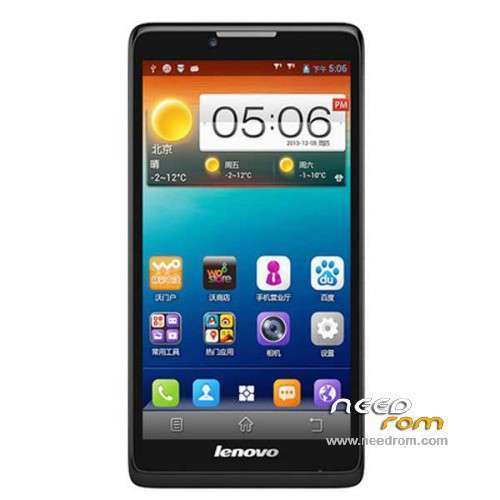
- Title: LENOVO A880
- Listed: January, 2014
- Last modified: 01/30/2014 8:35 pm
- Version: ROM Android 4.2.2
You must be logged for ROM download.
76140 total views, 4 today
15 Total favorites
 Member Info
DESCRIPTION
ROM Phone LENOVO A880 – ROM Android 4.2.2
Official ROM Lenovo A880 Version: Lenovo A880_S020_140109
No Gapps – No rooted
Language support: EN/CN
ROM Install :
1: the phone turned off (only shut down, do not pull the battery), and the phone do not connect the computer with the data cable, disconnect the cable
2: download ROM package first to extract, extract out of a folder
3: Extract the downloaded above down the Brush tool SP_Flash_Tool
4: And then to find out the unpacked folder SP_Flash_Tool [Flash_tool.exe] file, and then double-click to run
5: Scatter-loading button and then click on the corresponding software on the choice of software files.
6: Then select MT6582_Android_scatter.txt in just unzipped rom package folder

7: Then click on the check [DA DL All With Check Sum], check the name of the process, the whole tick:

8: Click [Firmware Upgrade] button

9: The phone in the off state, with usb data cable to connect your phone with a PC good start downloading automatically, without any action, is being downloaded (download time a bit longer, please be patient)
This case, unplug the cable re-brush once, not repeatedly try to restart the computer and try again the next.

10 And green circles display Finish ! You can now safely disconnect your phone and turn it on.
ROOT:
1. download vroot
2. Connect your phone to PC (USB debugging ticked) and start vroot. Click ROO and wait until the phone restarts. Disconnect it from the PC.
3. Download ClockworkMod superuser from the Play Store and launch the application. Update the binary.
4. Download Titanium Backup (with license) and from recent applications, close all open applications.
5. Start Titanium Backup and freeze vroot (recognizable at the end of list). Restart Clockworkmod SuperUser and put new update binary. Restart the phone.
6. VRoot uninstall with Titanium Backup
※Please make a backup of your device before installing or updating ROM
i hav a problem with a880 i want to upgrade kitkat n i did that but after that i cant able to open my phone please send me suggestion my email is ibesh4u@gmail.com
my phone stuck on logo..and i cant to active usb debug ..so how to flash?
Hi there!
I'm am a Hungarian buyer and user of the new lenovo A880. Unfortunatelly, after I finally got my new smartphone I got some problems with it. Firtsly they just forgot to renew the imei number, it has been solved after they sent me a protocol how to renew it. After that, my phone was behaving wired. I mean it has randomly reboot for e.g. during a phone call, or if I tried to pick on the music player. After that I wrote an email to them that it is not working well. They sent me a new protocol how to recover the rom, they said that was the problem. I used the same method that you mentioned above, i got the green circle and the download OK message. But after that my phone couldn't reboot. I saw the a message like this "DL file FAIL!" on my screen. After I reply to them again, and they said i try to follow the ZOPO mobile protocol and everthing in which were they mentioned. I did it, the firmware and upgrade was done DOWNLOAD OK message again. But after my phone was dead as it is now still. The nex answer was that i need to boot it, with the rooting method , as they mentioned I hold the power for three seconds then released after hold the volume up until the lenovo signal appeared, but nothing happened… Now I totally confused and don't know what should i do now… If you know what was the problem and what should i do, please inform me, I'm very thankful for it.
DONT USE THIS ROM findd the other one made by MANNUR for version S027 (we all in Mlaysia are all using his version and we have to more problems it is prerooted no need to worrry about how to root again) This one I used it (before the MANNUR version) is Chinese rubbish!! It is not stable and meant only for ChianUncom service utter rubbish I tell you (the ROM poster he just picks up firmware and post it here he doesny know a thing about modifying ROMs)
Can i update this directed from s013 to s027?. Pls advice. tnks
I am currently using miui rom. Hoe possible to get stock rom back?
Thithe stock ROM! Just wodering why anybody want to use a stock ROM since it is so iunstable. USE this ROM instead. It is stable. With the stock ROM you will have random reboots at least 6-10 times a day/ loose SMS/ Loose 3G to your telephone provider. I dont like to use MIUI because I have studied their ROM apps and drivers/files it is so much different than the A880 ROm . I woder why people like to use MIUI ROM when they deviate from Google (non AOSP)and the factory ROM.
I will never put or port MIUI ROM to make a new ROM for any phone models.I think the MIUI ROM for A880/A889 is not from MIUI company but was ported by an individual/personal by a MIUI fanatics. MIUI do not have the manpower to make MIUI ROM for ALL the phones here you can see/count for yourself the number of models on this site alone.
If you you are a MIUI fanatics next time buy the phone model that MIUI have declared teir support for it.
TNX BRO
Please visit my FB page : https://www.facebook.com/group.....73753182888351/ but first do you know how to use SPFlashTool to flash a firmware , please reflash your phone in order to get back your IMEI (that means you will loose ALL your downloaded apps) since you only lost your IMEI, I assume that all other phone function normally. Before flashing please backup all your downloaded app.>>>then flash the "Emergency Flash file ".zip you will get back your IMEI after that but it will be A880 version S020 and it will also install TWRP Recovery.
Then you can upgrade to version S027 by Flashing the "A880_027_SuperSU2.05" version.zip file through TWRP Recovery . i will not have the time to tutor you ALL the way through the flashing process but can guide you only and most members (Malaysian) on the FB are ex-users of A880/A889 they can also help you out. You also need access to Win7 PC to flash and all drivers can be access from the "PUBLIC" folder on my FB page (these are drivers to be installed on the Win7 PC. The A880 firmware files you can access and download from this link : http://www.4shared.com/folder/.....Gz7iF/A880.html .The rest you will have to Google for instructions and if you need help , you can just mesage other users on y FB page (thay are all ex-A880/A889 users)
I apologise to some of you whom I didnt answer your questions quickly because this site sometimes inform us of messages received and sometimes it doesnt and since I already stopped supporting this model (move on to S939) I dont usually come back to read messages received here.
Please visit this BLOG and FB Page for your A880 enquiries. I no longer support A880/A889 since MANNUR and myself left this model 18-20 months ago. http://malaysianandroidsupport......blogspot.com/
Thank’s a lot