
- Title: MLAIS MX69 Pro KK
- Listed: June, 2014
- Last modified: 08/01/2014 3:40 pm
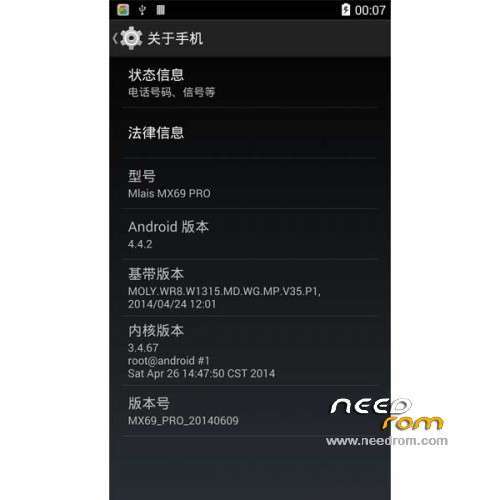
- Version: ROM Android 4.4.2
You must be logged for ROM download.
20563 total views, 4 today
1 Total favorites



 Member Info
DESCRIPTION
ROM Phone Mlais MX69 Pro – ROM Android 4.4.2
Update ROM Mlais MX69 Pro version : MX69_PRO_20140730 – KOT49H
———————————————————————————————————————————————-
ROM Mlais MX69 Pro version : MX69_PRO_20140625 – KOT49H
Gapps include – No Rooted
Language support : MultiLang
Install ROM :
- Unpack FlashTools, and Click on Flash_tool.exe
- Select a the MT6592_Android_scatter_emmc.txt in ROM
- Wait file to be added into Flash Tool
- choose Option->USB Model,click USB Model
–> Choose Option->DA DownLoad All->Speed->High Speed, click High Speed
- Turn off your phone, remove the battery.
- "Press F9 (hit Download button)" OR " if upgrade ROM Firmware->Upgrade "
- and connect your phone into the computer via USB data cable.
- The process will start and a red progress bar will appear after color purple, yellow.
- And green circles display
- Finish !
- You can now safely disconnect your phone and turn it on.
※Please make a backup of your device before installing or updating ROM
Rooting is not possible…
Hi guys can you tell me if there is a room that I can launch from the original micro sd? because the phone is dead and I can only enter the clokworkmode thanks in advance to those who will help me, I do not know what to do, I have to put the phone in cvondizioni to send the original warranty
I’m sorry I forgot to mention your phone model: mlais 69 mx pro 2 gb of ram 16 room
Root is now possible.
thumup
and the recovery is in English
English recovery is with the latest kitkat update dated 07/31/2014 on Needrom, but unfortunately it is NOT working, unless I don't know how to use it ?!?!?!?!
I had to reflash an older chinese recovery and had do tedious guesses to flash 4.4Root.zip or anything else… ^^
So could you explain how you were able to use the english recovery as whenever I used the ON/OFF button to validate an option nothing happens !!!
I will explain below my own experience with this kitkat firmware installation/update as this can be a very dangerious operation for the newbies, including non-newbies…
Fritzcremninge, how do you root it?
Play Market dont work "No conection"
ivanelectronico
It works with ROOT GENIUS 1.8.7
Google Play works
first
installed kk
boot the mobile
download root genius
on usb debugging
perform root-genius
Best greetings from Germany
First, much thanks to SoCr@Te for listening/reading and for working on the requests/comments, specially the Trebuchet setting which was missing in the previous kitkat versions and is working fine, and the english recovery version even though it is NOT working (for me only ???)…
Read the rest of the comment and tutorial so you will discover some other major bugs to be fix, please…
To those who wants to install or upgrade to the kitkat firmwares, be aware there is a very bad and nasty bug as it will nuke your IMEI so you won't be able to use your SIM cards unless you have a backup of you IMEI file and you are capable to restore it : ref. to non working english recovery and no root included in the firmware. (Sounds like Zopo users have the same problem with their kitkat firmware also…)
So pre-requisite before you go any further is to save your IMEI with Mobileuncle Tools or equivalent and keep it in a safe place (external SD card and else where).
Backup all your apps on your external Sd Card ! I'm not sure backing up your system data will do any good as most system apps will be of different version.
As previously said the english recovery is not working (at least for me), so if you don't have this problem or if you can use another recovery type then you can bypass this step :
1) Make a full backup of your actual firmware following this procedure :
http://forum.xda-developers.co.....d.php?t=2683406
Disable temporary your pin code(s), just in case… ^^
2) Download and Extract your kitkat firmware somewhere on your HDD.
3) Download and extract a previous Jelly Bean firmware (4.3.x or 4.2.2 : one with the chinese recovery) somewhere else on your HDD.
4) Copy the old recovery.img file and paste it in the kitkat folder replacing the existing one.
5) Flash the kitkat firmware the normal way with flash_tool and reboot once and wait everything is setting up until you get to your home screen.
6) Copy 4.4Root.zip file in your internal storage : you can get it here : Download file .
7) Power Off your phone and enter in recovery mode.
- Select the second line with the Zip word in the middle…, then select the 5th line (chinese word, SD, chinese word, Zip, chinese word).
- With the volume down button, select 4.4Root.zip and validate with the ON/OFF button.
- Confirm your operation validating the second line with the 4.4Root.zip name and you're done.
- When it's finish the system should reboot by itself…
- If you have Wifi connection, download Mobileuncle Tools or equivalent from the Google Play (or install it from your backup) and restore your IMEI and reboot !
- Now, your SIM card(s) and 3G connection should work the normal way. Enjoy (partially)… ^^
Another bug to be fix I guess… ^^
@ SoCr@Te,
If you reach that point, I have another request/wish to improve your firmware : could you add exFat and EAP-SIM support ?
(I can supply the source code if needed).
Finally, a little optimization for a better battery life would be welcome… :p
AGAIN, much thanks for your great work.
The latest version (Update 07312014) seems to work well. But, following the installation procedure with FlashTool the phone loses the "IMEI" file.To restore this file you must have Root permissions. How to get them? Or when there will be the root version of this Rom?
@g.gugliotta,
Have you red my comment and explanation/tutorial just above yours and specially the part in bold caracteres ???
All the instructions are still there, including getting Root, but if you lost your IMEI and you don't have a backup I have no idea on how to recover it, except sending back your phone to your retailler or a specialized repair shop/center…