
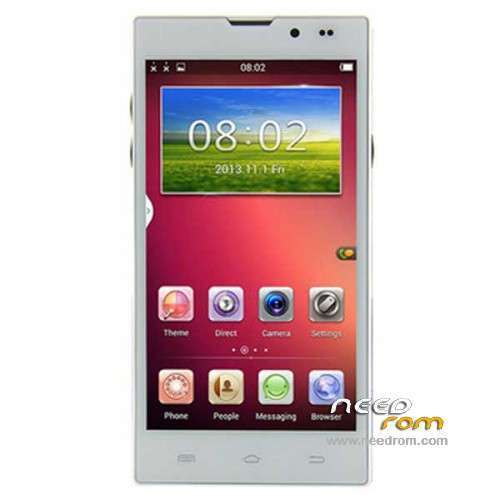
- Title: STAR HD5000
- Listed: March, 2014
- Last modified: 03/27/2014 3:15 am
- Version: ROM Android 4.2.2
You must be logged for ROM download.
31410 total views, 7 today
102 Total favorites
 Member Info
DESCRIPTION
ROM Phone STAR HD5000– ROM Android 4.2.2
Update ROM STAR HD5000 Version: V11.140313 – vh085_w_emmc_jhgg_v5 – G-WET-FULL-JB5.W1337
————————————————————————————————————————————————
Official ROM STAR HD5000 Version: V10.140218 – vh085_w_emmc_jhgg_v5 – G-WET-FULL-JB5.W1337
Gapps include – No Rooted
Language support: Multilang
Install ROM :
- Unpack FlashTools, and Click on Flash_tool.exe
- Select a the MT6582_Android_scatter_emmc.txt in ROM
- Wait file to be added into Flash Tool
- choose Option->USB Model,click USB Model
–> Choose Option->DA DownLoad All->Speed->High Speed, click High Speed
- Turn off your phone, remove the battery.
- "Press F9 (hit Download button)" OR " if upgrade ROM Firmware->Upgrade "
- and connect your phone into the computer via USB data cable.
- The process will start and a red progress bar will appear after color purple, yellow.
- And green circles display
- Finish !
- You can now safely disconnect your phone and turn it on.
※Please make a backup of your device before installing or updating ROM
I cant for the life of me find the driver for this phone. It searches and says the driver does not exist. Therefore, I cannot connect the computer to the phone for a download. WTH am I doing wrong?
Any ideas out there?
samplerman, here you have a website where you download the driver:
http://singledrivers.blogspot......or-windows.html
this driver works perfect. However when it comes to flashing I still cant figure out
why the flashtool doesnt proceed when I click "download" and connect the phone.
When I connect the phone it shows only battery percentage…
I just had a phone mod guy look at my HD5000…he said it wasnt possible to flash. something in the operating system that prevents it. So I'm guessing nobody here was able to upgrade or they'd be giving us hints on how to proceed on this. I tried to get a refund from ahappydeal.com. stay away from these people. they said I may get $80 back. Such BS. and horror stories abound on this company.
I would be willing to pay 30$ to somebodys paypal who will come with the idea which would really work
with my phone. What is really happening with my phone is that when I dial the number like for example voice messaging and then it asks me to press 1, 2 or 3, suddenly dialer crashes and it says "unfortunately process com.android.phone has stopped". I dont know how to fix it and I was hoping that flashing this phone would help. However flashing by the above method doesnt work with my HD5000 phone. When I do according to instructions and it comes to pressing "download" or "upgrade" and then I connect the phone, nothing happens except the phone showing battery percentage. In case I try to do it without battery, it doesnt work either. I still dont give up and hope somebody could help me, fixing this phone is a kind of challenge for me. I would appreciate any help and if somebody provides the solution which would really work with my phone, I would appreciate a lot and fulfill my promise.
I raise you ten…I offer $40….come on phone geeks! you're needed.
hey inchatosh, driver download will not load into my phone. I've tried everything. there's some kind of virus unleashed on these phones that block any modifications. I'm going to have to sell this cheap on ebay. HEY ANYONE HERE AVAILABLE TO UPDATE THIS DAMN PHONE FOR ME? THERE'S MONEY IN IT FOR YOU.
1. downoad this file
https://www.dropbox.com/s/qqcm.....tA4150.zip?dl=1
2. in your phone – settings – more – developer options you mark "usb debugging"
and connect the phone via usb to laptop and leave it turned on (check if your usb cable is good, as some of my usb cables were not good, try different ones and different usb ports in your laptop)
3. install the downloaded file and during installation mark "other" when asked about phone model
it should work that way
inchatosh…It worked…but one problem….it's loading a generic driver and not specific for that phone. I also question the flashtool provided above. The flashtool seen on youtube is much more sophisticated. However I cant seem to find a link to that program anywhere. Is this our problem?
ANYBODY HERE KNOWS THE TRICK TO:
- flash the phone and/or upgrade firmware?
- fix dialer problem?
- fix all the problems mentioned in previous posts?
because i know how it is for the instructions not working…after a lot off search and managing to flash my phone 4 or 5 times,here how it is done…
Install ROM :
- Unpack FlashTools, and Click on Flash_tool.exe
- Select a the MT6582_Android_scatter_emmc.txt in ROM
- Wait file to be added into Flash Tool
- choose Option->USB Model,click USB Model
–> Choose Option->DA DownLoad All->Speed->High Speed, click High Speed
- Turn off your phone, remove the battery.
- "Press F9 (hit Download button)" OR " if upgrade ROM Firmware->Upgrade "
- and connect your phone into the computer via USB data cable without the battery.
-press the volume down button until you listen the connection sound from the pc..after that put the battery in the phone and it will start flashing
- The process will start and a red progress bar will appear after color purple, yellow.
- And green circles display
- Finish !
- You can now safely disconnect your phone and turn it on.
michaelv…nope still doesnt work. I've followed everything including installing the drivers properly. Like inchatosh, I'm dumbfounded. What are we doing wrong?
there MUST be some setting in "developer options" or some kind of anti virus blocking us from acheiving this. hmmmmmmm
lets try to do the same with different laptops, different operating systems like Windows 7, Windows XP, Windows Vista, etc and lets disable antivirus, antimalware, firewall, etc.
Who will be successful with this idea, please let us know with all details.
I will try tomorrow and also let you know.