
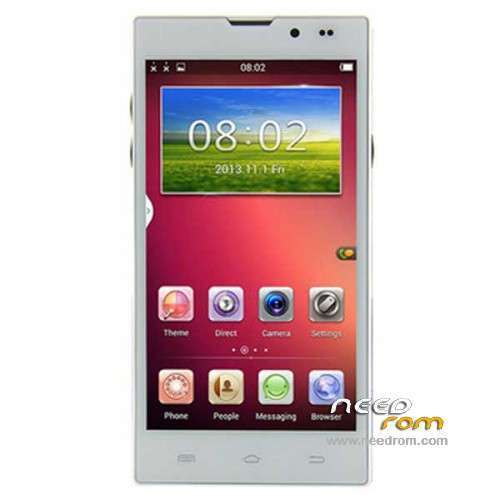
- Title: STAR HD5000
- Listed: March, 2014
- Last modified: 03/27/2014 3:15 am
- Version: ROM Android 4.2.2
You must be logged for ROM download.
31410 total views, 7 today
102 Total favorites
 Member Info
DESCRIPTION
ROM Phone STAR HD5000– ROM Android 4.2.2
Update ROM STAR HD5000 Version: V11.140313 – vh085_w_emmc_jhgg_v5 – G-WET-FULL-JB5.W1337
————————————————————————————————————————————————
Official ROM STAR HD5000 Version: V10.140218 – vh085_w_emmc_jhgg_v5 – G-WET-FULL-JB5.W1337
Gapps include – No Rooted
Language support: Multilang
Install ROM :
- Unpack FlashTools, and Click on Flash_tool.exe
- Select a the MT6582_Android_scatter_emmc.txt in ROM
- Wait file to be added into Flash Tool
- choose Option->USB Model,click USB Model
–> Choose Option->DA DownLoad All->Speed->High Speed, click High Speed
- Turn off your phone, remove the battery.
- "Press F9 (hit Download button)" OR " if upgrade ROM Firmware->Upgrade "
- and connect your phone into the computer via USB data cable.
- The process will start and a red progress bar will appear after color purple, yellow.
- And green circles display
- Finish !
- You can now safely disconnect your phone and turn it on.
※Please make a backup of your device before installing or updating ROM
also lets do it on different systems, with disabled security:
with battery
without battery
with volume down
without volume down
etc, all combinations, all usb ports
been there done that. like I said it has to be some added setting that we dont or do have applied.
our phone are just "invisible" to the computer. I've tried my main computer and my laptop. Win XP and Win 7. I've hooked up Pda software, installed drivers, etc. I'm wondering if the guys that had a successful flashing are using the included flashtool or another program. There's one video on youtube that a guy has many different programs to install proper drivers, etc. He mumbles with an accent and I have no idea wtf he's saying….or where he got the software. dammit.
Dear sampleman and inchatosh, I am sorry that you are having problems flashing your phones. I will try to help you. Follow the instructions below.
Unpack FlashTools, and Click on Flash_tool.exe
- Select the MT6582_Android_scatter_emmc.txt in downloaded ROM
- Wait file to be added into Flash Tool
- On the main top menu Choose Options->Connection->,click USB
Choose Options->Download>DA DownLoad All
Choose Option->Connection->USB Speed->High Speed
- Turn off your phone, unplug any USB data cables, remove the battery.
- Replace the battery and leave the phone off.
- on the main menu (Welcome/Format/Download/Readback/Memory Test) choose the "Download" tab and select the "Firmware Upgrade" option.
- Press the "green Download arrow".
- Connect your phone into the computer via USB data cable.
- The process will start and a red progress bar will appear after color purple, yellow.
- And green circles display
- Finish !
Notes:
When you turn the phone off you take out the battery and then put it back in to clear the phone memory.
Do NOT connect the usb cable yet!
You must leave the phone off before you start the "firmware upgrade" process.
Then plug back in the usb cable.
If the process does not begin you may also have to try the whole procedure one or two times before the flashtools program responds, but the process does work.
The phone must never be switched on when you do all this.
Those who are trying to flash the phone whilst it is switched on and booted into Android will not have any success. The phone must be switched off.
I hope that this all helps.
Yours sincerely
vitw1844
I forgot to mention that i am using the inclded flashtools program.
I upgraded the firmware to v11.
i can flash my phone properly using the flash tool given here with the way i mentioned above…
i run it on windows 7 ,32bit..
i have bitdefender antivirus…
i have flashed my phone with both roms v09 and v11
vitw1844…thanks…still not working. can I come over to your house and have you do this for me? I'm in Phoenix AZ….is that next door to you (lol). I give up. I've tried everything in the book. all the phone does is go into charge mode. nothing else. I repeated about 10 times…same ol same ol.
you must connect it without the battery so the phone will not get in charge mode…and by pressing volume down button it will recieve power…after that it will connect and disconnect all the time unless you put the battery back
Greetings sampleman,
It has to be either:
1) The MTK6589 drivers are not installed on the computer for the phone.
2) The operating system you are using may not be compatible.
3) Or that your antivirus software is stopping the flashing process.
4) Try it on another persons computer also.
Other than that I can only think that your phone is faulty.
Don't give up, keep on trying, the phone is worth the effort to update.
vitw1844.
so vitw1844 we are propably the only ones with an updated phone
Sorry, correction, MTK6582 drivers are needed.
where do I get the MTK6592 drivers? I downloaded and ran the PdaNet program but it did not include dirvers for the phone….didnt give me the option. WTF is going on? I hate websites that are cryptic and mislead you to software you do not want. The pdanet program loaded but my drivers in my control panel (winxp) dont show any driver for my phone…just "android (!)" and when I try to re-intall driver, It says it cannot.
there's a video on how to unlock and load drivers for chinese phones on youtube but the guy goes thru it so damn fast and the screen is at such a low resolution you cannot read or follow it.
I have given up. I just bought a nice Samsung Galaxy SIII mini at Groupon.com for under $200usd. I will be selling this damn piece of &*&$#@ . I wont acheive 3G and it's reception is horrible. Not worth wasting my time. Thanks for all your help. Inchatosh, if you find the answer…I'll keep checking here.
Greetings samplerman,
I have uploaded MTK drivers here:
http://we.tl/YXYMiZ0GVy
This link will remain active for seven days.
Unzip and try Try the MTK preloader files first.
vitw1844
thank you vitw1844 but still no go. every time I insert the cable into the phone and press the vol down button…I get notification then the window saying I dont have a driver installed. and then I press "find driver manually" in the box and re load the drivers. then it either says I'm ready and connected or improper driver may not work….nada…no download. I noticed in Root Explorer there are files calle emmc@protect_f and _s. maybe something in the code to keep people out??? are inchatosh and my phones bastardized with some kind of virus code? I also noticed today while trying to get TuneIn app to work I got "this device already registered with TuneIn."….a used phone repackaged without telling me. I really got screwed by the Chinese.
ok, I tried the above method on WINDOWS XP,
installed driver,
started flashtool,
clicked all options and uploaded scatter fike,
disconnected the phone and disconnected battery,
clicked "upgrade firmware" and pressed the arrow,
connected the phone and pressed volume down,
flashtool caught the phone, the red bar filled within 1 second to 100%, there was no yellow,
no purple, no circles, just filled 1 second and thats all, still the High Speed was showing
progress, but nothing else was moving, and after a few minutes I got
the following message:
BROM ERROR : S_FT_DA_NO_RESPONSE (4001)
DA didnt send response data to FlashTool! (HINT)
I dont know why and what to do with this, any ideas?
hey maybe we can talk one of these fine gentlemen to let us mail our phones to them and see if they can fix them. How about it guys?
did you putt the battery back after you pressed the volume down ?