
- Title: STAR N9500
- Listed: April, 2013
- Last modified: 12/06/2013 3:10 am
- Version: ROM Android 4.2.1
You must be logged for ROM download.
82293 total views, 8 today
2 Total favorites
 Member Info
DESCRIPTION
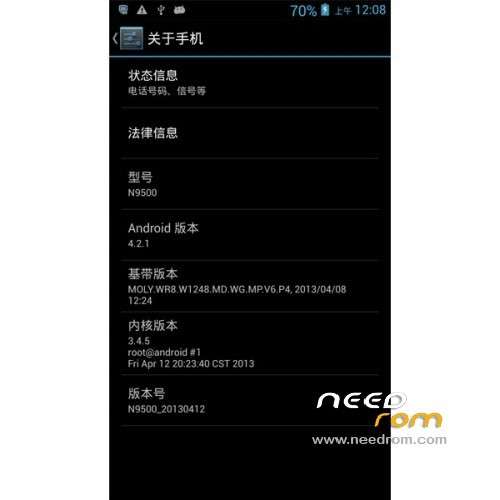
ROM Phone STAR N9500 – ROM Android 4.2.1
Update Official Star N9500 : N9500_20130827_e2006v20_v89_jbaol1 & N9500_20130827_e2006_v89_jbaol1
ATTENTION Version e2006v20_v89 and e2006_v89 ( I don't know why. Maybe another motherboard )
Changelog:
2013.08.28 jinweibo
Compatible with 8825
Compatible 12830
Chinese delete under English interface display
After modifying the camera interpolation 1200W, 500W proactive interpolation
2013.08.23 jinweibo
Open frace version
2013.08.07 jinweibo
Add floating window applications, off by default
Add 12830 camera
Delete Google Pinyin Input Method
Compatible memory Hynix256 +16
Modify distance sensor lights lit problem
———————————————————————————————————————————————
Update Official Star N9500 : N9500_20130517_e2006v20_v89_jbaol1
Changelog:
Modify some interface display
———————————————————————————————————————————————
Update Official Star N9500 : N9500.20130510_e2006_v89_jbaol1 (Thx anthony) With CWM
Update Official Star N9500 : N9500.20130419_e2006_v89_jbaol1 (Thx perico)
ROM Official Star N9500 : N9500.20130412_e2006_v89_jbaol1
Changelog:
Modify the hands-free calls whistle
Add customers Wallpaper
Compatible with exquisite screen
Update to the latest version
Language support : Multi Lang
Install ROM :
To unpack Flash run Flash_tool.exe
Select a the MT6589_Android_scatter_emmc.txt in ROM
Click Flash_tool.exe interface Firmware-> Upgrade
Phone after taking the battery in put something
Connect the data cable
Brush finished with green circles appears
Install with SP MDT: ( thx palicaj )
Unpack the archive SP_MDT_exe_v3.1304.00_A2013.02.26.rar and archive with the ROM
1). Turn off the smartphone. Cable is not connected to the computer.
2). Remove the battery and insert it again
3). Connect your phone to a computer cable. The operating system detects a new device
4). Disconnect the cable from the computer.
5). Run SPMultiPortFlashDownloadProject.exe
6). Choose Database Factory menu> Configuration File data source and specify the file MTK_DATABASE.mdb (it is in the folder SP_MDT).
7). Choose File> Open File Agent download and specify the file MTK_AllInOneDA.bin (it is in the folder SP_MDT).
8). Click File and select the MT6589_Android_scatter_emmc.txt file (it's in the folder with the rom).
9). choose this options:
Main sensor = ov8825_mipi_raw (back to camera), Sub sensor = hi253_yuv (front), LCD = LT050ANKP019A (display)
10). The other parameters are fixed, as in the screenshot below.
11). Click "Start all".
12). Connect your phone to a computer cable. The program should see and blink. If the phone is not detected, then unplug it from the computer, remove and insert the battery and reconnect it to the computer.
13). After (OK) click Stop and disable any phone.
14). Completed.
※Please make a backup of your device before installing or updating ROM
Any new room for n9500?
With this rom i have problems with charging the battery.
Also speaker phone /ringer is not very ok, must do some hidden settings.
Hi i have made basic cwm recovery for this device as i have one.
i have installed and tested with firmware N9500.20130419_e2006_v89_jbaol1 om my N9500 and works perfect and have done nandroid backup etc.
I flashed it by swapping cwm with stock recovery in firmware loaded spflashtool and unticked all except recovery,
http://www.mediafire.com/?c6nj.....co2ufpthwhu
sas007
I have flashed the updated firmware N9500.20130419_e2006_v89_jbaol1 on my N9500 from here and works perfect just follow instuctions and all will be good
I have rooted with motochopper root tool and installed my cwm,device is now perfect.
root tool http://www.mediafire.com/?2p96.....38bq50lmr5t connect device to computer ensure usb debugging is ticked in developer options on device.unzip tool and click run me bat follow on screen instructions,rooted in 10 seconds.
Adding star n9500 cwm recovery by my amigo bruno martins.again i have tested and working perfect with above firmware.(better cwm than mine)
http://www.mediafire.com/?yakf.....t19fkwqsxwa
I flash this ROM and everithing looks good But GPS have poor signal.
Have anone same problem after rom update? I try download satelites all AGPS settings are swithed on.
Thanks for replies.
"To debug the GPS do the following (tested! Works!)
1. Turning off GPS, EPO, A-GPS.
2. mtkgps.dat Delete the file in the directory / data / misc (for example, using RootExplorer).
3. Reboot your phone .
4. leave an open space (the street with no high-rise buildings nearby).
5. included in your GPS, EPO, A-GPS (base load EPO, if it was not loaded).
6. Enter the engineering menu * # * # 3646633 # * # *, select YGPS. On the Information tab click Full, and then Cold, then A-GPS restart. Go to tab Sattelites – and waiting for the signal to be recorded (this may take several minutes to tens of minutes).
6. Exit YGPS and engineering menu
now GPS catches perfectly!
in the new firmware is not YGPS.apk.
thx to anthony
GPS fixed.
I fix it at the morning, everithing ok and fast.
But I must apply fix After ca 12 hours again, because GPS problems come back.
Maybe I something make wrong at the first time.
Hi, I try both ways to fix GPS. But it works only for first catch of satelites.When I erase mtkgps.dat I catch satelites after few seconds. Byt when I try to catch it after few hours, I catch only one or two satelites. When I wait longer – 10minutes I lock position – but very poor quality. mtkgps.dat must be deleted for fast satelites catch. hanks for help
much better method for GPS FIX 100%
http://www.chinasmartphonerevi.....m-fastcardtech/
HOPE THIS HELPS
My gps doesn't work. Tried Mobileuncle that you mentioned, tried faster gps, tried engineer mode, gps gets no signal at all. NMEA log shows same strings over and over. I opened the phone and the gps-wifi-bt antenna on the back cover has a flat surface that makes contact with two contacts on the phone board. I took picture but I don't know how to post it here, in order to compair it with other N9500 phones.
I'am trying to install Clockwork Mod Recovery to this device.
I found many CWM instructions but not compatible with the phone.
I'am searching for right version and procedure - compatible with N9500 device.
thx for replies.
@mplucky This is correct cwm for N9500,both cwm posted i have tested on star n9500 and work fine.instuctions are correct.For CWM bruno martins just load scatter file into spflashtool and flash the recovery..simple???
check your device is star n9500
I have a question, I installed a apk in the star N9500 but now only lights up the logo of the phone and then I saw some comments and to them was the same, their phones are sprayed to lose but the solution is to install a room.
How I can install the N9500 room?, But I stay working well and if possible also install the CWM.
From my expirience you can't fully brick the mtk phones…
If you installed the USB drivers just install adb and in cmd write the following:
cd c:/adb
adb reboot recovery
Believe me you can fully brick MTK.they say ohh you can only soft brick..not the case if you flash incorrect preloader etc.
latest stock rom 10/05/13 it has cwm recovery
Works fine thanks anthony.
Yep everything is great…
sas007
Hi, I try both ways to fix GPS. But it works only for first catch of satelites.When I erase mtkgps.dat I catch satelites after few seconds. Byt when I try to catch it after few hours, I catch only one or two satelites. When I wait longer – 10minutes I lock position – but very poor quality. mtkgps.dat must be deleted for fast satelites catch. hanks for help
@mpluky data is not deleted it is auto saved to SD card..have a look you will see it there if you have followed the instructions,should be 2 dat logs
sas007