
- Title: STAR N9500
- Listed: April, 2013
- Last modified: 12/06/2013 3:10 am
- Version: ROM Android 4.2.1
You must be logged for ROM download.
82290 total views, 5 today
2 Total favorites
 Member Info
DESCRIPTION
ROM Phone STAR N9500 – ROM Android 4.2.1
Update Official Star N9500 : N9500_20130827_e2006v20_v89_jbaol1 & N9500_20130827_e2006_v89_jbaol1
ATTENTION Version e2006v20_v89 and e2006_v89 ( I don't know why. Maybe another motherboard )
Changelog:
2013.08.28 jinweibo
Compatible with 8825
Compatible 12830
Chinese delete under English interface display
After modifying the camera interpolation 1200W, 500W proactive interpolation
2013.08.23 jinweibo
Open frace version
2013.08.07 jinweibo
Add floating window applications, off by default
Add 12830 camera
Delete Google Pinyin Input Method
Compatible memory Hynix256 +16
Modify distance sensor lights lit problem
———————————————————————————————————————————————
Update Official Star N9500 : N9500_20130517_e2006v20_v89_jbaol1
Changelog:
Modify some interface display
———————————————————————————————————————————————
Update Official Star N9500 : N9500.20130510_e2006_v89_jbaol1 (Thx anthony) With CWM
Update Official Star N9500 : N9500.20130419_e2006_v89_jbaol1 (Thx perico)
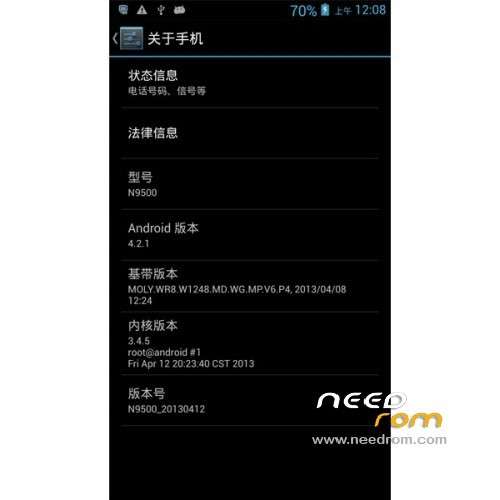
ROM Official Star N9500 : N9500.20130412_e2006_v89_jbaol1
Changelog:
Modify the hands-free calls whistle
Add customers Wallpaper
Compatible with exquisite screen
Update to the latest version
Language support : Multi Lang
Install ROM :
To unpack Flash run Flash_tool.exe
Select a the MT6589_Android_scatter_emmc.txt in ROM
Click Flash_tool.exe interface Firmware-> Upgrade
Phone after taking the battery in put something
Connect the data cable
Brush finished with green circles appears
Install with SP MDT: ( thx palicaj )
Unpack the archive SP_MDT_exe_v3.1304.00_A2013.02.26.rar and archive with the ROM
1). Turn off the smartphone. Cable is not connected to the computer.
2). Remove the battery and insert it again
3). Connect your phone to a computer cable. The operating system detects a new device
4). Disconnect the cable from the computer.
5). Run SPMultiPortFlashDownloadProject.exe
6). Choose Database Factory menu> Configuration File data source and specify the file MTK_DATABASE.mdb (it is in the folder SP_MDT).
7). Choose File> Open File Agent download and specify the file MTK_AllInOneDA.bin (it is in the folder SP_MDT).
8). Click File and select the MT6589_Android_scatter_emmc.txt file (it's in the folder with the rom).
9). choose this options:
Main sensor = ov8825_mipi_raw (back to camera), Sub sensor = hi253_yuv (front), LCD = LT050ANKP019A (display)
10). The other parameters are fixed, as in the screenshot below.
11). Click "Start all".
12). Connect your phone to a computer cable. The program should see and blink. If the phone is not detected, then unplug it from the computer, remove and insert the battery and reconnect it to the computer.
13). After (OK) click Stop and disable any phone.
14). Completed.
※Please make a backup of your device before installing or updating ROM
Hi everone,
I installed the rom but my back camera doesn't work !!!
If anyone got a solution it will be great
THE SOLUTION IS TO CHANGE DRIVER/SENSOR USING MDT FLASHTOOL.
LOOK AT FIRST PAGE MATE……..
MAKE SURE YOU USE THIS ROM…Update Official Star N9500 : N9500.20130510_e2006_v89_jbaol1 (Thx anthony) With CWM
IF YOU HAVE NOT THEN FLASH AGAIN WITH THIS FIRST AND THEN SEE IF YOUR CAMERA WORKS,WITH THIS FIRMWARE YOU SHOULD HAVE NO SENSOR PROBLEMS???
With this rom the camera works fine but just let you select 6MP or 12MP with MDT fix you'll be able to select 8MP as well.
I installed the ROM with Flash Tool. When I reboot the phone the icon camera disappears… And When I launch Camera I can't use the back camera… That's weird…
If I use SP Multi-Port Download with this options : Main sensor = ov8825_mipi_raw (back to camera), Sub sensor = hi253_yuv (front), LCD = LT050ANKP019A (display)
I got DA error : S_FT_ENABLE_DRAM_FAIL(4032)
I just bought n9500 and have this baseband version version:
MOLY.WR8.W1248.MD.WG.MP.V6.P4,2013/05/08 18:42
Kernel: 3.4.5 root@android # 1 Mon May 13 16:23:50 CST 2013
Build Number: N9500_20130514
No recovery inside.
Tried to install several recoveries but failed.
Can anyone help me?
How have you been trying to install them?
This is a correct working recovery.load scatter file into spflashtool and flash the recovery…
http://www.mediafire.com/downl.....6.0.2.8+B.M.rar
the firmware build you have is 4.2.1 and cwm are for latest 4.2.2 so update to latest.
and then install cwm or flash firmware with it in already..
opps sorry 4.1.2 you seem to have a later build. just flash the recovery as i said.
look here for more info.http://forum.xda-developers.co.....d.php?t=2276085
sas007
Thanks, i'll try and feedback to you
Like keylight, I too can't flash recovery. I have tried all the cwm's here and although spft reports they flashed fine, doing a vol down+power just brings me to a "factory mode" menu. What am I missing?
my phone is on MOLY.WR8.W1248.MD.WG.MP.V6.P4, 2013/05/04
This procedure works:
Phone running, press on/off button for 1-2 seconds, shut down the phone (first option), answer ok. Wait at least 15 to 20 seconds (my phone vibrates before fully shutted down). Now press and hold VOL+ together with on/off and keep pressing. After 3-5 seconds the blue Android shows, keep pressing the buttons. Two seconds later you'll see the CWM pic (circle with hat). Now release both buttons and you can use CWM.
- no hurry, be patient
- if this procedure does not work you used the wrong software. Version N9500-V2 works for sure. This description is based on this ROM. HTH
I belive its vol+ and power,if you are having trouble getting into recovery install "mobileuncle MTK tools" from google play or elsewhere as it has a boot into recovery option.
AP756 anthony I tried the vol+ power option and it just keeps rebooting and showing the blue android, when I stop holding the buttons it just boots as normal. I've also tried mobileuncle and after choosing to boot into recovery, it just does a reboot instead. N9500-v2.rar only downloads ro 57.6 and then stops dead. After a while it reports being downloaded but hasn't properly.
Scratch that. I finally got N9500-V2 downloaded. Just went for it and updated the entire rom instead of just cwm, worked a charm, camera working an reports many other options from qvga, vga thru 1, 1.3, 2, 3, 5, 8 and 12mp and cwm recovery working a dream. Very good work indeed anthony.
Happy days mate.I hve a thread on XDA will keep the firmware etc upto date there aswell.
http://forum.xda-developers.co.....d.php?t=2276085
sas007