
- Title: STAR N9500
- Listed: April, 2013
- Last modified: 12/06/2013 3:10 am
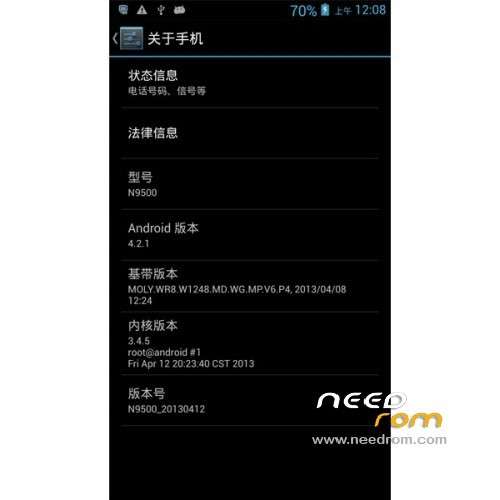
- Version: ROM Android 4.2.1
You must be logged for ROM download.
82294 total views, 9 today
2 Total favorites
 Member Info
DESCRIPTION
ROM Phone STAR N9500 – ROM Android 4.2.1
Update Official Star N9500 : N9500_20130827_e2006v20_v89_jbaol1 & N9500_20130827_e2006_v89_jbaol1
ATTENTION Version e2006v20_v89 and e2006_v89 ( I don't know why. Maybe another motherboard )
Changelog:
2013.08.28 jinweibo
Compatible with 8825
Compatible 12830
Chinese delete under English interface display
After modifying the camera interpolation 1200W, 500W proactive interpolation
2013.08.23 jinweibo
Open frace version
2013.08.07 jinweibo
Add floating window applications, off by default
Add 12830 camera
Delete Google Pinyin Input Method
Compatible memory Hynix256 +16
Modify distance sensor lights lit problem
———————————————————————————————————————————————
Update Official Star N9500 : N9500_20130517_e2006v20_v89_jbaol1
Changelog:
Modify some interface display
———————————————————————————————————————————————
Update Official Star N9500 : N9500.20130510_e2006_v89_jbaol1 (Thx anthony) With CWM
Update Official Star N9500 : N9500.20130419_e2006_v89_jbaol1 (Thx perico)
ROM Official Star N9500 : N9500.20130412_e2006_v89_jbaol1
Changelog:
Modify the hands-free calls whistle
Add customers Wallpaper
Compatible with exquisite screen
Update to the latest version
Language support : Multi Lang
Install ROM :
To unpack Flash run Flash_tool.exe
Select a the MT6589_Android_scatter_emmc.txt in ROM
Click Flash_tool.exe interface Firmware-> Upgrade
Phone after taking the battery in put something
Connect the data cable
Brush finished with green circles appears
Install with SP MDT: ( thx palicaj )
Unpack the archive SP_MDT_exe_v3.1304.00_A2013.02.26.rar and archive with the ROM
1). Turn off the smartphone. Cable is not connected to the computer.
2). Remove the battery and insert it again
3). Connect your phone to a computer cable. The operating system detects a new device
4). Disconnect the cable from the computer.
5). Run SPMultiPortFlashDownloadProject.exe
6). Choose Database Factory menu> Configuration File data source and specify the file MTK_DATABASE.mdb (it is in the folder SP_MDT).
7). Choose File> Open File Agent download and specify the file MTK_AllInOneDA.bin (it is in the folder SP_MDT).
8). Click File and select the MT6589_Android_scatter_emmc.txt file (it's in the folder with the rom).
9). choose this options:
Main sensor = ov8825_mipi_raw (back to camera), Sub sensor = hi253_yuv (front), LCD = LT050ANKP019A (display)
10). The other parameters are fixed, as in the screenshot below.
11). Click "Start all".
12). Connect your phone to a computer cable. The program should see and blink. If the phone is not detected, then unplug it from the computer, remove and insert the battery and reconnect it to the computer.
13). After (OK) click Stop and disable any phone.
14). Completed.
※Please make a backup of your device before installing or updating ROM
I upgraded to the 26052013 rom but the problem persists.
When I enter the "factory mode" and go on "Item Test" and go on "Main Camera" I try to test the camera on "Preview" and the message "acdkIFInit Fail".
Is this the sensor driver?
What do I do now?
Poderia me ajudar @anthony ?
Its your hardware at fault not firmware.if device is new send it back.
nothing you can do will fix it friend sorry.
@andremorato Its your hardware at fault not the firmware.if device is new send it back.
nothing you can do will fix it friend sorry.
hallo brauche eure hilfe .
habe einen N9500 versucht zu flashen nun habe ich nur Hintergrundbeleuchtung und die tasten gehen an,
ich hann per Power taste das gerät entsperren und sperren.
was muss ich machen?
Erstens sprechen english.second müssen Sie Flash agian mit MDT Flashtool und ändern Sie die Treiber / Sensor-Einstellungen für LCD-Treiber.
schauen auf Seite eins, wie dies zu tun.
First speak english.second you need to flash agian using MDT flashtool and change the driver/sensor settings for LCD driver.
look on page one for how to do this.
Now an interesting fact:
My phone ran out of battery. I got home and turn it on. Makes 2 hours he is loading and while it is plugged into the switch the camera is functioning normally. I did this by hardware Enginer mode and did not give any error. I'll leave it charging until tomorrow in decision making and will test the camera to see if it will issue. If it does not the problem is it may have something to do with your cell phone battery?
That is a weird one.Never heard it doing that before.Does it happen only on battery and at any amount of power left.EX it happens when battery is 100% and 689% 15% etc so not matter what charge battery has the camera malfunctions.?But when on charger camera works fine.?.
It would seem bad that you can only use camera on charger so i would still get it exchanged.
I'm sorry I'm from Germany and can not perfect English.
have compared the driver and made with mdt firmware update.
the error still exists.
need a manual.
shit an now say:
BROM ERROR: S_FT_ENABLE_DRAM_FAIL (4032)
EMI Enable DRAM faild.
My Device dead????
Please help
thx
my device is back
What you do for it? Help!
Hi if you are getting Brom error with flashtool
1)make sure rom is in same file as flashtool
2)use another version of flashtool one with different build number.
I have had the most success and no problems with this build.
http://www.mediafire.com/downl......1304.0.119.rar
Hello friends.
I have a problem. The rear camera of my N9500 disappeared. I've tried installing the firmware of the camera with Sp_mdt and I get nothing. I've tried installing new Rom and I have not gotten anything. Now go into Factory Reset-Test Report-Main camera-Preview/capture/strobe and I get the following error.
acdkIFInit Fail.
Anyone know what this is? Can you help?
Thanks for the help really