
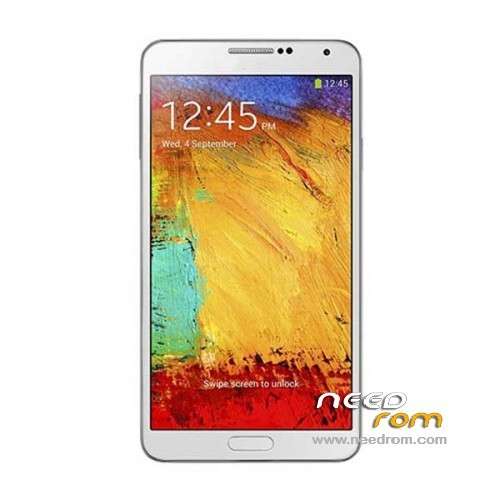
- Title: HDC Galaxy Note 3 N9006
- Listed: December, 2013
- Last modified: 09/18/2014 4:14 pm
- Version: ROM Android 4.4 (not Really)
You must be logged for ROM download.
173079 total views, 9 today
52 Total favorites
 Member Info
DESCRIPTION
ROM Mobile HDC Galaxy Note 3 N9006 - ROM Android 4.4 ( not Really )
ONLY MT6582
Features ROM:
Update Official Version : N9006V228En20140718 ( I don't know the changelog )
———————————————————————————————————————————————–
Update Official Version : N9006V224En20140529 ( I don't know the changelog )
———————————————————————————————————————————————–
Update Official Version : N9006V212En20140326 ( I don't know the changelog )
———————————————————————————————————————————————–
Update Official Version : N9006V206En20140305 ( I don't know the changelog )
———————————————————————————————————————————————–
Update Official Version : N9006V119En20131227 ( I don't know the changelog )
———————————————————————————————————————————————–
Official Version : N9006V112En20131128
Gapps include – No Rooted
Language support : Multilang
Install ROM:
- Unpack FlashTools, and Click on Flash_tool.exe
- Select a the MT6582_Android_scatter.txt in ROM
- Wait file to be added into Flash Tool
- choose Option->USB Model,click USB Model
–> Choose Option->DA DownLoad All->Speed->High Speed, click High Speed
- Turn off your phone, remove the battery.
- "Press F9 (hit Download button)" OR " if upgrade ROM Firmware->Upgrade "
- and connect your phone into the computer via USB data cable.
- The process will start and a red progress bar will appear after color purple, yellow.
- And green circles display
- Finish !
- You can now safely disconnect your phone and turn it on.
※Please make a backup of your device before installing or updating ROM
Hi,
1) Is this ROM for HDC N9006 Max MTK6589, 1 GB RAM, 8 GB ROM ?
2) Does this ROM have Multiwindow and IR Working remote ?
Please reply folks, it would be of great help !! Thanks. !!
no, this ROM is only for MTK6582
Hello everyone I have installed this ROM on my HDC NOTE 3 after istallazzione the phone does not start anymore, even under load.
How can I fix?
Maybe you should check your phone screen resolution. Use CPU indentifier, look at the screen resolution, if it's shown 720 x 1279, I guarantee, you will not be able use this ROM. This ROM is only work properly on device that has 720×1280 resolution.
I hope this will help.
same problem to me.. anyone to help us ?
Has anyone tried this? Does this have multiwindow???
Thanks a lot.
I have tried. Had multi windows but not work as multitasking like Sams. If you want multitasking multi windows apps, you can download FLOATING APPS in here : http://blapkmarket.cz/en/?sear.....h=Floating+apps
if this rom is working on a 5.7 inch screen?
for "air command" can be moved?
are there multiwindow on this rom?
sent back please..
можеш написать LCD драйвер на этих прошивках
Had implant the latest ROM. This is best ROM for HDC Note3 6285 1GB Ram 4 GB ROM. Thanks…
guys i need you help cause i'm confused !!
my vitnam note 3 model: GT-N9006 , and from MTK tool i found it is a MTK6572 also confirmed this info from the factory mode on the phone by pressing the volume down+power , it is written there MTK6572
so which Rom i can use ??? i did alot of search PLZ HELP
you can try this ROM.
https://www.needrom.com/mobile.....72-9006-sm1327/
HI there….
This ROM could not be implant to note 3 MTK 6572. You can used thid ROM : https://www.needrom.com/mobile.....e3-mtk6572_s00/
I hope this can help you.
guys i need you help cause i'm confused !!
my vitnam note 3 model: GT-N9006 , and from MTK tool i found it is a MTK6572 also confirmed this info from the factory mode on the phone by pressing the volume down+power , it is written there MTK6572
so which Rom i can use ??? i did alot of search PLZ HELP
## sorry this is replica is for mail notif. ###
please help me i do a terrible mistake and do a format in mtk tools. Now my phone not boot. Mtk tools worked and "see" my phone but i dont know how to load rom.
- Unpack FlashTools, and Click on Flash_tool.exe
- Select a the MT6582_Android_scatter_emmc.txt in ROM
- Wait file to be added into Flash Tool
- Push download nutton, an wait until the process end. The bar on below, will change the collor ; from yellow, red, purple.
- Put your USB cable data on you computer, and do the same to your phone.
- Wait until the process done. The process will start and a red progress bar will appear after color purple, yellow, green circles display
- Wait until your phone restarted
- Finish !
it won't let my phone chraged