
- Title: HDC/1:1 S5 G9006V
- Listed: July, 2014
- Last modified: 09/02/2014 7:41 pm
- Version: ROM Android 4.4.2
You must be logged for ROM download.
56974 total views, 4 today
11 Total favorites
 Member Info
DESCRIPTION
ROM Mobiles HDC Real 1:1 S5 G9006V– ROM Android 4.4.2
ONLY MT6592
Update Official ROM HDC and Real 1:1 S5 G9006V Version: A215_MULA_4G_V1.0_V01_2014-08-25 – KOT49H
Install with SP MDT:
1). Turn off the smartphone. Cable is not connected to the computer.
2). Remove the battery and insert it again
3). Connect your phone to a computer cable. The operating system detects a new device
4). Disconnect the cable from the computer.
5). Run SPMultiPortFlashDownloadProject.exe
6). Choose Database Factory menu> Configuration File data source and specify the file MTK_DATABASE.mdb (it is in the folder SP_MDT).
7). Choose File> Open File Agent download and specify the file MTK_AllInOneDA.bin (it is in the folder SP_MDT).
8). Click File and select the MT6592_Android_scatter.txt file (it's in the folder with the rom).
9). Click "Start all".
10). Connect your phone to a computer cable. The program should see and blink. If the phone is not detected, then unplug it from the computer, remove and insert the battery and reconnect it to the computer.
11). After (OK) click Stop and disable any phone.
12). Completed.
———————————————————————————————————————————————————————-
Official ROM HDC and Real 1:1 S5 G9006V Version: A215_MULA_4G_V1.0_V01_2014-07-19 – KOT49H
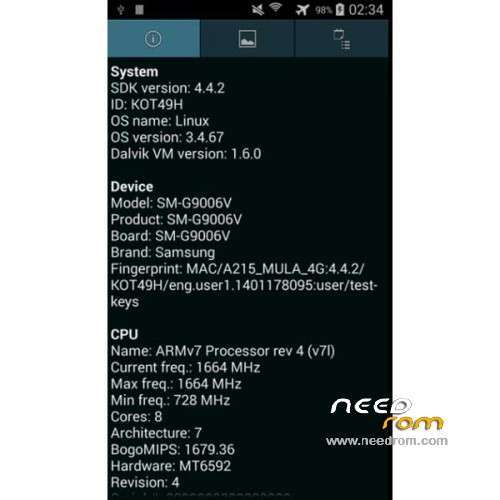
MT6592 + 720×1280 + 8G Rom + 1G Ram + single sim
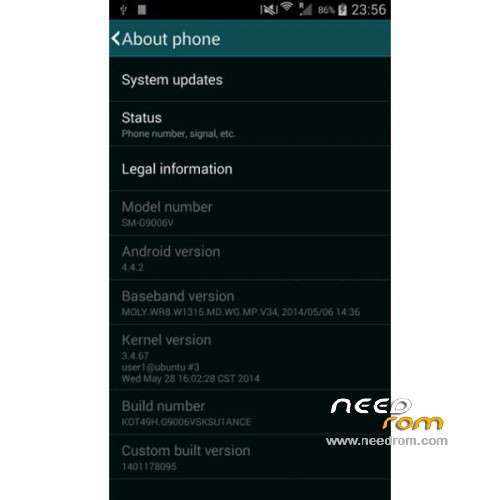
CPU: MTK6592 Octa core @ 1.7 GHz
Android: 4.4.2 KitKat
Baseband: MOLY.WR8.W1315.MD.WG.MP.V34 (2014/05/06)
Kernel: 3.4.67 user1@ubuntu #3 (2014/05/28)
Build Number: KOT49H.G9006VSKSU1ANCE
Gapps include – No Rooted
Language support: Multilang
Install ROM :
- Unpack FlashTools, and Click on Flash_tool.exe
- Select a the MT6592_Android_scatter.txt in ROM
- Wait file to be added into Flash Tool
- choose Option->USB Model,click USB Model
–> Choose Option->DA DownLoad All->Speed->High Speed, click High Speed
- Turn off your phone
- "Press F9 (hit Download button)" OR " if upgrade ROM Firmware->Upgrade "
- and connect your phone into the computer via USB data cable.
- The process will start and a red progress bar will appear after color purple, yellow.
- And green circles display
- Finish !
- You can now safely disconnect your phone and turn it on.
※Please make a backup of your device before installing or updating ROM
Hello. Help please. I flashed my phone. Turned into a brick. Model: hdc s5 g9006v. How can I restore it? Copy did not take off (((
Hi Baxa80,
Download the Flashtool and start it.
Load the scatterfile from this ROM and remove battery from the phone.
Click the download button and connect the phone via USB.
Push the battery in the phone and the flashing will start.
Sucsess root with kingroot
KingROOT
Official website: http://www.kingroot.net/
I instal this rom, my phone is G9006V and i dont have network, i have it only when is rom fresh instal without using wifi. When i conent to wifi newtork is not there. Any help?
Can U Upload Mt6572 Sir??
hallo from greece.. have s5 single sim with 4.4.2 kitkat fake cpu mtk 6582 quad 1.3ghz and show me 6592 octa core 2.0ghz .2gb ram have 1gb and 16gb rom. tatal fake. this rom is ok for my phone?? thanks.
Δεν νομίζω. Δεν θα ταιριάζουν τα ΕΜΒ
i found bug lockscreen yet after lock cant open lock again with blank screen, can u fix it
how to fix gps in this phone ? s5 G9006V ? rom its very good thanks
Root-άρεις το τηλέφωνο και εγκαθιστάς το GPSFix. Αυτό θα δημιουργήσει ένα αρχείο το GPSConf το οποίο θα σου λύσει το πρόβλημα με το GPS
Hi, can i have also this rom with specs 2gb ram,16gb flash, sam***g boot animation and 4g logo network? I' ve a no.1 s7+ dual sim. Thank you
I' ve black screen and doesn' t boot. Please help me