
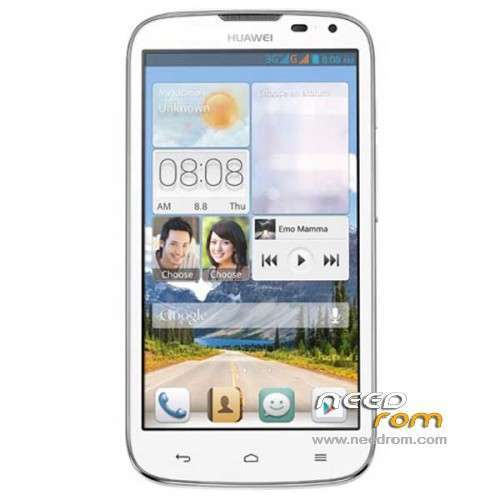
- Title: HUAWEI G610-U20
- Listed: January, 2014
- Last modified: 12/15/2014 4:45 pm
- Version: ROM Android 4.2.1
You must be logged for ROM download.
179059 total views, 11 today
86 Total favorites
 Member Info
DESCRIPTION
ROM HUAWEI G610-U20 – ROM Android 4.2.1
Update ROM 2 : Official for G610-U20 "V100R001C00" version: G610-U20 V100R001C00B121
——————————————————————————————————————————————————
ROM 1 : Official for G610-U20 "V100R001C96" version: G610-U20 V100R001C96B116
ROM 2 : Official for G610-U20 "V100R001C00" version: G610-U20 V100R001C00B116
Look your version on your mobile before install
Gapps include – No Rooted
Language support: Multilang
ROM install :
Step one: Prepare an SD card, it is recommended to use Sandisk, Kingstone, or Kingmax, size is recommended that more than 1G.
Step Two: Formatting SD card (optional).
The step three: copy a large package path UPDATA.APP to the SD card dload UPDATA.APP.
Step four: Check the root directory of the SD card you dload UPDATA.APP.
Step 5: SD card into the phone is switched on in the main screen, press the Menu key, the system updates -> SD card upgrade -> confirm -> upgrade, backup data, select the backup data; upgrade.
Step Six: The upgrade process progress bar shows after the finish of the pending progress bar, the phone automatically restart.
or
Step one: Prepare an SD card, it is recommended to use Sandisk, Kingstone, or Kingmax, size is recommended that more than 1G.
Step Two: Formatting SD card (optional).
The step three: copy a large package path UPDATA.APP to the SD card dload UPDATA.APP.
Step four: Check the root directory of the SD card you dload UPDATA.APP.
Step Four: cell phone turned off, insert the SD card, while pressing the volume up button + volume down key switch button, the phone automatically enters the upgrade mode, and then begin the upgrade in Figure
Step Five: After the progress bar to go full fixed, the phone will automatically restart If you do not manually remove the battery.
※Please make a backup of your device before installing or updating ROM
Thanks a lot. I hope Huawei gives us Kit Kat as soon as possible. It would be a hit in Iran if most of Huawei could be updated to Kit Kat. As a result people in Iran will trust this brand better than samsung.
Hi.
My Build number is
G610-U20 V100R001C00B125
Which build should I use?
I am from Iran, Mashhad
09153060254
I can call you?
Hi I installed the first rom but now my mobile stucks on a black page and it doesn't respond for any key i press.
What shoud i do now?
before installing rom my mobile had a bootloop.(huawei g160 u20)
Is it Corrupted? Doesn't work !!!!!?
Thanks Alot Needroom.com I was very very tenc for my Huawei G610-U20 this is very helpfull for me. 100 orignal room for Huawei G610-U20. Play store Is also available and one more option About Game I like this… Thankssssssssssssss
stock recovery error : no sdcard found >>>
please , help me , stock recovery error : no sdcard found , any solution?
@Memo did u follow the format of sdcard? Under Fat32, extracting dload folder to sdcard root,mine i followd the attachd instruction word file in rar content, using engineering mode, did you change your recovery? Or stil stock recovery 3e.
Jorufin Firstly thank you at attention and reply
I am still on stock recovery 3e (with lock bootloader)
I followed the instructions : i formated of sdcard Under Fat32, extracting dload folder to sdcard root,mine i followd the attachd instruction word file in rar content …
but my device dont give engineering mode (why?) i know engineering mode code but error massege appeared
Did you try changing sdcard, mine used scandisk luckily I have one class 10.. I have that experience sdcard not detected on my other android unit (tab) specially doing CWM recoveries or Rom update, due to noted defective sdcard, it has symptoms like too long to be detected by fon by normal booting,long error checking, sometimes unmount by itself as observe on settings/storage .. after changing sdcard it doesnt bother me at all,. Did you try local update process or by turning upgrade mode as instructed above…
hi jorufin after iinstalled this update my build num becom v100r001c00b110.. its downgrade my phone
I use the type of memory card KINGSTON CLASS 4 8 GB and also experimented with PQI 2 GB memory card and everyone fails, I try local update process … problem still …
thanks Jorufin i used another sd card and successful update
my bootloader is corruted what can i do
Hi.
My Build number is
G610-U20 V100R001C81B115
Which build should I use?
it is the same as me let us conect on facebook
https://www.facebook.com/muham.....779?ref=tn_tnmn