
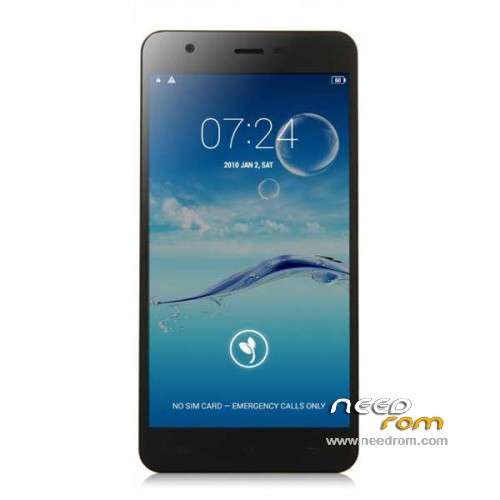
- Title: JIAYU S3
- Listed: January, 2015
- Last modified: 05/08/2015 7:28 pm
- Version: ROM Android 4.4.4
You must be logged for ROM download.
259222 total views, 19 today
217 Total favorites
 Member Info
DESCRIPTION
ROM Phone JIAYU S3 – ROM Android 4.4.4
ONLY MT6752
Update ROM 1 - S3S 20150507-083407- mt6752_h560_s3s_jyt_cc_128-24_kk_lte_5m-cs_tphone – KTU84P – Advanced – 3G Ram – no gapps – Multilang
Install Flash or OTA
———————————————————————————————————————————————————————————
Update ROM 2 – S3 20150430-131240 – mt6752_h560_s3_jyt_cc_kk_lte_5m-cs_tphone – KTU84P – Basic – 2G Ram - no gapps – Multilang
Install Flash or OTA
———————————————————————————————————————————————————————————
Update ROM 1 – S3S 20150411-154516 – mt6752_h560_s3s_jyt_cc_128-24_kk_lte_5m-cs_tphone – KTU84P – Advanced – 3G Ram – no gapps – Multilang
Install Flash or OTA
———————————————————————————————————————————————————————————
Update ROM 2 – S3 20150411-155027 – mt6752_h560_s3_jyt_cc_kk_lte_5m-cs_tphone – KTU84P – Basic – 2G Ram - no gapps – Multilang
Install Flash or OTA
———————————————————————————————————————————————————————————
ROM 4 – S3SW 20150314-141844 – mt6752_h560_s3sw_jyt_cc_128-24_kk_lte_5m-cs_mul_tphone – KTU84P – Advanced – 3G Ram – gapps – Multilang
———————————————————————————————————————————————————————————
Update ROM 2 – S3 20150319-073039 – mt6752_h560_s3_jyt_cc_kk_lte_5m-cs_tphone – KTU84P – Basic – 2G Ram - no gapps – Multilang
You've a Tuto for install
———————————————————————————————————————————————————————————
Update ROM 1 – S3S 20150127-151447 – mt6752_h560_s3s_jyt_cc_kk_lte_5m-cs_ldata_tphone – KTU84P – Advanced – 3G Ram – no gapps – Multilang
Update ROM 2 – S3 20150204-161147 – mt6752_h560_s3_jyt_cc_kk_lte_5m-cs_tphone – KTU84P – Basic – 2G Ram - no gapps – Multilang
Update ROM 3 – S3W 20150205-141543 – mt6752_h560_s3w_jyt_cc_kk_lte_5m-cs_mul_tphone – KTU84P – Basic – 2G Ram - gapps – Multilang
———————————————————————————————————————————————————————————
ROM 3 – S3W 20150123-225823 – mt6752_h560_s3w_jyt_cc_kk_lte_5m-cs_mul_tphone – KTU84P – Basic – 2G Ram
ONLY WCDMA
Gapps include – No Rooted
Language support: Multilang
———————————————————————————————————————————————————————————
Update ROM 2 – S3 20150120-121651 – mt6752_h560_s3_jyt_cc_kk_lte_5m-cs_tphone – KTU84P – Basic – 2G Ram
———————————————————————————————————————————————————————————
Official ROM JIAYU S3 version :
ATTENTION Two version :
ROM 1 – S3S 20150113-142450 – mt6752_h560_s3s_jyt_cc_kk_lte_5m-cs_ldata_tphone – KTU84P – Advanced – 3G Ram
ROM 2 – S3 20150117-172407 – mt6752_h560_s3_jyt_cc_kk_lte_5m-cs_tphone – KTU84P – Basic – 2G Ram
Gapps not include – No Rooted
Language support: Multilang
Install ROM :
- Unpack FlashTools, and Click on Flash_tool.exe
- Select a the MT6752_Android_scatter.txt in ROM
- Wait file to be added into Flash Tool
- choose Option->USB Model,click USB Model
–> Choose Option->DA DownLoad All->Speed->High Speed, click High Speed
- Turn off your phone
- "Press F9 (hit Download button)" OR " if upgrade ROM Firmware->Upgrade "
- and connect your phone into the computer via USB data cable.
- The process will start and a red progress bar will appear after color purple, yellow.
- And green circles display
- Finish !
- You can now safely disconnect your phone and turn it on.
※Please make a backup of your device before installing or updating ROM
While cooking a deodexed zipaligned version of stock ROM4 using
ArchiKitchen from XDA thread 2597220, I see the following for -ALL-
.apk and .jar files having an .odex part:
Deodexing EngineerMode.apk…
INFO: EngineerMode.apk contains classes.dex already, removing EngineerMode.odex
…
Deodexing mediatek-common.jar…
INFO: mediatek-common.jar contains classes.dex already, removing mediatek-common.odex
…
And indeed these files do contain a classes.dex.
Does this mean the .odex files can be deleted?
Agreed removing them will take space in /data for the .dex
files. But, it will also free space in /system.
U.S.A LTE bands please
I wish we had USA bands. Only getting 3g on AT&T
I think I'm doing it right but when I connect my phone with the computer it only charges the phone, nothing else happens. What should I do?
hi, im having trouble with the signal and internet, every tim it get lost, do you know if upgrading the rom i'll not have this issues anymore?
hello, when i connect me phone on my computer after launch flash tool, nothing is happening et my phone is charging…
have you got a solution?
thaknk you
Remove battery and then insert battery again while the phone is still connected to the PC
i had the same issue to fix it install the right adb driver
A D B
Extracting the OTA version give CRC error
Hi, great job.
Working properly
roms for S3W…Official
http://www.ejiayu.com/en/News-.....92.html
keep getting BROM ERROR : S_BROM_CMD_STARTCMD_FAIL 2005
[BROM] Can not pass bootrom start command! Possibly target power up too early.
Any ideas?
Same thing happened to me. Windows is switching off your device. You need to reinstall drivers.
Drop me a pm if you need instructions!
Remove akku then klick download then input akku and its must be work