
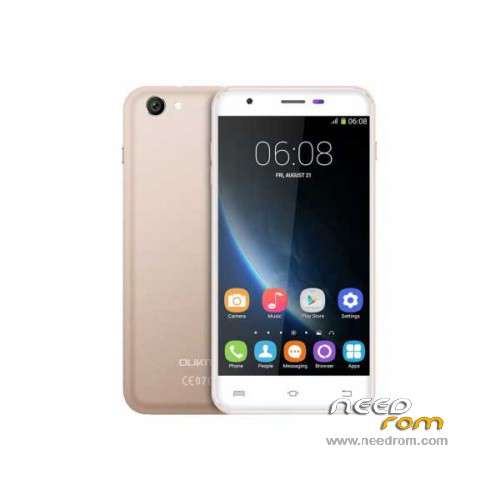
- Title: Oukitel U7 Pro
- Listed: November, 2015
- Last modified: 09/21/2016 1:40 am
- Version: ROM Android 5.1
You must be logged for ROM download.
43542 total views, 2 today
35 Total favorites
 Member Info
DESCRIPTION
ROM Mobile Oukitel U7 Pro – ROM Android 5.1
ONLY MT6580
Update Official ROM Oukitel U7 Pro version: T825W_648_AW_OUKITEL_U7PRO_V2.12 – full_w825_648_aw_loq_oukitel-user 5.1 LMY47I - ONLY DDR2
—————————————————————————————————————————————————————————————————-
Official Update ROM Oukitel U7 Pro version: T825W_648_AW_OUKITEL_U7PRO_DDR3_V2.1_20160708 – full_w825_648_aw_loq_oukitel_ddr3-user 5.1 LMY47I - ONLY DDR3
—————————————————————————————————————————————————————————————————-
Official ROM Oukitel U7 Pro version: T825W_648_AW_OUKITEL_U7PRO_DDR3_V1.9_20160627 – full_w825_648_aw_loq_oukitel_ddr3-user 5.1 LMY47I - ONLY DDR3
—————————————————————————————————————————————————————————————————-
Official ROM Oukitel U7 Pro version: T825W_648_AW_OUKITEL_U7PRO_V2.8 – full_w825_648_aw_loq_oukitel-user 5.1 LMY47I - ONLY DDR2
Gapps include – No Rooted
Language support: Multilang
Install ROM:
Install with SP MDT:
1). Turn off the smartphone. Cable is not connected to the computer.
2). Remove the battery and insert it again
3). Connect your phone to a computer cable. The operating system detects a new device
4). Disconnect the cable from the computer.
5). Run SPMultiPortFlashDownloadProject.exe
6). Choose File> Open File Agent download and specify the file MTK_AllInOneDA.bin (it is in the folder SP_MDT).
7). Click Scatter File and select the MT6580_Android_scatter.txt file (it's in the folder with the rom).
8). Click "Start all".
9). Connect your phone to a computer cable. The program should see and blink. If the phone is not detected, then unplug it from the computer,
remove and insert the battery (if the battery is removable) and reconnect it to the computer.
10). After (OK) click Stop and disable any phone.
11). Completed.
※Please make a backup of your device before installing or updating ROM
Hello.Help please find the version v1.1 ddr3.
Please this message is to SoCr@Te!!! Please can you upload a TWRP recovery for Oukitel U7 Pro DDR3 version here as I’ve tried everything I can to get recovery working on my Oukitel U7 Pro DDR3 version without any success. It seems like there’s no such support in the whole of the Internet because I’ve made serious search and yet can’t find anything. Or if there is link to any sites that could be of help, please do post the link here. The only sites I find are for Oukitel U7 Pro DDR2 version, which solution I’ve tried too without success. Thanks for everything and I do hope you see my message as there’s no provision to privately message you. I wish you success in all of your life’s endeavors and hoping to hear from you soonest!
After updating my oukitel U7 Pro ddr3 version with latest rom version (2.1) I now have a very annoying Chinese writing at the foot of my screen! Please is their any way to remove this anyone please?
This writing means "Test Version". How remove it i dont know yet.
In this forum, nobody replies. The feedback is kind of pathetic to me. Let’s liven up please…
Gracias por la recopilación de las roms. He logrado instalar la última ddr3
La instalación mejor por spflashtools … mediante la aplicación que recomienda el autor no es posible.
Un saludo
Thanks for the compilation of the roms. I have managed to install the latest ddr3
The best installation spflashtools … by applying recommended by the author is not possible.
a greeting
Hola gaxapu68..puedes decirme el procedimiento que usaste? download y luego con el boton volume- conectas el cable?
Hi after a lot of tries i found that my oykitel u7 pro is ddr3 version 1.5 is it possible anyone uploaded ?
After updating my oukitel U7 Pro ddr3 version with latest rom version (2.1) I now have a very annoying Chinese writing at the foot of my screen! Please is their any way to remove this anyone please?
after flashing 2.1 DDR3, my phone is having a big problem in "ghost touch" on the screen. Its crazy. What to do now pls ?
tryed every possible image – but still error after a while – S_FT_FORMAT_FAIL 0xFAA.
is this a dead RAM in phone ?
Hi guys!
someone knows which is the highlights of the new update ver. 2.12 ddr2? thx