
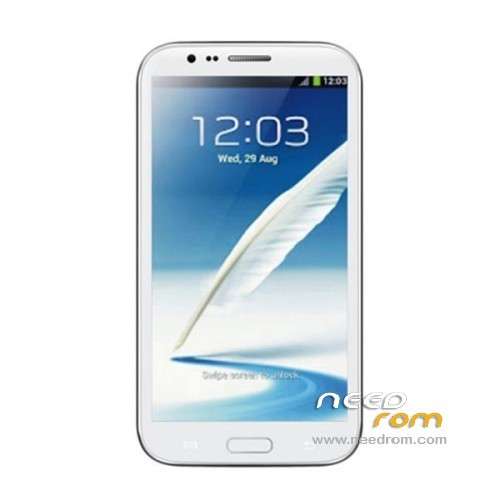
- Title: STAR S7589
- Listed: April, 2013
- Last modified: 12/21/2013 4:16 pm
- Version: ROM Android 4.2.1
You must be logged for ROM download.
62780 total views, 4 today
118 Total favorites
 Member Info
DESCRIPTION
ROM Mobile STAR S7589 – ROM Android 4.2.1
Update Official ROM STAR S7589 version :20131024_e2001_v89_jbl1a698
———————————————————————————————————————-
Update Official ROM STAR S7589 version :20131024_e2001_v89_jbl1a698
———————————————————————————————————————-
Update Official ROM STAR S7589 version :20130415_e2001_v89_jbl1a698
Changelog:
1. the direction of the gravity sensor calibration
2. touch screen multi- touch role
3. before optimization proactive 253
4. solve the problem of distance sensor distance, now the calibration divided into two
5. dial the area is truncated
6. wifi address conflict
7. Flashlight open after the release of the camera flash does not work
2 version 1GO and 2.4GO
———————————————————————————————————————-
Model name: Star S7589 4G/8G version Official : 20130320_e2001_v89_jbl1a698
Features ROM:
1. Solve the problem of address conflicts wifi
2. Optimize photo
3. Solve the problem much focus
4. Dialing display area is truncated
Language support: Multilang
Install ROM :
To unpack Flash run Flash_tool.exe
Select a the in MT6589_Android_scatter_emmc.txt in ROM
Click Flash_tool.exe interface Firmware-> Upgrade
Phone after taking the battery in put something
Connect the data cable
Brush finished with green circles appears
or
Install with SP MDT:
Unpack the archive N9589-SPM.zip and archive with the ROM
1). Turn off the smartphone. Cable is not connected to the computer.
2). Remove the battery and insert it again
3). Connect your phone to a computer cable. The operating system detects a new device
4). Disconnect the cable from the computer.
5). Run SPMultiPortFlashDownloadProject.exe
6). Choose Database Factory menu> Configuration File data source and specify the file MTK_DATABASE.mdb (it is in the folder SP_MDT).
7). Choose File> Open File Agent download and specify the file MTK_AllInOneDA.bin (it is in the folder SP_MDT).
8). Click File and select the MT6589_Android_scatter_emmc.txt file (it's in the folder with the rom).
9). The other parameters are fixed, as in the screenshot below.
10). Click "Start all".
11). Connect your phone to a computer cable. The program should see and blink. If the phone is not detected, then unplug it from the computer, remove and insert the battery and reconnect it to the computer.
12). After (OK) click Stop and disable any phone.
13). Completed.
※Please make a backup of your device before installing or updating ROM
HOw remove rooot china? Guide plz?
Whats in this update? how to update?
TQ
Download the file and with root explorer replace original modem.img by the new one in the archive. Modem.img is located on system/ect/firmware. Before don’t forget to make a copy of your original modem.img.
Sorry dont update modem.img like i say previously.
Make update via recovery or mobileuncle tools.
It’s update basebande v6 to v8. 3g connection works better for me.
Installed via clockworkmod but when i dont see the new modem info at android's phone information menu..
Is there a way to translate root program from chinese to english? I don't understand anything.
Those that have problem installing the rom use latest sp flash tool
http://www.mediafire.com/downl......1312.0.139.zip
Installed via clockwork but cant make or receive calls..
2.4 GO camera not work corectly…always go to zoom mode.
i have a phone very simmilar to this its a alps e2001_v89_jbl1a698 cpu MTK MT6589T cores 4 speed497mhz-1209mhz gpu PowerVR SGX 544MP open gl es 2.0 build 1.9@2204701 brand alps model e2001_v89_jbl1a698 OS Andriod 4.2.1 need root access to new phone but probaly old phone to copy game data from, the apps in question are drag racing zombies ate my friends vector, if ANYONE can root my phones for me step by step il make a paypal donation to you but you have to be giving me idiot proof step by step guides the links below are my 2 phones both where bought from ebay and naturally both sellers wont/dont know/want to about rooting so far ive tried… Root_with_Restore_by_Bin4ry_v18_2.rar (failed on both new and old phone) eroot_v1.3.4.zip (was in chinese and did nothing) SRSRoot-Setup.exe v4.7 (looked good rebooted new phone but still no root and said it failed on old phone also mentioned characters from LOTR not sure what that was about but both phones had somthing called Boromir old phone failed new phone said success but no root was present after reboot used root checker from play store to test) if you can help please email me as im not sure il get a notificaton you replied here ultrasayingoku@hotmail.com
new phone i want to put the old data on to continue my games http://www.ebay.com.au/itm/171.....189216957? ssPageName=STRK:MESINDXX:IT&_trksid=p3984.m1436.l2649
old phone the one with data/progress i want to keep
http://www.ebay.com.au/itm/130.....950299078? ssPageName=STRK:MESINDXX:IT&_trksid=p3984.m1436.l2649
I do not know who the author of this rom is but pls do this rom with english rcovery, replace china root aplication to english (SuperSU), set English as the default language and 2,4G Can you do this for me?