
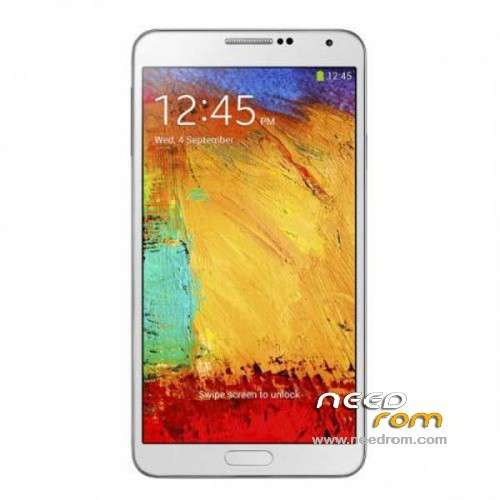
- Title: 1:1 Note3 SM-N900
- Listed: November, 2013
- Last modified: 01/19/2014 6:31 am
- Version: ROM Android 4.3
You must be logged for ROM download.
103084 total views, 13 today
153 Total favorites
 Member Info
DESCRIPTION
ROM Mobile 1:1 Note3 SM-N900 – ROM Android 4.3
Official ROM For 1:1 Note3 SM-N900 Version: JSS15J.N900UBUBMJ2_SM_N900_V05_12212013 ( I don't know the changelog )
ATTENTION This ROM is given For version 16G ROM !!!!!!!!!!!!!!!!!!!!!!
———————————————————————————————————————————————-
Update Official ROM For 1:1 Note3 SM-N900 Version: JSS15J.N900UBUBMJ2_SM_N900_V02_11292013 ( I don't know the changelog )
———————————————————————————————————————————————-
Official ROM For 1:1 Note3 SM-N900 Version: JSS15J.N900UBUBMJ2_SM_N900_V01_11122013
MTK6589 Quad cores 1.5GHz Cortex A9 + SGX544 GPU
1G Ram + 8G Rom
5.7 inch Touch Screen Resolution, 1280*720IPS
Single SIM Cards
Gapps include - no Rooted
Language support: Multilang
Install ROM :
- Unpack FlashTools, and Click on Flash_tool.exe
- Select a the MT6589_Android_scatter_emmc.txt in ROM
- Wait file to be added into Flash Tool
- choose Option->USB Model,click USB Model
–> Choose Option->DA DownLoad All->Speed->High Speed, click High Speed
- Turn off your phone, remove the battery.
- "Press F9 (hit Download button)" OR " if upgrade ROM Firmware->Upgrade "
- and connect your phone into the computer via USB data cable.
- The process will start and a red progress bar will appear after color purple, yellow.
- And green circles display
- Finish !
- You can now safely disconnect your phone and turn it on.
※Please make a backup of your device before installing or updating ROM
Hi yall i'm back. Hey I touched the engineer mode and since I did something to try to fix the GPS I can not send any text messages! same after a full restore of the rom. I can receive and call but not send. I don't know what the f**k happened? Can somebody help me please to tell me his own settings inside the engineer mode
please guys those who have a good working rom please share
WORKS WITH VERSION MT6582?
HI, WORKS WITH VERSION MT6582?
Hi guys ! I bought a fake SM-N900 to somebody but i don't know where is it from, and i have an issue with Google +, Youtube, etc … it's says Google Play services, which rely on blablabla ….
Those infos of my mobile are from CPU-Z:
Model:SM-N900 (SM-N900)
Manufacturer: Samsung
Board: SM-N900
Display: JSS15J.N900UBUBMJ12
Hardware: MT6589
Android Version: 4.3
Kernel Architecture: armv7l
Kernel Version: 3.4.5 (eng.zhanghongqiang.1385…
Screen Resolution (pixels): 720 x 1280
Screen Resolution (dp): 360 x 640
Screen Density: 320 dpi
Total RAM: 2440 MB
Available RAM: 638 MB (28%)
Internal Storage: 0,98GB
Available Storage: 0,74GB (75%)
Root Access: Yes
CPU Architecture: ARM Cortex-A15 + ARM Cortex-A7
Cores: 4 + 4
Somebody can help me ?
I HAVE THE SAME PROBLEM, BUT MY ME ME OUT MT6582. NEITHER CAN I USE NOTHING TO INSTALL PLAY SERVICE
When stupid people would think they have 2 GB REAL RAM ? LOL
This Phone has 1 GB RAM, even if it´s display 2440 RAM, the information is fake, the hardware of the phone has been modified to display fake RAM information, dosent matter if you test it with Antutu from PlayStore, Antutu read the hardware information, and if the hardware info has been written fake, then Antutu will read it Fake.
People like Hypnos should stfu instead of saying that he has a phone with 2GB RAM ))))
))))
The Only Note 3 1:1 that has 2 GB Real RAM is the N900 Goophone Note 3, which mayiandjay review on youtube…
manage to solve my playservices issues with method below.updated youtube,google + working now
1: phone must be rooted with cwm installed
2: download GApps "gapps-jb-20121212-signed.zip" from http://wiki.rootzwiki.com and save to SDcard
3: start in to CWM recovery and perform Wipe data / factory reset, Wipe cache and Wipe dalvik cache
4: without exiting cwm recovery,select install zip from sdcard and locate gapps-jb-20121212-signed.zip and install
5: reboot phone
cwm as I put the note 3 sm n900 mt6582 32gb??
Hi guys,
i already installed the flash tools and follow the instruction but i've been wating around 1 hour nothing happen.
Pls help me guys. im using note 3 sm-n900
you have to use windows 7 on the computer
Guys..
i hv some prob when downloding the rom. the error is pic below.. kindly pls help me…

Hi. I newbie here. Can someone help me to fix wifi low signal. Evendo my router beside me still have low signal.