
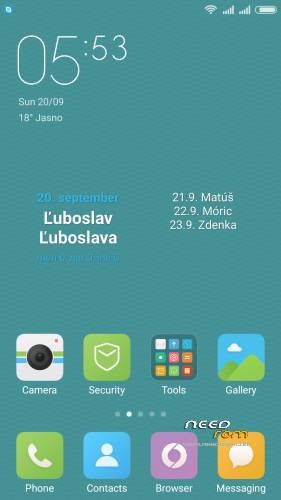
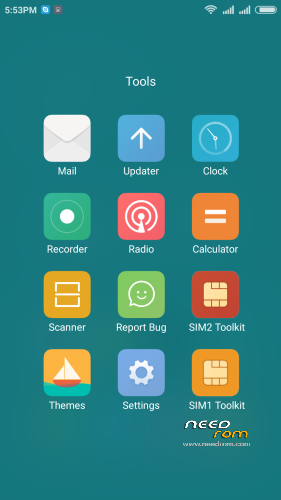
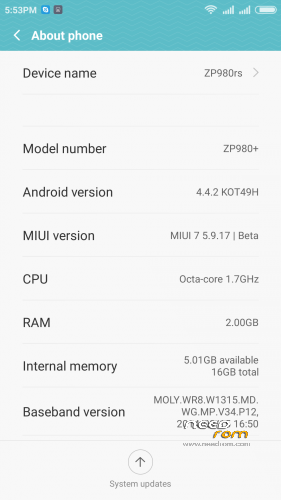
- Title: MIUI V7 for ZP980+
- Listed: September, 2015
- Last modified: 12/09/2016 2:20 pm
- Version: MIUI V7 6.5.19
You must be logged for ROM download.
76524 total views, 16 today
39 Total favorites

 Member Info
DESCRIPTION
05.21.2016 – added MIUI V7 6.5.19
03.20.2016 – added MIUI V7 6.3.17
01.26.2016 – added MIUI V7 6.1.21
12.29.2015 – added MIUI V7 5.12.24
11.21.2015 – added MIUI V7 5.11.19
ROM is ported from official ROM for Xiaomi Redmi Note 3G (xiaomi.eu_multi_lcsh92_wet_jb9_6.x.x_v7-4.4)
ROM is multi lang.
Please always make backup before install! Flash at your own risk. I am not responsible for bricked devices or any damages caused due to the ROM.
For first Installation:
1. Download the. zip file and put it in to internal memory,
2. Go to Recovery – recomended TWRP 2.8.1, or newer
3. Do factory reset (wipe Data, System, Davlik cache, Cache),
4. Reboot recovery,
5. Select Install – choose zip file with ROM,
6. After install reboot your device.
For update from my previous version of MIUI V6, V7:
1. Download the. zip file and put it in to internal memory,
2. Go to Recovery – recomended TWRP 2.8.1, or newer
3. Select Install – choose zip file with ROM,
4. After install, do cache and dalvik wipe only, then reboot your device.
For backup and restore lost IMEI look at here: http://tvoje.blogspot.sk/
※Please make a backup of your device before installing or updating ROM
I hate all about ROM and developers for cause all others who instead of teaching step by step, they think that all people have to know what a TWRP, cwm or any other program and how it works them.
Every tutorial, have to start from the beginning that this is for the laity. So please leave well detailed, as if were to a child of 2 years because if you are a programmer, he does not need to a personalized rom, he himself personalise one for him.
So please, explain for me step by step how can install twrp, cwm or others and things. Please make a video, post images. I thank the roms, really, but if I can't install it, what's the use?
@edilsonet
You cannot expect other people to give you what you want just because you ask for it, we don't owe you anything. The developer doesn't owe you anything…
I once was at the point where you are now. Not knowing how to root, flash, … And I learned through trial and error and searching and reading and asking and learning.
If you are seriously looking into using custom roms, you have to expect and accept the fact that there is stuff that you should find out and learn first. There are many risks involved, and unexpected things might happen (you can kill your phone). Compare it with lifting the engine out of your car and reassembling it. You probably wouldn't do that either without propper preparation.
Long story short: you can ask other people to do it for you, but it'll most likely cost you. If you want to do it yourself, you'll have to get your hand dirty.
One major pointer that you might have found if you bothered to google and read and to help yourself (instead of whining like a little b*tch waiting for fried chickens to fly into your mouth):
http://forum.zopomobileshop.co.....d-2247-1-1.html
Know in your heart that your current attitude should change. This will only get you so far in life…
I thought I would provide a brief update. I did end up flashing the stock ROM but using the flash tool. The only way I could get it to work is set it all up, select the scatter file and then hit the Upgrade button with NO phone connected. I then connected the phone and it was found and the upgrade flash progressed. If I just connect the phone I would get a bing-bong and then a bong-bing about 1/2 second later. This is after a month of playing with drivers and Win7 as well as XP.
Unfortunately, while the phone works and is rooted, I cannot, not matter what method I use, get the IMEI back. It just will not work. I have now shot an email back to Zopo in hopes they can fix it if I send the phone back to them. The biggest issue I have with all the methods I've tried is that the phone cannot be connected to a PC with no battery and be recognised. It just won't stay connected and because of that none of the IMEI repair tools work.
You just have to brush back to the official ROM and brush it into the IMEI with the tool.You can go to the net is used to find ROM black c2. XP brush machine
not see sim card.. the baseband problem.
I figured out the solution with all of the other rom 5.4.10 rum in the sim card was not seen, but also recognized with imei mobiluncle and ROM. 5.4.10 currently installed on my phone, but when installing 5.4.10 5.6.4 restore zip file and supersu v 2.46 download with these three zip file from 2.8.1 sets first twrp factory reset after full wipe and install. good luck to everyone
Hi Pmerrill! Don’t you have a backup with mobile uncle? I flashed the stock ROM as you did, rooted the phone and restored the Imei with mobile uncle.
Worked perfectly!
Before flashing I formatted everything with the flash tool. Take out tour sd and sim card before
lost my imei and i cant run recovery mode well done nitro…… DO NOT USE!!!!!!!
for recovering imei try this (XDA) or this (app).
i tried it via mtk-droidtools. but then only sim1 imei was recovered. with chameleophon i was able to manually change the imei numbers.
I have finally got my phone back to stock after corrupting with this MIUI rom and loosing baseband and IMEI. I have written a comprehensive recovery guide here.
I hope it is useful to everyone and I invite comments if there are specific errors, so that I can update. I've allowed people to comment on the guide.
If there are any questions, please PM me.
Hi Norton!
I still think that it’s great ROM and hope you will continue to provider updates!
Thanks
I think it's a pretty good rom as well but for some reason it does not play well with some ZP980+'s and we're all not sure why. I would say, if you do try to use it, then absolutely backup first, just in case, as it's the best approach. If you find that baseband is present in the new rom and IMEI is missing, then first don't flash back to stock, as in my guide, but try the last bit of my guide using SN Write Tool to fix the IMEI. If that does not work, then you need to flash back to stock.
What we all really need to know is what's going on that causes the problem in the first place, which seems to be unknown. It's a shame really because it is a good rom but gee, if you get the problem, then it takes an hour or so to recover and that's a bummer.