
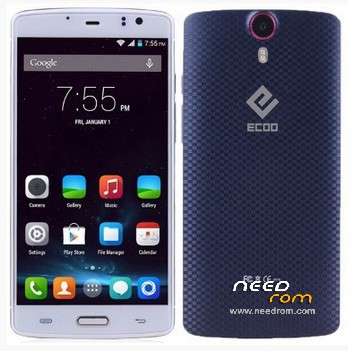
- Title: Ecoo E04
- Listed: May, 2015
- Last modified: 06/02/2015 4:05 pm
- Version: Lollipop 5.0 3gb (2015-04-30)
You must be logged for ROM download.
44878 total views, 6 today
9 Total favorites
 Member Info
DESCRIPTION
01, June, 2015.
Posting the last update from Ecco.hk (thanks to @stapo101 for tip). Please, be patient because uploading process is not fast. I Hope we can have the best working firmware.
07,May,2015:
Here is link to download update provided for @stapo101, thanks friend. I still do not have the phone because I sent it back to the supplier. I'm still waiting for shipment arrives. So I can not comment about the stability and performance on this firmware
Still I can not upload directly to this server, so I'm sending file to our friend Socrt@ate, who will help me. Thanks friend..
It will be necessary that those interested, download and install the firmware upgrade.
Please remember it is very important to do a complete backup of the rom in use, before installing the update.
NOTE: Please check well before giving bad rating, because most of the problems are caused by faulty installation.
It is very important to check that you have the proper drivers, the USB cable is not damaged and that the PC / Lap runs smoothly.
Thank you.
ONLY FOR 3GB RAM VERSION
Update version Android V5.0 virtually free of "bugs" published in 2015-0430. Untouched
I've installed on my phone and it really works well, excellent audio quality, very good resolution images and videos. No Chinese applications.
No root permissions
Multilanguage.
I have detected only two drawbacks:
1. Unable to install root permissions, having tried all options: iRoot, KingoRoot, RootGenius, etc.
If any of you able to install this option, I beg you let us to know the way.
2. I've installed a CWM Recovery, but the system does not allow me to access these services. It seems as if there is a special block for these options.
INSTALLATION:
a) Very important that a full backup is made before starting the update.
b) You can get here also the Sp Flashtool V5.1516. With this application I've made the installation.
I wish you luck and enjoy the update ..
Please remember that you will apply this update at your own risk and I can not take any responsibility for any inconvenience that may arise.
ESPAÑOL:
NOTA: Por favor revisen muy bien antes de otorgar mala calificación, pues la mayor parte de los problemas, se originan por una instalación defectuosa.
Es muy importante comprobar que se tienen instalados los drivers adecuados, que el cable usb no está dañado y que la Pc/Lap funciona sin problemas.
Gracias.
Se trata de la actualización Android V5.0 prácticamente libre de "bugs" publicada en 2015-0430. Original, sin modificaciones
Yo la he instalado en mi telefono y realmente funciona muy bien, excelente calidad de Audio, muy buena resolución en imagenes y videos. Sin aplicaciones chinas.
Sin permisos de Raiz.
Multilenguaje.
Solamente le he detectada 2 inconvenientes:
1.- No ha sido posible instalar permisos de raiz, habiendo probado con todas las opciones: Iroot, KingoRoot, RootGenius, etc.
Si alguno de ustedes logra instalar esta opción, le ruego indicar aqui mismo, la forma de solucionarlo.
2.- Aun cuando yo instalé un Recovery CWM, el sistema no me permite acceder a estos servicios. Parece como si existiese un bloqueo especial para estas opciones.
INSTALACION:
a) Muy importante que se haga un respaldo completo, antes de iniciar la actualización.
b) Aqui tam bien podras obtener la V5.1516 de SpFlashtool, que es la mas reciente. Con esta aplicacion yo realice la instalación.
Les deseo Suerte y que disfruten la actualización.
Por favor, recuerda que tu aplicarás esta actualización bajo tu responsabilidad y yo no podré asumir ninguna responsabilidad por cualquier inconveniente que pueda surgir.
※Please make a backup of your device before installing or updating ROM
the best rom, best telephone..
In completion at "stapo101" , now the smartwake run very well but with TWRP recovery (from Spacerom) without boot and usedata.img (with them don't work).Also,fingerprint run very smooth.Maybe it's only a impression but I feel a little improvement a battery consumption.
Good spot @stjames, yes Smart Wake does work now. Also, I have noticed much improvement on teh fingerprint scanner with the latest ROM.
I tend to agree with you about the battery. It's early days, but if anything the battery is being used up quicker but I haven't performed a proper test.
someone please help to convert from stock rom to flash zip…
i couldn’t use flash tool. i try all sorts of method but just couldn’t work. please help help help. thanks thanks
This one arranged it of the video me phenomenal VAT less the video than veia to you get crazy my previous rom thank you
I have ecoo e04 plus hard brıck rom loading HELP ME PLEASE (((((((((((((((((
what exactly do it?
Rom in the official website.
Rom you posted.
What specifically is the difference?
Did the same thing?
May 28 ROM is not not working the CWM.
The PMT will pop up an error.
@kimono
the PMT error appear when the MT6752_Android_scatter is not the same with rom which you want to flash
so,copy the MT6752_Android_scatter from rom to folder with cwm and replace
try again
@stapo101
Xposed which version have you installed?
@AntAnt67
It is an experimental build of Xposed for 64bit Armv7 found in this thread:
http://forum.xda-developers.co.....sfully-t3074586