
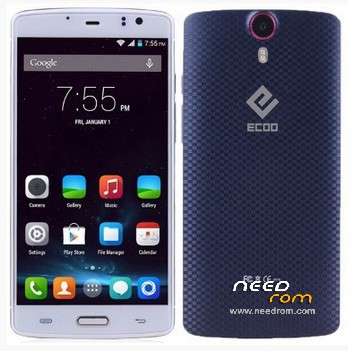
- Title: Ecoo E04
- Listed: May, 2015
- Last modified: 06/02/2015 4:05 pm
- Version: Lollipop 5.0 3gb (2015-04-30)
You must be logged for ROM download.
44877 total views, 5 today
9 Total favorites
 Member Info
DESCRIPTION
01, June, 2015.
Posting the last update from Ecco.hk (thanks to @stapo101 for tip). Please, be patient because uploading process is not fast. I Hope we can have the best working firmware.
07,May,2015:
Here is link to download update provided for @stapo101, thanks friend. I still do not have the phone because I sent it back to the supplier. I'm still waiting for shipment arrives. So I can not comment about the stability and performance on this firmware
Still I can not upload directly to this server, so I'm sending file to our friend Socrt@ate, who will help me. Thanks friend..
It will be necessary that those interested, download and install the firmware upgrade.
Please remember it is very important to do a complete backup of the rom in use, before installing the update.
NOTE: Please check well before giving bad rating, because most of the problems are caused by faulty installation.
It is very important to check that you have the proper drivers, the USB cable is not damaged and that the PC / Lap runs smoothly.
Thank you.
ONLY FOR 3GB RAM VERSION
Update version Android V5.0 virtually free of "bugs" published in 2015-0430. Untouched
I've installed on my phone and it really works well, excellent audio quality, very good resolution images and videos. No Chinese applications.
No root permissions
Multilanguage.
I have detected only two drawbacks:
1. Unable to install root permissions, having tried all options: iRoot, KingoRoot, RootGenius, etc.
If any of you able to install this option, I beg you let us to know the way.
2. I've installed a CWM Recovery, but the system does not allow me to access these services. It seems as if there is a special block for these options.
INSTALLATION:
a) Very important that a full backup is made before starting the update.
b) You can get here also the Sp Flashtool V5.1516. With this application I've made the installation.
I wish you luck and enjoy the update ..
Please remember that you will apply this update at your own risk and I can not take any responsibility for any inconvenience that may arise.
ESPAÑOL:
NOTA: Por favor revisen muy bien antes de otorgar mala calificación, pues la mayor parte de los problemas, se originan por una instalación defectuosa.
Es muy importante comprobar que se tienen instalados los drivers adecuados, que el cable usb no está dañado y que la Pc/Lap funciona sin problemas.
Gracias.
Se trata de la actualización Android V5.0 prácticamente libre de "bugs" publicada en 2015-0430. Original, sin modificaciones
Yo la he instalado en mi telefono y realmente funciona muy bien, excelente calidad de Audio, muy buena resolución en imagenes y videos. Sin aplicaciones chinas.
Sin permisos de Raiz.
Multilenguaje.
Solamente le he detectada 2 inconvenientes:
1.- No ha sido posible instalar permisos de raiz, habiendo probado con todas las opciones: Iroot, KingoRoot, RootGenius, etc.
Si alguno de ustedes logra instalar esta opción, le ruego indicar aqui mismo, la forma de solucionarlo.
2.- Aun cuando yo instalé un Recovery CWM, el sistema no me permite acceder a estos servicios. Parece como si existiese un bloqueo especial para estas opciones.
INSTALACION:
a) Muy importante que se haga un respaldo completo, antes de iniciar la actualización.
b) Aqui tam bien podras obtener la V5.1516 de SpFlashtool, que es la mas reciente. Con esta aplicacion yo realice la instalación.
Les deseo Suerte y que disfruten la actualización.
Por favor, recuerda que tu aplicarás esta actualización bajo tu responsabilidad y yo no podré asumir ninguna responsabilidad por cualquier inconveniente que pueda surgir.
※Please make a backup of your device before installing or updating ROM
Ha! Now I have had a reply from Ecoo saying they are sorry and I should return the phone to the seller for a refund or replacement! This is clearly a software issue and not a hardware issue as everything works fine with the KitKat ROM.
The only thing I have done that is different is that I have installed the TWRP recovery and rooted the ROM, so I'd be ineterested whether anyone has the fingerprints app working ok with their phone and the 5.0 ROM from 30th April?
Well, if you have test phone with mtk droid tools the first line, report Error.
And error is about memory, perhaps nvram is not there. I 've sent and receive severals emails with ecoo techs and also, ask me to send phone back to seller. I'll do today. I think the phone is deffective from factory.
Btw, they wrote in last email:
We are sorry to tell you that P7000 model do not work with root permission.
I'll be back to my jiayu S3s 3gb.
Hi
My fingerprint app works fine and is really good. I am on latest v5 room from 2015-0430 and it is good and stable. I do Not have root. So I would say this is a nice stable Rom with all working except OTA updates. I use finger print scanner every day sins I flashed no problem. Also at work I use the secure device feature witch is also cool.
So a big thank you for this almost perfect rom (just need the ota update to work and for some root access)
You're welcome @BadTag. Thanks for comments. I belive the same, this is a firmware for people do not need root access.
HK Ecco technicians told me that the restriction of root permissions and CWM Recovery was a decision of the creators of the Android OS. ???
I'll see other providers that offer V5.00 in their models, to check they do not have the same limitation that we now see in ECOO-E04 3g and P7000.
Greetings.
@suricatoy I don't really understand what you are saying. To be honest, in my limited experience the folks at ecoo haven't been very helpful so far so I wouldn't necessarily trust their comments about not rooting the ROM. I have been running the 30th April ROM for a few days now rooted with no issues other than the fingerprint scanner not working. That seems to be the only downside of running the rom rooted vs un-rooted. The upsides are many, not least the ability to install Viper4Android as without this I find the audio through headphones pretty useless. even after maxing the volume using MTK engineering.
Just to test, I have just reflashed the ROM without the recovery and root and the fingerprint scanner does work. I then flashed the recovery (with the associated boot and userdata img files) but did not root this time and the fingerprint scanner doesn't work. So I would say there is something about the TWRP recovery and/or the associated boot or userdata img files that is causing the issue. My bet is it's in the userdata img.
@simoneguarrera Thanks for all your work in making the TWRP recovery available. Do you know what in the recovery files may be causing the fingerprint scanner app to stop working? If it can be identified and fixed that would make this ROM very usable indeed.
I'm having the same problem. If I flash the rom the finger print scanner runs well but if I flash the TWRP (and before flashing the root) the finger print scanner stop working.
There are other stange issues like the cache is not cleaned after rebooting and you can see all the apps you opened before and once the bluetooth refused to shutdown.
Even that….Thank you @simoneguarrera for you effort. If I report this is only in order to help. It is nice to have TWRP in our mobiles (with or without errors)
@stapo101, I only partially transcribe the text of the message received from HK ECOO technicians, and I think that does not require more interpretation.
-Ecoo-E04, they do not recommend setting permissions root. Here the text:
"…Hi,
-P7000, Technicians confirm that this model does not accept root permissions.
This is the text "…
@suricatoy thanks. However that reply regarding the p7000 could easily be interpreted as it not coming with built in root. There is nothing to suggest android 5.0 is not open to root exploits.
Well friend, you can understand anything, anyway me and 3 close friend do not take high risk to buy P7000.
Have fun.
Ok, some progress….
The file that causes the issue with the fingerprint scanner app is the modded boot.img that comes with the TWRP recovery. I can install the latest 5.0 ROM and the TWRP recovery with the modded boot.img and userdata.img and can successfully root the phone, I can also make a full backup using TWRP…..however using this boot.img means the fingerprintscanner fails to work. If I then flash the stock boot.img, when the phone boots, it goes through the encryption process. The fingerprint scanner works now and root is still present, however, I can't make a full backup using TWRP as the system is encrypted. If I then flash back to the modded boot.img the fingerprint scanner does not work again and when I go into TWRP the system remains encrytped so I can't then make a full back up. So at the moment I have 2 choices:
1) Use the modded boot.img only = I can root and make backups
2) Use the stock boot.img after rooting = I can remain rooted and use the fingerprint scanner but can no longer make a backup
Unless someone can help with the modded boot.img….
I hope this helps people.
Thank you friend @stapo101, u have done hard work. Perhaps @simoneguarrera will can do the modd and finally, we can get a normal root and full backup process with our phone.
I've ask another sellers about root permissions and full backup options with other brands phone with V5.0 OS. 3 days elapsed and not answer received.!!
I'll confirm my question.
Thanks for info.
Here is a further update for anyone interested….
I have now finally got the official Ecoo Android 5.0 from 30th April working.
- everything seems to be running smoothly
- I have TWRP installed and can make full backups
- I have successfully rooted and can install viper4Android etc from recovery
- The fingerprint scanner is still working
Issues remaining:
- Occaisional overheating (this is probably due to the cpu governor, I don't know whether the latest Spacerom kernel addresses this)
- Wireless update still doesn't seem to respond
The issue regarding the fingerprint scanner appears to involve the modified boot.img file included in teh TWRP recovery posted here on needrom. To fix this I flashed the boot.img from the latest version of Spacerom for the 3gb E04 (v 1.0). Unfortunately it isn't available on it's own so you wil need to download the entire rom.
Clearly @simoneguarrera has been doing some great work on this. Next I am going to check out the latest ful Spacerom Rom and see if there are any further improvements over the official ROM.
Helo stapo101.
Apart from these issues I have checked something rong with the rom that when you want to use the external sdcard transparently many programs give an error because they can not save files on that location because they don't have enough privileges to do it.
For example in open camera if you try to store on the external sd card you can make a photo but the photo is not saved and you get an error… the same with Adownloader etc etc etc.
THere is an error with the fstab , the permissions or the names used.
I have tried to flash only the rom and it is the same…. so the problem is with the rom or something everybody is copying from the kernel, in the fstab because the mnt folder only has the right privileges por the internal sd card when mounted.
I have tried CWM recovery and the same…the finger print scanner works …everything goes well but you can not make backups and you can not use transparently the external sd card or an external udisk.
I hope it helps.
Friend @stapo101, thanks for your work, congratulations. I have the intention to do the same but I have some doubts and comment below.
You're referring to the official upgrade 30 April, 2015.Could you please indicate link to download or are you using the same version from this post.?.
1- I understand that first we need install this original version. (via download or firmware update)?
2- Then we must install the TWRP via flashtool. It is there where you do change boot.img ? or please tell me when boot.imp is changed from stock rom. You make mention that you used, the E04 3GB Space Rom. You could tell me the link, because the published here in needrom is designed for the 2GB version.,
I used iRoot to set permissions for root. If you use another method I beg you to explain, because that detail can be decisive.
In truth, I appreciate all the effort you made as @simoneguarrera by mods provided. Just send me a comment and I will perform the update immediately.
Thank you in advance for your answer.
3.-
3.-
@jocameney
Ok. The ROM that I used was the one available at ecoo.hk/download.html . It's the one for the E04 3GB "Android 5.0 20150430". I don't know whether its is the same one as in this thread, but I suspect so as it has the same date.
I am going to assume you know how to use SP Flashtool already, if not there are plenty of tutorials around. Here are the steps that I would reccomend, although I am strictly an amateur and some of them may be redundant but worked for me.
****Be aware that this will install a completely fresh install on your phone, you will lose all data and your IMEI information which you will have to enter later. Do not do any of this if you don't have a note of your 2 IMEI numbers. They should be written on the packaging or under the battery of the phone*****
1) Download the ROM from the ecoo.hk website
2) Remove any SD card from the phone
3) Flash the full rom using SP Flash Tool, use the option "Format All + Download"
4) Boot up the phone, you now have a "stock" install of the ecoo android 5.0 ROM, at this point you could open up the Fingerprints app if you like and check that it is working.
5) To install the recovery you will need to download the latest version of Spacerom from the original Italian forum that can be found here
http://www.androidiani.com/for.....coo-e04-88.html the download link is in post #874
6) Using SP Flashtool you will need to use the scatter file from the stock rom, select download only, uncheck everything other than boot, recovery and userdata. Replace these 3 files with the ones found in the Spacerom (you can do this by clicking on their paths in SP Flashtool, it will ask you to browse for the new file)
7) Once you have flashed the recovery, boot and userdata you can reboot and again check that the Fingerprints app is working
8.) You will now need to re-enter your IMEI information, – I use the MTK Engineer mode app found in the playstore.
9) To Root the phone I used the latest SuperSU flashable zip, this can be found at XDA amongst other places. You can flash this via recovery, this will give you root access, I find it easier than iRoot, Kingroot etc.
10) Don't forget to put your sd card back in!
Once you have rooted I would thoroughly reccomend installing Viper4Android, this vastly improves the audio and most importantly the headphone volume. Search for "installing viper4android on android 5.0" for instructions and files.
Just FYI I also use HTC Sense 7 and Blinkfeed as my launcher of choice, again this can be found on XDA.
As stated before @simoneguarrera has done some great work and as you have downloaded Spacerom you may want to have a play with that. I have installed it and it works, comes pre-rooted and also has TWRP already, and the fingerprints work. I know that it is running a modified kernel so he may have made some improvements to the overheating issue. I haven't been running it long enough to tell – and google translate is hard work on the forum! One big bonus is that it comes with it's own OTA updates.
Good luck
Again, thank you friend @stapo101, and I'll try right now.
Btw, do you have had any important "bug" working new version from Space Rom.? Because if not, I think that is the first step I'll take.
I have not a problem to use SpFlashtool, V5.1516 downloaded from this post. Working fine.
You have done a great work. Thank you again.
Just for your info, I'm 72 years old man ad I do like all this themes on android phones.
Have a nice day.
@jocamaney Not a problem. I have hardly done anything, I have just been stubborn trying lotsof different things.
I have only been running with Spacerom for about 30 mins so too early to tell about any bugs, but I plan to run it for a day or 2 and see if there is much difference. I suspect it will be updated more frequently than the Rom from the Ecoo website whih is a bonus.
72 years old? That's great. I'm 43 myself and often think most of the people here are far far younger!
Yeah, I hope also we can get new updates from Ecoo site.
Have fun.
Process is Done.!! Thanks to italians friend for this Rom and to my friend @stapo101 for all the help.!!
- Nice bootanimation.
- good audio and video.
- First start over 3 minuts.
- Temperature is very High and I'm worry.
- Root and recovery working.
Full access to TWRP recovery and I've creat the first backup..
Everything was ok, until I've inserted the Sd Card 32gb. After that, the phone's behavior changed.
- Slow response when try reboot. Works anyway.
- I don't know how to set the compatibility on TWRP for restore CWM files. Please, I need all help on this problem.
- Have not option to copy files from Internal Memory to SDcard. ??
I'll try for 2 or 3 days, but I'm worried for high temperature.
Friend @stapo101, in your last message you said something new for me:
"2) Remove any SD card from the phone."
I've flashed many phones (last: Jiayu S3s 3gb, G9000, N9800, etc) and I never had removed Sd card.
Perhaps, Do I need to do only in Ecoo-E04 3gb.?
Greetings.