
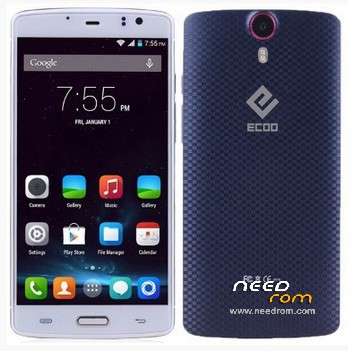
- Title: Ecoo E04
- Listed: May, 2015
- Last modified: 06/02/2015 4:05 pm
- Version: Lollipop 5.0 3gb (2015-04-30)
You must be logged for ROM download.
43985 total views, 1 today
9 Total favorites
 Member Info
DESCRIPTION
01, June, 2015.
Posting the last update from Ecco.hk (thanks to @stapo101 for tip). Please, be patient because uploading process is not fast. I Hope we can have the best working firmware.
07,May,2015:
Here is link to download update provided for @stapo101, thanks friend. I still do not have the phone because I sent it back to the supplier. I'm still waiting for shipment arrives. So I can not comment about the stability and performance on this firmware
Still I can not upload directly to this server, so I'm sending file to our friend Socrt@ate, who will help me. Thanks friend..
It will be necessary that those interested, download and install the firmware upgrade.
Please remember it is very important to do a complete backup of the rom in use, before installing the update.
NOTE: Please check well before giving bad rating, because most of the problems are caused by faulty installation.
It is very important to check that you have the proper drivers, the USB cable is not damaged and that the PC / Lap runs smoothly.
Thank you.
ONLY FOR 3GB RAM VERSION
Update version Android V5.0 virtually free of "bugs" published in 2015-0430. Untouched
I've installed on my phone and it really works well, excellent audio quality, very good resolution images and videos. No Chinese applications.
No root permissions
Multilanguage.
I have detected only two drawbacks:
1. Unable to install root permissions, having tried all options: iRoot, KingoRoot, RootGenius, etc.
If any of you able to install this option, I beg you let us to know the way.
2. I've installed a CWM Recovery, but the system does not allow me to access these services. It seems as if there is a special block for these options.
INSTALLATION:
a) Very important that a full backup is made before starting the update.
b) You can get here also the Sp Flashtool V5.1516. With this application I've made the installation.
I wish you luck and enjoy the update ..
Please remember that you will apply this update at your own risk and I can not take any responsibility for any inconvenience that may arise.
ESPAÑOL:
NOTA: Por favor revisen muy bien antes de otorgar mala calificación, pues la mayor parte de los problemas, se originan por una instalación defectuosa.
Es muy importante comprobar que se tienen instalados los drivers adecuados, que el cable usb no está dañado y que la Pc/Lap funciona sin problemas.
Gracias.
Se trata de la actualización Android V5.0 prácticamente libre de "bugs" publicada en 2015-0430. Original, sin modificaciones
Yo la he instalado en mi telefono y realmente funciona muy bien, excelente calidad de Audio, muy buena resolución en imagenes y videos. Sin aplicaciones chinas.
Sin permisos de Raiz.
Multilenguaje.
Solamente le he detectada 2 inconvenientes:
1.- No ha sido posible instalar permisos de raiz, habiendo probado con todas las opciones: Iroot, KingoRoot, RootGenius, etc.
Si alguno de ustedes logra instalar esta opción, le ruego indicar aqui mismo, la forma de solucionarlo.
2.- Aun cuando yo instalé un Recovery CWM, el sistema no me permite acceder a estos servicios. Parece como si existiese un bloqueo especial para estas opciones.
INSTALACION:
a) Muy importante que se haga un respaldo completo, antes de iniciar la actualización.
b) Aqui tam bien podras obtener la V5.1516 de SpFlashtool, que es la mas reciente. Con esta aplicacion yo realice la instalación.
Les deseo Suerte y que disfruten la actualización.
Por favor, recuerda que tu aplicarás esta actualización bajo tu responsabilidad y yo no podré asumir ninguna responsabilidad por cualquier inconveniente que pueda surgir.
※Please make a backup of your device before installing or updating ROM
and also tell me is it the same rom that is available on the official website of Ecoo????
can u tell me how to install that rom which is available on the website of ecoo i have downloaded that one
Hi friend, I do not know about ron you tell on Ecoo website, sorry.
To flash rhis firmware you need some experience, otherwise, you can "brick" your phone.
You need download and install drivers inside your pc. You can find drivers in this site just perforn a search in Gapps &tools category.
Download in this ad and install SpFlashtool inside your pc.
Turn off your phone and take out the battery.
Start spflashtool and select scatter file from the open directory of the firmware you want to flash.
Inside spflashtool select option "firmware update" and check that all boxed marked.
Insert battery to phone.
Press "download" in spflashtool and connect your phone to pc via usb cable. You need a new usb cable without damage.
You'll see color bars: red, dark, green and yelow. When process done, you'll see a box centered with green color. Everything is ok.
Close spflashtool, disconnect your phone and take out battery.
Afther 2 Minuts you have restart phone and, enjoy it.
Be lucky.
Apologize for finger errors but I am via my phone.
@suricatoy brother on this link ECOO have provided offical update rom to 5.0
http://www.ecoo.hk/download.ht.....ml
plz see it and tell me that can i install that with the same method u told above
Thanks
Friend, to test it I mneed to download that firmware and I'm so bussy now.
But let me tell you:
The process I've wrote for you is the same for all firmware, so, you can download the rom you wish and try it.
I think will bve ok.
I have succesfully rooted that version this way:
- installed TWRP with SP Flash Tool: https://yadi.sk/d/m0rNRpeDgUAq.....a
- installed root with TWRP: https://yadi.sk/d/8S6pv_VFf2Hs.....K
It works.
thank you @fourzero, I'll try and let's see.
Do you have installed and working inside V5.0.? Do you know if working in version 4.4.4?
I'll appreciate your answer, Because I am a 75 years old and prefer the "black style" that has 75% the 4.4.4 version. It is more pleasant to my tyred eyes. Jiji.
Regards.
Well, When install TWRP recovery via SpFT process ends ok.
Restarting phone via recovery works ok.
When try create and save a full backup, TWRP only works in Phone's Internal Memory (as the CWM recovery) and that's a big problem, becauswe backups saved on internal memory can be deleted, just we can perform a copy to SD Card. Opsss.!!
Try to set root permission with the file you provide, saved in SD card and executed, system report error and abort process.
Btw, the Imei's data was lost.!!
Perhaps those apps was made fror 2gb Version.
That's why I asked before if you have installed and used inside 3gb version.
I'm back to 4.4.4 version.
Perhaps for that people that do not use root permission, that V5.0 will be the best. I belive so also.
Thank you my friend, I still look a solution but technicians said: No root permission in V5.0, perhaps only for Ecoo E04 3gb.
Regards.
@fourzero
give the right credits….this TWRP is compiled by me and anyone can download it from needrom
https://www.needrom.com/downlo...../ecoo-e04-twrp/
please delete comment or give some credits….for patch the boot i used many hours of my life
I have now Root one V 5.0 , I have Ecoo E04 3Gb telefoon @fourzero is working Oké - installed TWRP with SP Flash Tool : flash ( Download Only )
That's sound great @pecari.
Just for confirmation, please read that I've received from Ecoo HK technicians:
"…
On 07/05/2015 – 10:32 p.m., HK ECOO wrote:
Hi,
Sorry to tell you but we officially don't encourage customers to get root permission for 5.0.
Regards,
*could you please*
Just got AnTuTu Benchmark score of 45100
Great.!
Do you have rooted your phone?
If yes, please let us know the way.
Thanks
@suricatoy: my phone is rooted with this method, I'm on 20150430 official release and have 3G version.
@simoneguarrera: I'm really sorry for this, I have just found that links on a russian forum. Is there any way to edit or delete the comment in here?
Thank @fourzero. I've tried several times inside Ecoo E04 3gb ram with v5.0 150430 but can not set root permission and, intalling Twrp recovery, my phone lost imei's data.
Thank you anyway.
Hi. I'm still not clear whether this is the same rom as on the Ecoo.hk website (30th April 2015). Can someone confirm?
I have flashed the ROM from the website and have also managed to root using the TWRP recovery and supersu.
The main problem I have found so far is the fingerprint scanner does not work. It worked on the KK rom so I guess must be a rom/software issue. Can anyone else confirm the same issue? Are there any fixes? It also seems to suffer still from the overheating issue.
<p> if you can, put there the link of the forum, it's not a very beautifull thinks see your work leaked from other </strong>
@<strong class="name" style="border: 0px; outline: 0px; font-size: 16px; vertical-align: baseline; margin: 0px; padding: 0px; color: rgb(102, 102, 102); font-family: Arial, Helvetica, sans-serif; line-height: 18px; background-image: initial; background-attachment: initial; background-size: initial; background-origin: initial; background-clip: initial; background-position: initial; background-repeat: initial;"><a href="https://www.needrom.com/author/fourzero/" style="border: 0px; outline: 0px; vertical-align: baseline; margin: 0px; padding: 0px; color: rgb(102, 102, 102); text-decoration: none; background: transparent;" rel="nofollow">fourzero</a> no problem man
</p>
<p>
<strong class="name" style="border: 0px; outline: 0px; font-size: 16px; vertical-align: baseline; margin: 0px; padding: 0px; color: rgb(102, 102, 102); font-family: Arial, Helvetica, sans-serif; line-height: 18px; background-image: initial; background-attachment: initial; background-size: initial; background-origin: initial; background-clip: initial; background-position: initial; background-repeat: initial;">@suricatoy you lost imei because the 5.0 rom have a partition encrypted, when you flash the new userdata you wipe also the NVRAM data</strong>
</p>
<p>
<strong class="name" style="border: 0px; outline: 0px; font-size: 16px; vertical-align: baseline; margin: 0px; padding: 0px; color: rgb(102, 102, 102); font-family: Arial, Helvetica, sans-serif; line-height: 18px; background-image: initial; background-attachment: initial; background-size: initial; background-origin: initial; background-clip: initial; background-position: initial; background-repeat: initial;">you can simply restore both IMEI and NVRAM err 0x in wifi using my video tutorial</strong>
</p>
<p>
<iframe allowfullscreen="" frameborder="0" height="250" src="https://www.youtube.com/embed/6WYF7nFcFzA?rel=0" width="500"></iframe>
</p>
<p>
</p>
<p>
<iframe allowfullscreen="" frameborder="0" height="250" src="https://www.youtube.com/embed/XM_Xsetjtnk?rel=0" width="500"></iframe>
</p>
<p>
</p>
<p>
</p>