
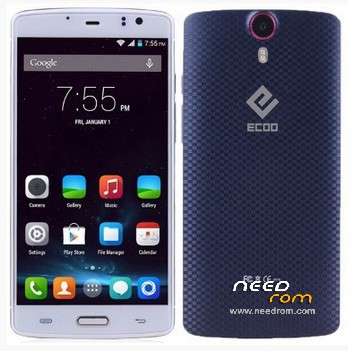
- Title: Ecoo E04
- Listed: May, 2015
- Last modified: 06/02/2015 4:05 pm
- Version: Lollipop 5.0 3gb (2015-04-30)
You must be logged for ROM download.
43775 total views, 1 today
9 Total favorites
 Member Info
DESCRIPTION
01, June, 2015.
Posting the last update from Ecco.hk (thanks to @stapo101 for tip). Please, be patient because uploading process is not fast. I Hope we can have the best working firmware.
07,May,2015:
Here is link to download update provided for @stapo101, thanks friend. I still do not have the phone because I sent it back to the supplier. I'm still waiting for shipment arrives. So I can not comment about the stability and performance on this firmware
Still I can not upload directly to this server, so I'm sending file to our friend Socrt@ate, who will help me. Thanks friend..
It will be necessary that those interested, download and install the firmware upgrade.
Please remember it is very important to do a complete backup of the rom in use, before installing the update.
NOTE: Please check well before giving bad rating, because most of the problems are caused by faulty installation.
It is very important to check that you have the proper drivers, the USB cable is not damaged and that the PC / Lap runs smoothly.
Thank you.
ONLY FOR 3GB RAM VERSION
Update version Android V5.0 virtually free of "bugs" published in 2015-0430. Untouched
I've installed on my phone and it really works well, excellent audio quality, very good resolution images and videos. No Chinese applications.
No root permissions
Multilanguage.
I have detected only two drawbacks:
1. Unable to install root permissions, having tried all options: iRoot, KingoRoot, RootGenius, etc.
If any of you able to install this option, I beg you let us to know the way.
2. I've installed a CWM Recovery, but the system does not allow me to access these services. It seems as if there is a special block for these options.
INSTALLATION:
a) Very important that a full backup is made before starting the update.
b) You can get here also the Sp Flashtool V5.1516. With this application I've made the installation.
I wish you luck and enjoy the update ..
Please remember that you will apply this update at your own risk and I can not take any responsibility for any inconvenience that may arise.
ESPAÑOL:
NOTA: Por favor revisen muy bien antes de otorgar mala calificación, pues la mayor parte de los problemas, se originan por una instalación defectuosa.
Es muy importante comprobar que se tienen instalados los drivers adecuados, que el cable usb no está dañado y que la Pc/Lap funciona sin problemas.
Gracias.
Se trata de la actualización Android V5.0 prácticamente libre de "bugs" publicada en 2015-0430. Original, sin modificaciones
Yo la he instalado en mi telefono y realmente funciona muy bien, excelente calidad de Audio, muy buena resolución en imagenes y videos. Sin aplicaciones chinas.
Sin permisos de Raiz.
Multilenguaje.
Solamente le he detectada 2 inconvenientes:
1.- No ha sido posible instalar permisos de raiz, habiendo probado con todas las opciones: Iroot, KingoRoot, RootGenius, etc.
Si alguno de ustedes logra instalar esta opción, le ruego indicar aqui mismo, la forma de solucionarlo.
2.- Aun cuando yo instalé un Recovery CWM, el sistema no me permite acceder a estos servicios. Parece como si existiese un bloqueo especial para estas opciones.
INSTALACION:
a) Muy importante que se haga un respaldo completo, antes de iniciar la actualización.
b) Aqui tam bien podras obtener la V5.1516 de SpFlashtool, que es la mas reciente. Con esta aplicacion yo realice la instalación.
Les deseo Suerte y que disfruten la actualización.
Por favor, recuerda que tu aplicarás esta actualización bajo tu responsabilidad y yo no podré asumir ninguna responsabilidad por cualquier inconveniente que pueda surgir.
※Please make a backup of your device before installing or updating ROM
IMEI back
I'm not sure why everyone is having problems here. I can personally attest to the stability of the 7th of May 5.0 ROM. I have been running it for over a week without issues.
It can be rooted by installing the recovery, boot and userdata images from the Spacerom v1.0 and then flashing the latest SuperSU.zip from xda. By using the Spacerom files this also means that the phone in not encrypted as default. Going to settings>>storage then allows you to set the sd card as your default storage – this will work for system apps such as the default camera. For 3rd party apps such as amazon music you can use xposed and the XDInternalSD module to allow all apps to use the SD card if you so desire.
Out of the box and using an Ecoo ROM without any tweaks the phone is a bit dissapointing, however if you bother to read a little and spend a bit of time stting te phone up it works very very well.
For the record, my E04 3GB is my daily phone.
It is running the official Ecoo lollipop ROM from 7th July.
It is rooted.
It has TWRP recovery installed.
I have full use of the recovery and can back up and restore what I want from where I want.
I have xposed installed
I have Amplify xposed module installed giving me significant battery usage benefits
I have XinternalSD xposed module installed giving my apps full access to teh external SD card
If you haven't already, I would thoroughly recommend going across to XDA and reading the Ecoo E04 thread:
http://forum.xda-developers.co.....1-7ghz-t3027563
There are lots of very useful posts telling you how to achieve the above.
Fine friend, I am also a member of Xda and seen the comments link, but if you look thoroughly, most owners ECOO-E04 have different types of problems. Some partially solved, others still pending, and finally left with a "patching" phone.
Personally, I've always preferred a phone without complications, allowing traditional modifications of those we love to root permissions. That is why I continue to believe that the ECOO-EO4 is a phone for users who do not use root permissions.
I think it seems very complicated and tedious performing many actions to access root when the new phone with 3GB RAM, 64bit as Jiayu S3S, can be performed without major complications.
I do not want any kind of confrontation, and I respect those who like you, confirmarn they have access to these options, without major complications while maintaining stability.
For this reason, I will keep this post and I appreciate your participation and your positive comments on this mobile. I still believe that this phone is not the luckiest Elephone editing.
Greetings.
@stapo101
Thank you , that will help me a lot, currently running spaceman rom, and i think the sound quaility is poor to low, use mtk eng mode to change the values, but is not as good as it was in KK builds.
Is the sound good @stock?
Are u using Gravity Box, can the 4G/3G BIG icons be removed, ins´t working on spacerom
Again thanks
@suricatoy
We will have to agree to disagree. It has been proven that this phone can be very stable and perform very well – just not out of the box. This is a cheap chinese phone. As such our expectations should be lower than for a flagship HTC or Samsung. If you are willing to invest a bit of time and follow instructions then it represents great value for money. I'm not sure anyone looking for a phone that does everything out of the box should be looking at buying a cheap chinese phone anyway. In fact they possibly shouldnt be looking for an Android Lollipop phone at all – best sticking with an iphone which will work straight away.
For those of us who like to tweak and customise then it is a great value for money phone to do this with and it will give great results.
Very good friend, I respect your opinion.
And not all relation to invest a little more or a little less, because finally I personally have always sought, is a phone easy to modify without major complications, because I'm 75 years old and I have some problems with my eyes.
I have invested a lot sometimes. In other cases, as in the previous N9800 or S3S Jiayu, the investment has not been very expensive and the results, excellent.
Greetings and wish you a good weekend.
@stapo101
Do you mind posting your Viper4Android speaker settings? would be awesome!
I don't use Viper4Android for the speakers, only for the headphones. To my ears, built in phone speakers sound crappy whatever you do so I don't waste my time with them. Sorry.
çok şaçma kamera flaşh ı sorunlu boşa zaman kaybetmeyin bir sonraki guncelemeyi bekleyin en iyisi 4.4 k.k burdakı rom ların hepsini kullandım denedim bu romları yapanı işten atmaları lazım
will be the update for ecoo 2 gb? please anwers the question
Amigo @eliax, esta publicación es solamente para el Ecoo-e04 3gb ram.
Te dejo el enlace donde estás todas las publicaciones para Ecoo y alli podrás elegir la correspondiete al modelo de 2gb.
https://www.needrom.com/catego.....s/e-f-g-h/ecoo/
Suerte.
Thabk you @dfps, your info will help to many Ecoo-E04 user.
Thank* sorry
There is a new 5.0 ROM available through the Ecoo.hk webpage and this link:
https://mega.co.nz/#!C8UBRJBT!.....Du5mmPM27Scr5Ig
It would probably be worth adding it to this thread as the links tend to come and go on the Ecoo page.
Thank you @srapo101, do you have
tested this firnware.?
@jocamaney
I am testing it at the moment, today being the first full day of "normal" use.
Improvements over the 30th April/7th May versions:
- Wireless update now works (it succesfully checks for any updates – there aren't any at this time)
- TWRP recovery (from Spacerom) can be flashed without the need for the associated boot.img and userdata.img
- This ROM does not automatically encrypt the phone (unlike the 30th April version)
I have also successfully rooted the phone and run Xposed.