
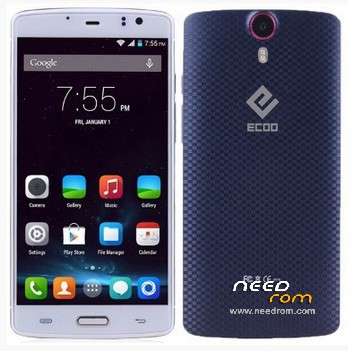
- Title: Ecoo E04
- Listed: May, 2015
- Last modified: 06/02/2015 4:05 pm
- Version: Lollipop 5.0 3gb (2015-04-30)
You must be logged for ROM download.
44878 total views, 6 today
9 Total favorites
 Member Info
DESCRIPTION
01, June, 2015.
Posting the last update from Ecco.hk (thanks to @stapo101 for tip). Please, be patient because uploading process is not fast. I Hope we can have the best working firmware.
07,May,2015:
Here is link to download update provided for @stapo101, thanks friend. I still do not have the phone because I sent it back to the supplier. I'm still waiting for shipment arrives. So I can not comment about the stability and performance on this firmware
Still I can not upload directly to this server, so I'm sending file to our friend Socrt@ate, who will help me. Thanks friend..
It will be necessary that those interested, download and install the firmware upgrade.
Please remember it is very important to do a complete backup of the rom in use, before installing the update.
NOTE: Please check well before giving bad rating, because most of the problems are caused by faulty installation.
It is very important to check that you have the proper drivers, the USB cable is not damaged and that the PC / Lap runs smoothly.
Thank you.
ONLY FOR 3GB RAM VERSION
Update version Android V5.0 virtually free of "bugs" published in 2015-0430. Untouched
I've installed on my phone and it really works well, excellent audio quality, very good resolution images and videos. No Chinese applications.
No root permissions
Multilanguage.
I have detected only two drawbacks:
1. Unable to install root permissions, having tried all options: iRoot, KingoRoot, RootGenius, etc.
If any of you able to install this option, I beg you let us to know the way.
2. I've installed a CWM Recovery, but the system does not allow me to access these services. It seems as if there is a special block for these options.
INSTALLATION:
a) Very important that a full backup is made before starting the update.
b) You can get here also the Sp Flashtool V5.1516. With this application I've made the installation.
I wish you luck and enjoy the update ..
Please remember that you will apply this update at your own risk and I can not take any responsibility for any inconvenience that may arise.
ESPAÑOL:
NOTA: Por favor revisen muy bien antes de otorgar mala calificación, pues la mayor parte de los problemas, se originan por una instalación defectuosa.
Es muy importante comprobar que se tienen instalados los drivers adecuados, que el cable usb no está dañado y que la Pc/Lap funciona sin problemas.
Gracias.
Se trata de la actualización Android V5.0 prácticamente libre de "bugs" publicada en 2015-0430. Original, sin modificaciones
Yo la he instalado en mi telefono y realmente funciona muy bien, excelente calidad de Audio, muy buena resolución en imagenes y videos. Sin aplicaciones chinas.
Sin permisos de Raiz.
Multilenguaje.
Solamente le he detectada 2 inconvenientes:
1.- No ha sido posible instalar permisos de raiz, habiendo probado con todas las opciones: Iroot, KingoRoot, RootGenius, etc.
Si alguno de ustedes logra instalar esta opción, le ruego indicar aqui mismo, la forma de solucionarlo.
2.- Aun cuando yo instalé un Recovery CWM, el sistema no me permite acceder a estos servicios. Parece como si existiese un bloqueo especial para estas opciones.
INSTALACION:
a) Muy importante que se haga un respaldo completo, antes de iniciar la actualización.
b) Aqui tam bien podras obtener la V5.1516 de SpFlashtool, que es la mas reciente. Con esta aplicacion yo realice la instalación.
Les deseo Suerte y que disfruten la actualización.
Por favor, recuerda que tu aplicarás esta actualización bajo tu responsabilidad y yo no podré asumir ninguna responsabilidad por cualquier inconveniente que pueda surgir.
※Please make a backup of your device before installing or updating ROM
@jocamaney I'm not sure whether it's completely necessary or not, but I'm sure that on some occaisions when I have flashed a new rom with teh sd card in place it has built the file structure on the external sd card rather than the phone storage. So I always think it's safer to have it removed for the initial installation.
Ok friend, I've done that way. Only after when have reboot phone twice, I proced to installa SD card and, after that, phone's behavior changed.
Still testing and I let know the experience in this post.
About my age, we have an older user, my close friend and neighbor, suricatoy, who now left the country again, to deal with matters related to his sister. He has 75 years … !!
Thank you @stapo101 for all the support.
Bye
System collapsed when I install firewall and antivirus apk.
I think that room is not what I need.
I'll be back to 4.4.4, wich let me to work behind firewall and allow me to use antivirus.
It was an exciting experience, has very good things like sound and video quality, but does not have: the permissions controller, so the apk to wake the phone with gestures, etec.
Gracias por todo.
Another quick update for those interested. I managed to successfully install xposed and am able to use gravity box and more importantly amplify which has helped a lot with battery use.
Sure friend, It works.
Only in Status Bar, because mine can't show Navigation Bar.
Good luck.
I'm going to try to contact Ecoo to make them correct the error with the rom. It is not a question of making root it is something simplier as you can't use an external sd card transparenly with Lollipop so It is useless.
It is a big error but I suppose that every of us must write to Ecoo to solve it or they are not going to care about it
Sorry, I don't undertstand what you mean by "you can't used an external sd card transparently with Lollipop". I am running Lollipop with an SD card with no problems at all. Not only that, it's a 128GB SD card with over 80GB of data on it. Runs very smoothly. What issues are you experiencing?
Yes friend
I've wrote to Ecoo Hk and after several days, finally told me, "…you have to send back phone to seller, to replace for a new one.."
No nadamas en Latinoamerica hay irresponsables. Jiji
I've send package this day and…I never will purchase any nd Elephone phone.
By lucky.
@stapo101.
I mean you can not use some third party apps like opencamera, adownliafer, es explorer (without root) using external sd card because /storage/sdcard2 has 771 permissions instead 777 so they can not save anything without being root.
And yes… You can have a 128 gb to use only with some (system) apps.
What I have found is that using gl2sd the problem is corrected . It creates a new user and gives new permissions ¿??????? It is incredible…. but it works.
I add that I am using Cwm and I am root …but the problem is independent from being root or using Twrp
I hope it helps someone.
Ok, I have mine rooted, but have no problems with the SD crad. I have it set up to be used as the default in settings>>storage. All my music is on there and apps like apollo, music etc have no problem accessing it. Also the built in camera and also Google Camera have no problem saving photos to teh sd card.
@stapo It depends on the app you are using …system apps or Hoogle apps don't have problem.You are going to find problems eith third party applications changing the saving folder to a folderr in the external sdcard.
It's sonething rong in the rom …no matter root., TWRP or CMW.
@gustavobaezz
If you install xposed for lollipop (you will need to google for the experimenta xposed lollipop for armv8 on xda) you can then install a module called XinstallerSD. With this module you can give all apps access to teh SD card as well re-direct specific apps to the sdcard rather than the internal emulated sd card. This resolves the problem regarding 3rd party apps such as open camera.
Sorry for the spelling mistakes I'm using the mobile phone in Spanish with autocorrection
Another bug:
There is a problem with the camera focus when pointing to infinitum (so more than 1,5 metres).
When pointing to infinitum it focuses wrong (using macro macro instead????)!!!
The only way to solve this is to use another camera app, block the focus, point to the flor and focus then point to what you want to take in the picture and shoot without to focus!!!
@stapo101:
First of all, thank you very much for your advise althought I used gltosd to correct it.
Now I am on KK again because of the camera… every copy of Lollipop for E04 has the camera bug.
The camera can not focus beyond 3 metres and it is obvious for exaple when you take a photo to a number plate 20/30/40 metres far…With KK a number plate is readable at 40 metres …with Lollipop it is not focused farther than 5/10 metres.
While this problem is not corrected, I can not use Lollipop. It is disgusting to focus to the fllor, block the focus and then take the picture…. If a use a mobile for a photo is for doing it fast.
The KK rom for Ecoo is one of the best I have never tried.,.. I mean, no relevant bugs, veeeeeeery good stability, I have tap to wake and not bad battery performance.
Lollipop gives 5000 Antutu points more than KK… but I prefer KK with everything working on the mobile.
The only thing that itches me is the 1000 ponits less for the graphic card, in Antutu (because the t760 mp2 graphic card is a bit slow for gaming obviously is not an t760 mp6).
I will wait for a fully stable and functional Lollipo rom.
Thanks and sorry for my English… I was using the mobile.