
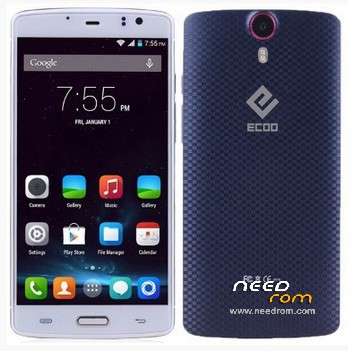
- Title: Ecoo E04
- Listed: May, 2015
- Last modified: 06/02/2015 4:05 pm
- Version: Lollipop 5.0 3gb (2015-04-30)
You must be logged for ROM download.
44878 total views, 6 today
9 Total favorites
 Member Info
DESCRIPTION
01, June, 2015.
Posting the last update from Ecco.hk (thanks to @stapo101 for tip). Please, be patient because uploading process is not fast. I Hope we can have the best working firmware.
07,May,2015:
Here is link to download update provided for @stapo101, thanks friend. I still do not have the phone because I sent it back to the supplier. I'm still waiting for shipment arrives. So I can not comment about the stability and performance on this firmware
Still I can not upload directly to this server, so I'm sending file to our friend Socrt@ate, who will help me. Thanks friend..
It will be necessary that those interested, download and install the firmware upgrade.
Please remember it is very important to do a complete backup of the rom in use, before installing the update.
NOTE: Please check well before giving bad rating, because most of the problems are caused by faulty installation.
It is very important to check that you have the proper drivers, the USB cable is not damaged and that the PC / Lap runs smoothly.
Thank you.
ONLY FOR 3GB RAM VERSION
Update version Android V5.0 virtually free of "bugs" published in 2015-0430. Untouched
I've installed on my phone and it really works well, excellent audio quality, very good resolution images and videos. No Chinese applications.
No root permissions
Multilanguage.
I have detected only two drawbacks:
1. Unable to install root permissions, having tried all options: iRoot, KingoRoot, RootGenius, etc.
If any of you able to install this option, I beg you let us to know the way.
2. I've installed a CWM Recovery, but the system does not allow me to access these services. It seems as if there is a special block for these options.
INSTALLATION:
a) Very important that a full backup is made before starting the update.
b) You can get here also the Sp Flashtool V5.1516. With this application I've made the installation.
I wish you luck and enjoy the update ..
Please remember that you will apply this update at your own risk and I can not take any responsibility for any inconvenience that may arise.
ESPAÑOL:
NOTA: Por favor revisen muy bien antes de otorgar mala calificación, pues la mayor parte de los problemas, se originan por una instalación defectuosa.
Es muy importante comprobar que se tienen instalados los drivers adecuados, que el cable usb no está dañado y que la Pc/Lap funciona sin problemas.
Gracias.
Se trata de la actualización Android V5.0 prácticamente libre de "bugs" publicada en 2015-0430. Original, sin modificaciones
Yo la he instalado en mi telefono y realmente funciona muy bien, excelente calidad de Audio, muy buena resolución en imagenes y videos. Sin aplicaciones chinas.
Sin permisos de Raiz.
Multilenguaje.
Solamente le he detectada 2 inconvenientes:
1.- No ha sido posible instalar permisos de raiz, habiendo probado con todas las opciones: Iroot, KingoRoot, RootGenius, etc.
Si alguno de ustedes logra instalar esta opción, le ruego indicar aqui mismo, la forma de solucionarlo.
2.- Aun cuando yo instalé un Recovery CWM, el sistema no me permite acceder a estos servicios. Parece como si existiese un bloqueo especial para estas opciones.
INSTALACION:
a) Muy importante que se haga un respaldo completo, antes de iniciar la actualización.
b) Aqui tam bien podras obtener la V5.1516 de SpFlashtool, que es la mas reciente. Con esta aplicacion yo realice la instalación.
Les deseo Suerte y que disfruten la actualización.
Por favor, recuerda que tu aplicarás esta actualización bajo tu responsabilidad y yo no podré asumir ninguna responsabilidad por cualquier inconveniente que pueda surgir.
※Please make a backup of your device before installing or updating ROM
Must the Sim & SD card be removed from the phone before flashing a new ROM or not?
Not relevant that retire or leave them on the phone.
Is recommended use the "firmware update" for best results. You can also use "fullformat + download" but should previously backed up data IMEI's, in order to restore them later.
If you have no experience, it is recommended that first you read carefully all the information that is within this post, because otherwise, you could generate some damage to your phone, by improper installation.
Thnk you jocamaney, I've been through this thread tree times allready and I still don't feel any confidence.
I'm not sure I do understand how to make a full backup (ROM settings, Apps. etc) and recovery just in case somthing goes wrong.
hi
the iroot start and says it is root now .
but the root checker say it is not root …
supersu binary cant install …
Seems as you have a problem with your phone.
Try to perform a new install via Spflashtool with the firmware version 150528. The process will finish without error.
If all is ok you can proceed to root your Ecoo 3gb ram wit Iroot. After 2 or 3 minuts you will get root access. Disconnect phone from pc and restar it.
I suggest use this chinesse apk first and, when you can perform root-acctions , perhaps your will be ready to install superuser or supersu.
Hi all,
I've upgraded my phone with this last ROM.
All data mobile networks (2G, 3G, 4G) seem to be failing.
With 4.4.4 I had perfect 4G without adjusting anything.
I have set up the APN according to the KPN (=Dutch provider) manual, but with no positive result.
Does anyone have the same problem?
Thanks
Laurens
Sorry, it seems to work now.
Setting it it the settings screen was not working, but I also had to switch it on separately in the ICON screen with the settings.
Regards
Laurens
so , all works fine with 5.0 and tprw and root .
but now the flipcover does not work … the display is not going on ore off and i cant see the clock in the window …
what can i doo ?
Can anyone explain to me why do I get this Error message
—Error: —TotalBytesPerChunk Not Found. Set dafault PageSpare=2048/64 !!!
and why the IMEI/NVRAM button is disabled?
hi soricato
in this rom solve overheating problems?
Hi,
With official 5.0 rom my 4G signal on sim 1 is loosed, plane mode doesn't help, need reboot twide a day.
Signal on second sim is regulary lost.
Had no trouble in 4.4.4.
any issue.
Best Regards