
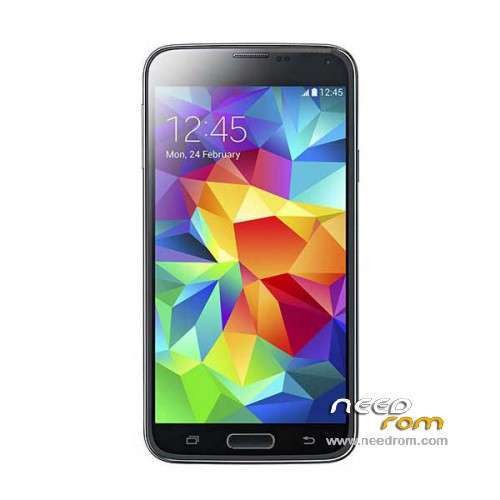
- Title: HDC S5 SM-G900S
- Listed: June, 2014
- Last modified: 12/17/2014 6:20 pm
- Version: ROM Android 4.4.2
You must be logged for ROM download.
100136 total views, 10 today
167 Total favorites
 Member Info
DESCRIPTION
ROM Mobile HDC S5 SM-G900S – ROM Android 4.4.2
ONLY MT6582
Config HDC : MT6582 + 2G Ram (real 1G) + 4G Rom + 1280×720 + Single sim
Update Official ROM HDC S5 SM-G900S version: KOT49H.G900SKSU1AND3 – S105_XLF – SM-G900S_V16
———————————————————————————————————————————————
Update Official ROM HDC S5 SM-G900S version: KOT49H.G900SKSU1AND3 – S105_XLF – SM-G900S_V10
———————————————————————————————————————————————
Update Official ROM HDC S5 SM-G900S version: KOT49H.G900SKSU1AND3 – S105_XLF – SM-G900S_V09
———————————————————————————————————————————————
Official ROM HDC S5 SM-G900S version: KOT49H.G900SKSU1AND3 – S105_XLF – SM-G900S_V08
Gapps include - No Rooted
Language support : Multilang
Install ROM :
- Unpack FlashTools, and Click on Flash_tool.exe
- Select a the MT6582_Android_scatter_emmc.txt in ROM
- Wait file to be added into Flash Tool
- choose Option->USB Model,click USB Model
–> Choose Option->DA DownLoad All->Speed->High Speed, click High Speed
- Turn off your phone, remove the battery.
- "Press F9 (hit Download button)" OR " if upgrade ROM Firmware->Upgrade "
- and connect your phone into the computer via USB data cable.
- The process will start and a red progress bar will appear after color purple, yellow.
- And green circles display
- Finish !
- You can now safely disconnect your phone and turn it on.
※Please make a backup of your device before installing or updating ROM
i changed the gps .conf file but still no gps fix
http://gt35pro-mobile-gadgets......ed-on-your.html
also did this: http://extrabuy.wordpress.com/.....id-smartphones/
but still no fix, i can see satellites but no fix, anybody in v09 or v10 got gps working?
i have tried root file enhancment and also a teardown to resolder the gps but the chipset is missing in mine
no gps fix.
My gps is working now. Open Mobileuncle tools – engeneer mode – location – location based services – gps and turn gps ON. Then open "view" screen, go to the open field and wait
Gps imposible. Please help.
la HDC S5 SM-G900S – Update v10 tutto funzionante, serve il windows xp o windows7, istallare i driver e dopo aver cliccato su firmware update connettere il telefono spento con la batteria e fa tutto da solo, alla fine dopo averlo acceso, digitare il codice *#0075# e torna il logo samsung originale.
grazie siete fantastici
Per favore, Come hai fatto a risolvere la telecamera che è a testa in giù?
Please, How did you fix the main camera that is upside down?
FOR THE GPS FIX TRY THIS ONE !!!
root your phone
install a file manager such as root explorer
install faster gps and put your region and country (this will make the gps.conf)
do to location settings UNCHECK AGPS AND EPO then set off gps
go with root explorer to data -) misc and find 2 files ( mtk.dat και epo.dat ) and delete this files
find a VERY open place ( although most phones such LG and Samsung work near windows this will not work good because it does not have high performce ceramic antenna )
restart the phone go to open gps in settings but ONLY GPS AGPS AND EPO SUPPORT MUST BE OFF go to mobile uncle tools to location based service and wait it should apear down some bars that slowly grows until it locks
every time you change a country this must be done
not working for me, after restart epo is still on i uncheck it again and went to mobile uncle tools waited 10 minutes and nothing
i have hdc (htc one) m8 clone and gps working without tricks instantly. No need to install faster gps even.
Even without faster GPS works but it locks later. I also try to delete gps. Conf and still works but locks later, maybe you touched some system files that’s why it doesn’t work. If I were you I would do flash a clean rom. With sp flash tools. And then do the procedure. I describe above
where is f9 button in tihs tlephone..
Thx! I installed the V10 via SP Flash Tool, seems everything working. I also deleted the clock and music app in root explorer and installed KitKat Clock and stock Android Music Player. Camera OK, GPS OK. THX Very much !!!!!!!!!!!!
Is there a solution for the fast battery draining ?
Try greenify program