
- Title: Lenovo A820 KK
- Listed: February, 2015
- Last modified: 03/25/2015 2:49 am
- Version: Android 4.4.2 AOSP
You must be logged for ROM download.
68961 total views, N/A today
40 Total favorites
 Member Info
DESCRIPTION
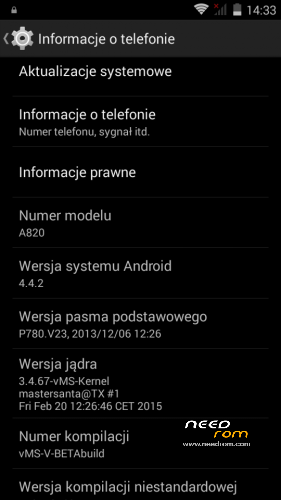
Android: 4.4.2
Kernel: build from source
RadioROM: from P780 like in previous vMS ROMs
Root: yes
WARNING!
This is for test only build! It can damage the device if you do something wrong!
What you need:
- Phone, best if it will be the Lenovo A820
- ZIP from this site
- ~250MB free space on SD card (internal/external)
- recovery like TWRP, may be older, but it's good to have a new one like this (CWM is not recomended/tested) https://www.needrom.com/download/twrp-2-8-4-0-themes/
- MAKE A BACKUP OF YOUR FILES! You can use TWRP for it. Select all partition! All!
How to install:
- enter into TWRP recovery
- in advanced wipe option select data, dalvik and cache and erase it. You can wipe secure and system for sure too
- back to install option and select ZIP file
- wait…
- reboot device
OMG I get bootloop! What to do? How to live?
As I said at the beginning… ROM/Kernel may not work on any device… Especially if it is not the Lenovo A820. Sometimes there are problems by replaced display. The first thing you should do then is wipe data/davlik/cache again in recovery – it's sometimes help. You can also use the kernel from the infrared (4pda.ru) because it may contain more fix.
What not work:
- network location (GPS work well)
- root make sometimes the problem with mouuntpoints so be watchful
- if SIM cards not work just try to reenable it in options few times
- tell me in comments…
※Please make a backup of your device before installing or updating ROM

|
I've got problem with instaling:
"symlink: some symlinks failed
E: Error in /sdcard/vMS-4.4.2-V-beta3.zip
(Status 7)
Error Flashing zip '/sdcard/vMS-4.4.2-V-beta3.zip'
updating partition details…"
"Failed"
I have A820 for over a year with original soft, but i need to change my rom,
I do this becasue my WiFi stopped working, it could not turn on
I've installed MIUI and this WiFi still does't work so it can it be and hardware problem?
but i still want to have normal android (not MIUI), the best for A820
me too
Thanks mastersanta for the symlink solution. So far doing ok. I did two antutu tests to see in numbers how well it behaves.
Result: 1,69% better with this ROM than factory S150.
========================================
TEST 1:
ROM>Oficial S150
android 4.1.2
kernel 3.4.5
baseband A820.V16,2013/03/04
build A820_S150_130925
benchmark 15547
========================================
TEST 2:
ROM > vMS-4.4.2-V-beta3
android 4.4.2
kernel 3.4.67
baseband P780.V23 2013/12/06
build vMS-V-BETAbuild
benchmark 15811
========================================
Can I use this rom the A830 ? I know this seemingly silly question , but apart from the display of these phones are not different
They are different.You need to put the core 3.4.67 lunix ver(boot.img) of your phone in this ROM or it won't even run.
A830's run with A820 roms and vise-versa, except screen rotation, flash-light and front camera won't work.
I've currently solved all issues except front camera with my custom kernel for A830, plus there are KK roms for your phone already. But yes, you can actually install all KK roms from A820 on A830.
Thank you for your reply @infrared.
It's perfect ROM. Thanx!
hi mastersanta,
I've done a stupid thing and now my IMEI is gone.
I've tried several methods without success, restoring old backups doesn't help (I also have a nvram backup but it has no effect), neither changing roms or using at+egmr commands from engineering mode.
TWRP gives a lot of errors about ' /emmc' can't be mounted, I fear it could be related (I've changed partition table with a script), looking in /etc/vold.fstab when in recovery I saw that in the mount line for /emmc there is no block descriptor so obviously it cannot mount anything.
also fdisk -l /dev/mmcblk0 give me warnings about partitions not ending on cylinder boundary.
could you please suggest something I can try?
Reflash stock rom with FlashTool, then restore your backuped nvram block with dd.
thanks @infrared, I'll try that
can you give me more info about the dd command?
I have the file nvram.emmc.win (backup up with twrp) so:
dd if=/sdcard/nvram.emmc.win of=/dev/block/mmcblk0pX
where X should be the partition number where it's stored the nvram (I think it should be mmcblk0p8 but I'm not sure)
is this right?
Not sure if it will work with that backup. Maybe it is the same binary backup…
dd if=/tmp/NVRAM.img of=/dev/nvram bs=5242880c count=1
But you actually need busybox and root. Might be able to do it from adb when in recovery mode. Why don't you restore it from TWRP? Can it access the external sdcard?
What you can try. Reboot into TWRP, then connect with usb cable to PC and start adb shell
[CODE]adb shell[/CODE]
Then see if you can access your external card and navigate to the backup folder where your nvram backup is.
In my case it is /sdcard/TWRP/BACKUPS/Lenovo_A820/2015-05-11–09-26-00 PROTON.KK.V1.0.DEV
[CODE]
/sdcard/TWRP/BACKUPS/Lenovo_A820/2015-05-11–09-26-00 PROTON.KK.V1.0.DEV # dd if
=nvram.emmc.win of=/dev/nvram bs=5242880c count=1
1+0 records in
1+0 records out
5242880 bytes (5.0MB) copied, 0.263577 seconds, 19.0MB/s
[/CODE]
thanks infrared, I'm a little scared to break things, there are too many things I don't understand of android, your help it's very appreciate, you know android and in particular this phone really well, your roms are great
the backup is exactly of 5232880 bytes so I think it's the correct one, however restoring it with dd or twrp have no effect, maybe the backup it's corrupted?
already checked md5 hashes of the backups, everything it's right.
I've others backups with cwm but I can't restore them anymore since I installed twrp, even if I reflash cwm restore fails with an error (tar: short read in the cwm logs, apparently the archive header length is wrong but I can't find anything useful on google about this), they worked before so I don't know what's happening here. very strange
maybe I should try generating a valid IMEI from scratch, but there is only one written under the battery, is it sufficient or I need another for the other sim?
When did you do the backup of nvram? Are you sure it was not broken before?
Writing IMEI numbers from engineering mode does not store them in nvram block, it's not permanent solution. If it was damaged before that, then your nvram backup is useless. Do you happen to have some old JB backup which you can restore and see the real IMEI numbers you had before?
You can also try full wipe/factory reset after restoring your nvram backup with dd or directly from TWRP (I think it uses dd as well, but haven't checked the source).