
- Title: Proton KK AOSP
- Listed: July, 2015
- Last modified: 10/22/2017 3:25 am
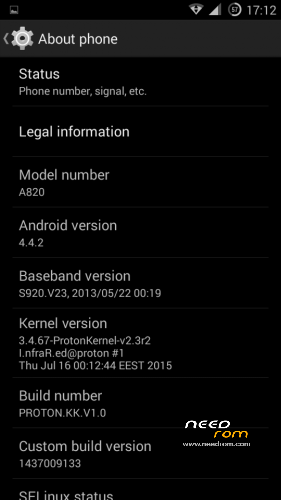
- Version: 1.0.2 (4.4.2)
You must be logged for ROM download.
106796 total views, 25 today
99 Total favorites
 Member Info
DESCRIPTION
This is a custom KitKat rom for Lenovo A820 compiled from source.
It took me a lot of time to get it to this stage, so if you're porting to another device or do some mods, please have respect and give proper credits to original author.
Update 22.10.2017
Added patch for WPA2 vulnerability. Install from recovery, then wipe cache and dalvik. Reboot.
Key features:
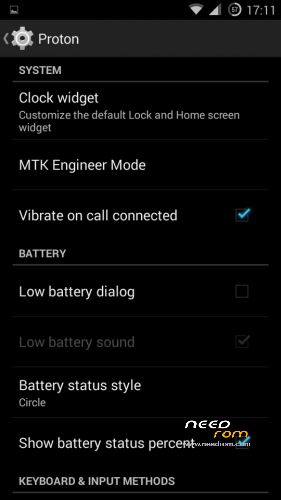
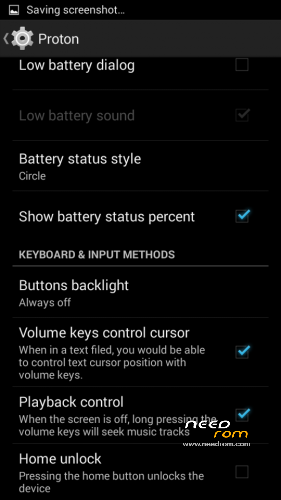
- Proton Settings page with useful options:
—– Vibrate on call connected
—– Low battery sound
—– Low battery dialog
—– Volume keys control text cursor
—– Home key unlock
—– CM11 battery indicators
—– Button backlight control
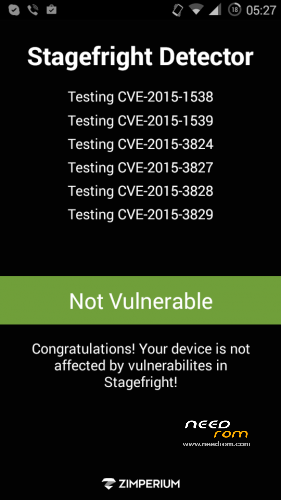
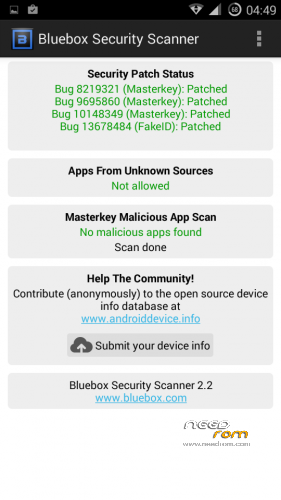
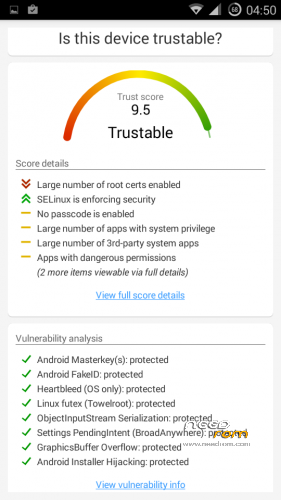
- Fixed vulnerabilities
—– FakeID
—– ObjectInputStream Serialization
—– Settings PendingIntent
—– GraphicsBuffer Overflow
- Adjusted 3G signal indicators levels
- Improved battery life
- Battery tables from S150 exctracted with "reverse-engineering"
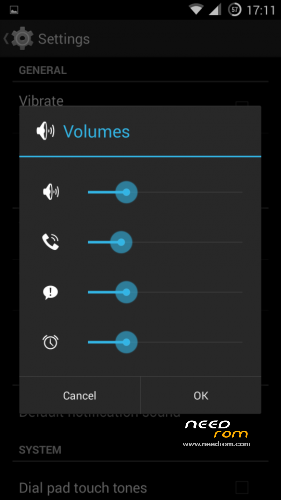
- Unlinked volume sliders and expandable volume dialog
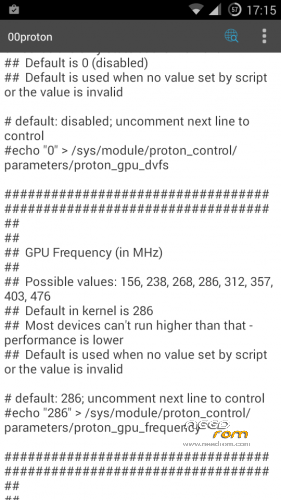
- init.d script to control GPU frequency, voltage and DVFS
- kernel compiled with linaro 4.9.3 toolchain, ROM compiled with SaberMod 4.8
- UI mods for statusbar icons
- Extended power menu
- Working GPS/EPO/A-GPS
- init.d support
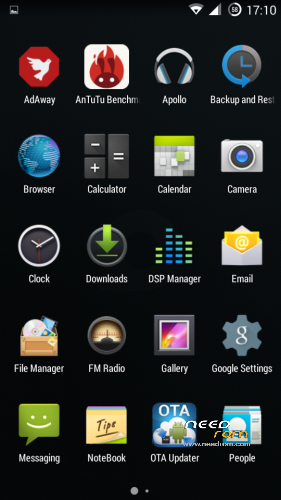
- Calculator, Apollo, DSP Manager, Browser from CM11 (compiled from source)
- Camera shoots in MP4 format. Increased photo quality to 100%.
- Fullscreen caller picture
And many more improvements…
ART is not working, so it is disabled. Could not solve this problem.
For full kernel changelog, visit my github repo: https://github.com/infraredbg/Lenovo_A820_kernel_kk
GPU overclock (works on some A820):
Currently it is only supported via init.d script
Go to /system/etc/init.d and open 00proton with a text editor
Uncomment and change desired value (all values are explained in the script)
Save and make sure the file has correct permissions
Reboot device
You can verify if the GPU frequency have changed in /proc/gpufreq/gpufreq_var_dump
Installation:
If you're currently using one of my DEV roms, it is recommended to do a clean install
It is recommended to use my TWRP 2.8.4.0 recovery (install via Rashr from PlayStore on phone or from FlashTools on PC)
Copy zip on sdcard and optional GApps package and reboot to recovery
Do a full backup of your current ROM including nvram block (IMPORTANT)
Wipe system, data and cache from TWRP. The script does not do automatic format.
Install ROM zip and GApps (optional)
Reboot system (first boot takes time)
Credits:
jwchen for helping me with kernel and testing
hyperion70 for the hint how to fix gralloc mem leak
masterwasome for guides on xda
varunchitre for some initial work on mt6589 kernel
faux123 for dynamic filesync
Christofer83 for prebuilt linaro toolchain
superdragonpt and Dr-Shadow for valuable code which I learned a lot from
mastersanta for finding how to fix USB mounting problem in the beginning
CM11 team
all other people for their guides and information, which I've found over the net
Update:
Uploaded new version of the zip with fixed IMEI backup. Sorry for inconvenience, but that's why I have written in the description to make a full backup.
※Please make a backup of your device before installing or updating ROM
Does Anyone know whether A820 supports 64GB TF card ?
Ok, I've read all the 18 pages… I need an advice: I currently have Infrared's Lambda 2.3.4 on my A820.
Everything has been working fine for almost two years, so I did not feel the need to change it. But now… the phone has started self rebooting every now and then, and the SD card sometimes unmounts itself abruptly.
Therefore I thought it would be time to flash a new rom.
Problem is, I have CWM 5.0.something, VERY OLD, and I can't seem to be able to make a working backup through it. And Infrared says it's better to use the TWRP recovery, so I downloaded the files, but… which one should I install?
recovery_TWRP_2.8.4.0_A820_v1.1.img
or
new_TWRP_recovery_L.img?
I have never touched the partitions (I've been relying on Link2SD to move apps to a second partition on my microSD so far), so I shouldn't have any problems upgrading, right?
The procedure I have in mind:
1) flash the TWRP recovery (which one? see above question) via Flashify or Rashr (any suggestions on which is better)?
2) make a full backup via TWRP recovery
3) install A820-PROTON.KK.V1.0, then A820-PROTON.KK.V1.0.1_OTA and then A820-PROTON.KK.V1.0.2_OTA
Is this correct?
Also, do you recommend using the repartitioning tool? It seems like it makes upgrades to new roms harder.
Thanks!
Edit:
step 2a) wipe cache, dalvik, data, system
I strongly recommand upgrade from 4.1.2 to 4.4.2, both are stable but Proton is more faster.
As for the self reboot issue, it may related to loosely battery pin, you can try to stick some tape to make the battery more tie to fit the compartment, or use WD-40 or alcohol to clean the pin.
About the procedure, you should flash "recovery_TWRP_2.8.4.0_A820_v1.1.img" first.
And I strongly suggest you to follow "Install_and_restore_guide" to complete your upgrage.
Thread about Infrared's recovery is here on needrom (and link for download too): https://www.needrom.com/downlo.....2-8-4-0-themes/
Forget about Link2sd repartitioning is a great solution.
Sorry for not complete reply but I'm in job If you didn't messed with partitions so far hope your backup won't be helpful but it is a must.
Thanks for your replies and help.
I have already read the guide, but do I need to flash via flashtools, then? I was hoping I could just wipe everything and install the rom via recovery.
Also, is the new_TWRP_recovery file needed or not? I don't understand this. Thank you so much and sorry for the lame questions but it's always better to be safe than sorry…
Yes, new recovery is needed. Any of the recoveries in the kk folder should work, but if you skip FlashTool steps, then you do it on your own risk.
Better prepare in case nvram block gets broken – write down both IMEI numbers, Wi-FI MAC and Bluetooth MAC from About section of the Settings. You need to turn on wi-fi and bluetooth in order to see them.
Ok, so I have just flashed the recovery_TWRP_2.8.4.0_A820_v1.1.img, I will flash the new_TWRP_recovery file too.
I will use flashtool and go the extra mile to be safe. It's not like I'm lazy or want to cut corners, it's just that I have had a few problems with flashtool and the A820 drivers in the past, and I would have loved to avoid to go through the same ordeal again.
just found a little bug.
when listening to music via bluetooth headphone, then if i receive a call and answer it……that is it, phone app frozen and i have to wait for a while for the system to recover…..then ive got to reboot to get back to normal….not fast boot though, but the proper hard one.
I have Xposed and GB, not sure it is related but will try to turn GB off and test.
Phone is bloody fast though, as infrared mentioned, as fast as it can get.
Cheers
Hi Sciamano,
easiest way you may install Infrared's TWRP without flashtool (I used Rashr if I can remember), then you may install KK via this recovery (remembering about backup, clear etc.)
Ok, stupid question time but… I've looked everywhere and can't find the link: how do I find infrared's Google Drive?
I don't have flashtool nor the drivers on this PC… Have to download them again. Thanksa
As usual… found the solution immediately after posting
For others having the same problem (who knows?):
https://drive.google.com/folde.....sp=sharing#list
First, try with files available on needrom (twrp and kk).
Link to Drive's stuff in PM.
Er…. How can I follow the guide if I don't have flashtool?
Infrared said I should use the flashtool method…
Look into private message. I can see SP_Flash_Tools.7z on Infra's Google Drive.
Yes, of course… I thought you meant to flash via recovery, just a little misunderstanding.
I was trying to copy the IMEI numbers, but in Lambda, when I go to Phone -> Status I can only see IMEI 1. I've also tried putting the sim in the second slot, but I still can only see IMEI 1.
How can I see IMEI 2?
Thanks
Settings->About phone->Status->Imei information->imei slot 1 and 2
That's where I looked, I can only see IMEI 1, see screenshot
Maybe in old Lambda that is normal…
Maybe… managed to read both IMEI from MobileUncle Tool… I can proceed now
I knew it… it's a deja-vu all over again: I've installed the Lenovo drivers, but nothing happens. Same ordeal as last time.
I'm running Win 7 Professional 32 bit. I guess LenovoUsbDriver_1.0.0.exe is not the right one…
Install the drivers from here: http://lenovo-forums.ru/index......h&tid=1120 (second file, whish is for XP/7).
Google flags some of the files as proprietary and they are invisible for other people.
Thanks. I actually solved by installing the old drivers I've used when I installed Lambda. I got back home and I've found them on my PC. The file name is MT6589_drivers_winxp-win7_32-64_bit.zip
I don't think it's the same thing, since it's just 403 Kb… But it worked.
I've also flashed everything else and everything went fine. IMEI kept, and phone very quick.
Repartitioning also worked perfectly.
Looks like you gave my A820 some more lifetime
Thanks a lot for your work!!
Quick review: very stable rom, very fast, improves battery life.
I have not noticed any particular problems with the camera, with picture quality (they look as bad/good as before, depends on your point of view) or with the loudspeaker. Maybe the volume is a little lower than before, but nothing really perceptible.
There is a problem with the notifications of text messages when using a non-stock messaging app. The notifications of "new messages" keep showing up even after having read them and/or after boot. Workaround: use an app like Titanium Backup and freeze the stock messaging app. This solves the problem, but of course you won't be able to use the stock app anymore.
Another problem is the light sensor. In low light it makes the display continuously change brightness levels, almost to the point of flickering, but this has been already pointed out.
Nothing else to point out has surfaced after these few hours of use of this great rom.
Just a question: I've installed the GApps package, but it actually only installed the Play Store. Is that correct? I was expecting it to install GMail, Maps and so on…